
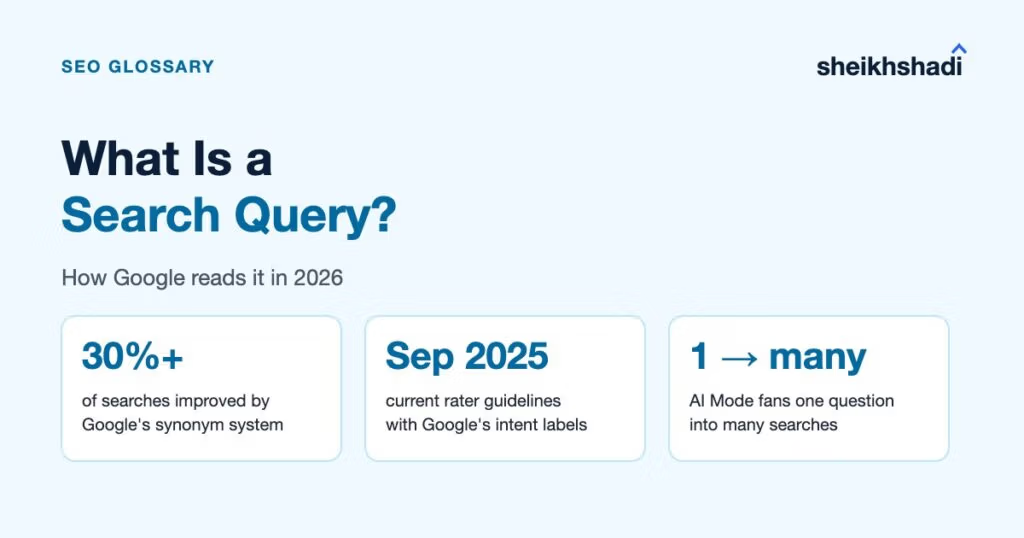
A search query is the exact word, phrase or question a person types or speaks into a search engine. A keyword is the topic you choose to target. One keyword can stand for hundreds of different queries. But Google does not take your query at face value. It corrects spelling and matches synonyms. Google says its synonym system “significantly improves results in over 30% of searches across languages”. In AI Mode it splits one question into many searches before it answers.
That changes how you read query data. In my experience, the queries a page already ranks for are the clearest signal of what Google thinks that page is about. It is also why the link I value most sits on a page that already ranks for real queries close to your topic.
What is a search query?
A search query is the raw input: “crm for startups”, “hubspot login”, “how do I fix crawl budget issues”, or a misspelled “linkbuilding servises”. It can be one word, a fragment, a full sentence or a voice question. Nobody edits it for SEO. It is whatever the person had in their head at that moment.
A Google search query is simply a query typed into Google. Google’s own help page on how search terms work says that, generally, all the words in your query are used, search is case insensitive and most punctuation is ignored. So “New York Times” and “new york times” are the same query to Google.
What is the difference between a search and a query?
The search is the whole act: typing, scanning the results page, clicking, maybe searching again. The query is the specific string that starts it. One search session can hold several queries, because people refine. “crm” becomes “crm for small saas” becomes “hubspot vs pipedrive pricing”. Each of those is a separate query in your data.
Search query vs keyword vs search term
These three words get mixed up in reports. Here is how I separate them:
| Term | Who creates it | Example | Where you see it |
|---|---|---|---|
| Search query | The searcher | “best seo tool for b2b saas 2026” | Search Console Performance report, Queries tab |
| Keyword | You, the marketer | “b2b seo tools” | Your keyword map, Ahrefs or Semrush |
| Search term | The searcher (paid search name) | The query that triggered your ad | Google Ads search terms report |
The practical rule: you plan with keywords, but you diagnose with queries. A keyword like “b2b seo tools” is a bucket. The queries inside that bucket tell you whether people want a list, a comparison or a free tool. That decides what the page should be. Our SaaS SEO guide maps those buckets to buyer stages.
What are the types of search queries?
The marketing model sorts queries into four types by intent. The labels are useful as long as you remember they come from the industry, not from Google’s documentation.
| Type | What the searcher wants | B2B SaaS example | Page that fits |
|---|---|---|---|
| Informational | To learn or understand | “what is product-led growth” | Guide or explainer |
| Navigational | To reach a specific site or page | “notion login”, “ahrefs pricing” | The brand’s own page |
| Commercial investigation | To compare before buying | “hubspot alternatives”, “best crm for startups” | Comparison or “best X” page |
| Transactional | To act now: buy, sign up, book | “buy semrush subscription”, “book seo audit” | Pricing, signup or contact page |
Two things trip teams up here. First, many queries carry more than one intent. “ahrefs pricing” is navigational and commercial at once. Second, short queries are often ambiguous. “Search query” itself shows this: its results mix SEO pages with a Microsoft Exchange developer reference and a library search guide. Check the live results page before you decide what a query wants. Our guide to what a SERP is covers how to read that page.
How does Google interpret a search query?
Google’s “How Search works” pages describe the first job as working out the meaning of your query. The steps that matter for SEO:
- Spelling. Google says its systems recognise and correct spelling mistakes, so a misspelled query can still reach the pages the searcher meant.
- Synonyms. Google’s synonym system finds relevant documents “even if they don’t contain the exact words” you used. Its own example: a search for “change laptop brightness” matches a page that says “adjust laptop brightness”.
- Context signals. Words like “cooking” or “pictures” can lead Google to show recipes or images. The language of the query sets the language of results. A query like “pizza” gets nearby businesses.
- Freshness when it matters. Google’s consumer information page says freshness plays a bigger role for current news queries than for dictionary definitions.
- Links pointing at pages. Google’s Search Help says that “in addition to word matches on the page, Search uses the text in links that point to a page.” That is one reason anchor text still matters.
You can also narrow a query yourself with operators: quotes for an exact phrase, a minus sign to exclude a word and site: to search one domain.
What is a search query evaluator?
A search query evaluator, or search quality rater, is a person who rates how well Google’s results match queries, following Google’s Search Quality Rater Guidelines. Their ratings help Google measure how well its results work. The guidelines are explicit that “no single rating can directly impact how a particular webpage, website, or result appears in Google Search.” So a rater cannot push your page up or down. What the guidelines can do is show you how Google thinks about queries, which is the first gap below.
How Google really reads a search query
Google doesn’t read a query the way most keyword advice assumes. Four things change how you should plan for it. (One side note: Google Analytics only shows organic queries if you link a Search Console property to it.)
Google’s own intent labels: Know, Do, Website, Visit-in-Person
Search intent is usually taught as “Know”, “Go” and “Do”. Google’s own Search Quality Rater Guidelines (version dated 11 September 2025) use different words. Section 12.7, “Understanding User Intent”, has five parts:
| Google’s label (section) | What it means | Closest marketing type |
|---|---|---|
| Know and Know Simple (12.7.1) | Find information; Know Simple wants a short, precise answer | Informational |
| Do (12.7.2) | Accomplish a goal or activity: buy, download, sign up | Transactional |
| Website (12.7.3) | Reach a specific website or page | Navigational |
| Visit-in-Person (12.7.4) | Find a business or place to visit, tied to user location | Local |
| Multiple user intents (12.7.5) | One query, several intents at once | No equivalent |
Three things change once you use Google’s model. There is no “Go” and no “commercial investigation” category in the current table of contents, so in my reading a comparison query has to be judged as Know, Do or both. Section 12.5 treats queries with more than one meaning separately, weighing interpretations as dominant, common or minor. And section 12.6 is titled “Query Meanings Can Change Over Time”, so a query’s intent is not fixed.
What to do: when you classify a keyword list, add two columns next to intent. One for “multiple intents?” and one for “is my meaning the dominant one?” If your meaning is a minor one for that query, a better page is unlikely to change which meaning Google favours, so target a longer query where your meaning dominates.
Google names the systems that read your query
Search engines handle spelling and synonyms, but Google names the systems that do it. Google’s own guide to its ranking systems (updated December 2025) is more specific:
- BERT helps Google “understand how combinations of words express different meanings and intent.”
- Neural matching is used “to understand representations of concepts in queries and pages and match them to one another.”
- RankBrain “helps us understand how words are related to concepts.”
- MUM can understand and generate language, but Google says it is “not currently used for general ranking in Search” and is used for specific applications.
On top of that, Google’s How Search works page says its synonym system “took over five years to develop and significantly improves results in over 30% of searches across languages.”
What to do: stop building one page per phrasing. If “change laptop brightness” and “adjust laptop brightness” can match the same page, close variants like “seo reporting template” and “seo report template” are likely to as well. Build one page per intent, write it in natural language and use the variants where they read naturally.
In AI Mode, one query becomes many
Google announced on 20 May 2025 that AI Mode uses a “query fan-out technique”, “breaking down your question into subtopics and issuing a multitude of queries simultaneously on your behalf.” Deep Search takes it further and “can issue hundreds of searches.”
Search Console reflects this. Google’s Performance report documentation says “AI Mode groups the user’s question into subtopics and searches for each one simultaneously.” It also says that “if a user asks a follow-up question within AI Mode, they are essentially performing a new query,” and all impression, position and click data in the new response count toward that new query.
That explains some odd rows. In August 2026, SEOs shared Search Console queries like “yes, pricing” and “yes go on” and Google’s John Mueller pointed to this documentation. Google did not confirm the source of those specific rows, so treat it as the likely explanation, not a certainty.
What to do:
- Do not delete or ignore short conversational queries in your exports. Read them as follow-ups and look at which page earned the impression.
- Cover the subtopics a fan-out would search, not only the head question. For a “what is X” page, that means the definition plus types, examples and “how it works”.
- Do not expect the Search Generative AI performance reports (added in June 2026) to show these queries. Coverage of the launch reports page, country and device data but no query-level data, so the main Performance report is still where queries live.
Search Console now groups your queries for you
The Search Console Queries tab is often described as showing “every query that showed your site”. It is not every query: Google leaves out anonymized queries and caps the rows, which our long-tail keywords guide explains.
In October 2025 Google introduced Query groups in Search Console Insights, a card that clusters similar queries into topics. Google says the groups are computed using AI and may change over time. They are only available for properties with a large volume of queries.
What to do: if your site qualifies, compare Query groups with your keyword map. A group you did not plan for is either a content gap or a page ranking for a meaning you did not intend. If your site is too small for Query groups, filter the Queries tab by one page at a time. For brand vs non-brand, use the branded query filter we cover in SEO KPIs.
How do you find the search queries your site ranks for?
- Open Search Console, then Performance, then Search results and select the Queries tab.
- Click a page in the Pages tab first, then switch back to Queries. You now see the queries for that one URL.
- Sort by impressions. High impressions with a low position show a query Google already connects to the page but does not rank well yet.
- Check that each query’s intent matches the page. A navigational or support query landing on a blog post is a mismatch to fix with internal links or a better page.
- Compare date ranges after any change and read short conversational queries as possible AI Mode follow-ups.
Ahrefs and Semrush estimate the queries any site ranks for, including competitors, but for your own site Search Console is Google’s first-party record.
My verdict: read your queries before you write
Queries tell you how Google reads a page. Before you write or rewrite one, open its queries in Search Console: high impressions with a weak position show what Google already connects with the page and short conversational queries show what readers ask next. Build each page around one intent and let the close variants sit inside it.
This suits SaaS and B2B teams with pages that already earn impressions. A site whose pages earn none should fix the content and technical basics first, then come back to the query data.
Not sure which queries your pages are winning or losing? Ask us for a free audit.