
Internal linking remains one of the most underutilized yet powerful SEO strategies. Strong internal linking helps search engines find and understand your pages better than a poor linking structure does. Yet, most content creators still struggle with this crucial aspect of SEO optimization. This Link Whisper review looks at how the plugin automates internal linking, where it helps and who it suits.
Link Whisper has emerged as a leading solution to this challenge, promising to transform how WordPress users approach internal linking. This comprehensive review examines whether this AI-powered plugin lives up to its promises and delivers real value for your SEO efforts in 2026.
Whether you’re managing a personal blog or multiple client websites, this detailed analysis will help you make an informed decision about incorporating Link Whisper into your SEO toolkit.
What Is Link Whisper?
Link Whisper is a WordPress plugin that suggests and automates internal linking strategies. Rather than manually searching through hundreds of posts for relevant linking opportunities, the plugin analyzes your content and suggests contextually appropriate internal links.
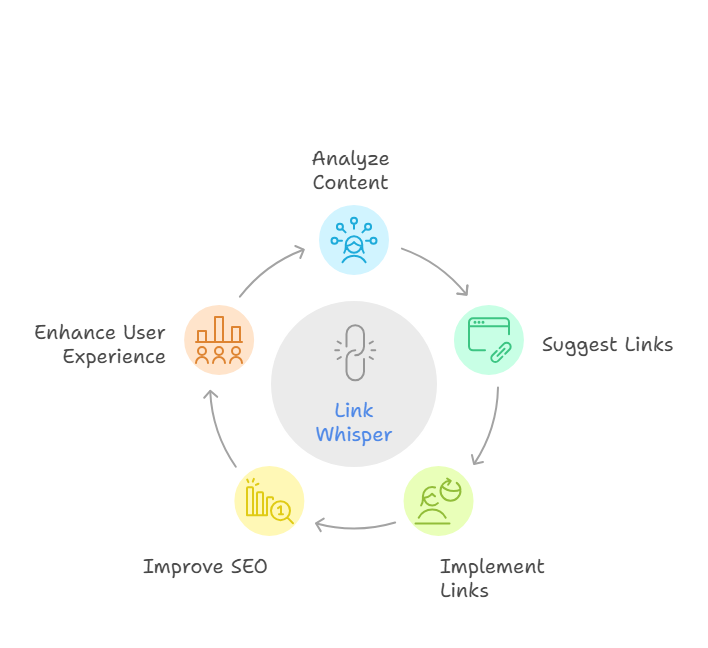
Base link suggestions in the Premium plugin are keyword-based. Link Whisper AI, which runs on separately purchased AI credits, adds stronger semantic matching. Google uses links to find pages, so fewer orphan pages helps crawling.
What distinguishes Link Whisper from basic linking tools is its contextual understanding. The AI considers topic relevance, content depth, and user intent when making suggestions, ensuring each recommended link serves both SEO and user experience purposes.
Who Is It For?
Link Whisper serves multiple types of WordPress users effectively:
- Content creators managing 50+ blog posts who need systematic linking strategies
- SEO professionals handling multiple client websites requiring consistent optimization
- Affiliate marketers seeking strategic internal linking for conversion optimization
- Digital agencies looking to scale their SEO service delivery
- Established bloggers wanting to maximize their existing content’s potential
The plugin becomes particularly valuable once you reach 30-50 published posts. At this content volume, manual linking becomes increasingly time-consuming and prone to oversight. Larger sites with over 100 pages tend to surface far more linking opportunities when using automated suggestion tools.
Link Whisper vs. Manual Linking
Traditional manual linking requires opening multiple browser tabs, searching through your content library, and relying on memory to identify relevant connections. This approach often results in inconsistent linking patterns and missed opportunities.
Link Whisper transforms this process by providing real-time suggestions directly within your editor. The plugin continuously analyzes your content as you write, presenting relevant linking opportunities without interrupting your creative flow.
Manual linking might offer complete control, but it’s significantly more time-intensive and subject to human limitations. Content creators using automated linking tools can save hours each week on SEO optimization tasks.
Key Features of Link Whisper
AI-Powered Link Suggestions
The core functionality is link recommendations based on your content, with stronger semantic matching available through Link Whisper AI credits. When editing content about “email marketing automation,” the plugin might suggest linking to related topics like “lead scoring strategies” or “customer lifecycle management.”
The AI engine has evolved significantly in 2026, incorporating natural language processing improvements that better understand context and user intent. This results in more accurate suggestions that enhance both SEO value and user experience.
Internal Link Reporting
The comprehensive reporting dashboard provides actionable insights into your site’s internal linking structure:
- Identification of orphaned content lacking internal links
- Analysis of pages with excessive external linking
- Visualization of your most and least linked content
- Assessment of overall link distribution patterns
These reports go beyond basic metrics to provide strategic recommendations. Pages that receive a healthy number of internal links consistently outperform orphaned content in search rankings.
Broken Link and 404 Monitoring
Continuous monitoring of your internal link structure helps maintain optimal user experience and preserve link equity. The plugin has a Broken Links Report that scans for broken links and 404s so you can review and repair them.
This feature proves particularly valuable for sites that frequently update or reorganize content. Broken internal links can erode page authority and hurt user experience, making proactive monitoring essential for maintaining search performance.
The Broken Links Report lets you scan, review and repair broken URLs, which supports both user navigation and search engine crawling.
Auto-Linking with Keywords
The automated linking feature allows you to establish rules for specific keywords or phrases. When new content contains these terms, Link Whisper automatically creates predetermined internal links based on your configuration.
This functionality needs careful setup. A sensible rule of thumb is to limit auto-links to 1-2 instances per 1,000 words and focusing on high-value, long-tail keywords rather than broad terms.
Successful auto-linking strategies concentrate on cornerstone content and money pages, creating systematic pathways that guide users toward your most important content while maintaining natural linking patterns.
Compatible Editors and Page Builders
Link Whisper integrates seamlessly with popular WordPress environments:
- WordPress Classic Editor with full support
- Gutenberg Block Editor with full support
- Elementor with full support
- Divi Builder with some limitations
- WPBakery with partial support
Bricks Builder is not supported. If you use a page builder, check the vendor compatibility list before buying, because support is not the same across all of them.
Recent Feature Updates
Recent additions listed by the vendor include AI credits for semantic suggestions, Visual Sitemaps and Google Search Console integration. Check the vendor changelog for the current list.
How Link Whisper Works (Step-by-Step)
Getting Started with Setup
Installation follows the standard WordPress plugin procedure. After activation, Link Whisper runs an initial content scan to build its suggestion database. How long this takes depends on your site size.
During setup, you’ll configure which content types to include in analysis, set exclusion rules for specific pages, and customize suggestion preferences. The setup wizard guides you through essential configuration options without overwhelming technical details.
The vendor lists a minimum of PHP 7.2 and WordPress 5.0, and recommends PHP 7.4 or 8.0+ and WordPress 6.0+. Larger sites also need adequate memory.
Using the In-Content Suggestion Tool
The suggestion interface appears as a sidebar panel in your WordPress editor. As you highlight text phrases, the plugin displays relevant internal linking opportunities ranked by contextual relevance.
When you highlight “content marketing strategy,” for example, Link Whisper might suggest linking to posts about “editorial calendars,” “content distribution channels,” or “performance measurement techniques.” Each suggestion includes a preview snippet to help you make informed decisions.
Link Report Dashboard Breakdown
The reporting dashboard organizes data into four primary categories:
- Link Opportunities: Identifies content requiring additional internal links
- Domain Analysis: Monitors external linking patterns and opportunities
- Individual Page Reports: Provides detailed analysis for specific content pieces
- Error Detection: Highlights broken links and technical issues
Each report section includes actionable recommendations rather than just data presentation. This approach helps you prioritize optimization efforts and understand the strategic implications of your linking decisions.
Custom Auto-Linking Settings
Auto-linking configuration requires careful planning to maintain natural linking patterns. Start with your most important keywords and gradually expand the system as you observe performance results.
Effective auto-linking strategies follow these principles:
- Focus on long-tail keywords rather than broad terms
- Limit automatic links to prevent over-optimization
- Prioritize cornerstone content and conversion pages
- Regular monitoring and adjustment based on performance data
The system allows for detailed exclusion rules, preventing certain pages from being auto-linked or excluding specific terms from automated processing.
Pros and Cons
Pros
- Intuitive user interface: Clean, accessible design that doesn’t overwhelm users with unnecessary complexity or technical jargon
- Significant time savings: Reduces internal linking tasks from hours to minutes
- Enhanced SEO structure: Creates logical content relationships that improve crawlability and topical authority signals
- Comprehensive analytics: Provides actionable insights beyond basic link counting, including strategic recommendations for optimization
- Broken link report: Scans for broken links and 404s so you can repair them
Cons
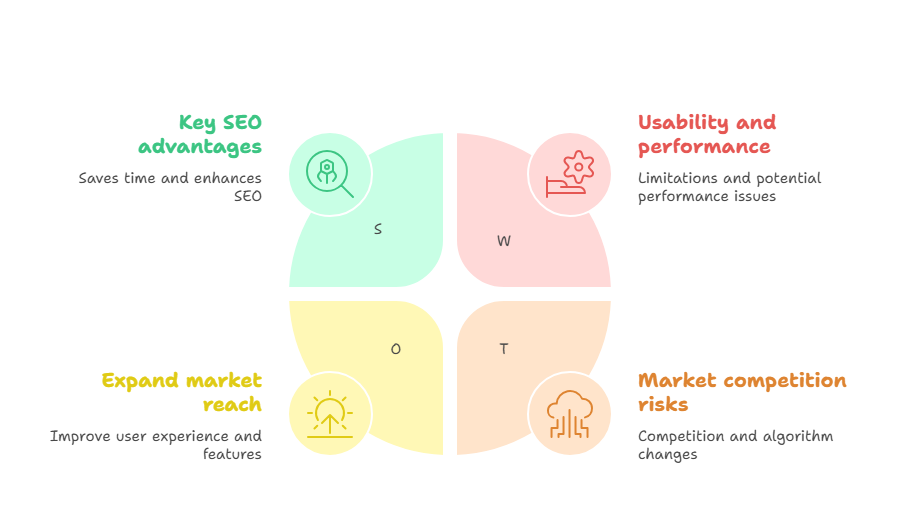
- Limited free version functionality: Basic features only, with advanced reporting and automation requiring premium subscription
- Performance impact on large sites: Large sites (1,000+ posts) may need higher memory and execution-time limits, per the vendor docs
- Auto-linking complexity: Requires strategic setup and ongoing monitoring to prevent over-optimization issues
- Learning curve for advanced features: While basic functions are intuitive, maximizing advanced capabilities requires time investment
Link Whisper Pricing
Free vs. Premium Comparison
The free version provides basic internal link suggestions and simplified reporting features. Users can evaluate core functionality, but advanced features require premium subscription for full optimization potential.
Premium subscription includes comprehensive reporting, automated linking, broken link reports and multi-site licensing. The vendor lists premium support on the 3-site plan and up.
While the free version suits initial evaluation, serious users typically require premium features for meaningful SEO impact. The limitation reflects the development and maintenance costs associated with AI-powered suggestion engines.
Pricing Tiers Overview
Link Whisper has four license tiers based on the number of sites, and AI credits are sold separately. Prices below are as of November 2026:
- Single Site License: $97 annually – Ideal for individual bloggers and small business websites
- 3 Site License: $197 annually – Suitable for agencies with limited client portfolios or multiple personal projects
- 10 Site License: from $297 annually – For small agencies and SEO professionals managing several client sites
- 50 Site License (Agency): about $997 annually, with custom pricing available – For larger agencies with extensive client bases
All licenses include one year of updates, customer support, and feature access. The pricing structure remains competitive within the SEO tool market, particularly considering time savings and automation capabilities.
Is It Worth the Cost?
Cost-benefit analysis depends on your time valuation and SEO goals. If you value your time at $50 hourly and Link Whisper saves 2 hours monthly, the $97 single-site license pays for itself within about a month of usage.
The SEO performance improvements often generate additional value beyond time savings. Even modest traffic increases frequently exceed the annual subscription cost through improved visibility and conversion opportunities.
For websites with fewer than 30 pages or infrequent publishing schedules, manual linking approaches might remain more cost-effective. However, growing sites quickly reach the threshold where automation becomes economically advantageous.
Link Whisper vs Competitors
Link Whisper vs. Internal Link Juicer
Internal Link Juicer emphasizes automated rule-based linking, while Link Whisper focuses on intelligent suggestions with manual approval. Both serve valid strategies but appeal to different optimization philosophies.
Link Whisper provides superior reporting and analysis capabilities, while Internal Link Juicer excels at bulk automation for established rule sets. User preference often depends on desired control levels and optimization approaches.
Pricing remains comparable between both tools, but Link Whisper offers more polished user interface design and comprehensive onboarding resources for new users.
Link Whisper vs. Yoast Internal Linking Tool
Yoast’s internal linking functionality relies on basic keyword matching, while Link Whisper employs contextual analysis for more sophisticated suggestions. The difference becomes significant for complex content strategies.
Link Whisper’s standalone focus enables deeper feature development compared to Yoast’s integrated approach. Users seeking comprehensive internal linking optimization typically prefer Link Whisper’s specialized capabilities.
Yoast’s advantage lies in integration with their existing SEO suite, potentially reducing plugin overhead for users already committed to their ecosystem.
Comparison Table: Features, Pricing, Usability
| Feature | Link Whisper | Internal Link Juicer | Yoast Internal Linking |
|---|---|---|---|
| AI-Powered Suggestions | Keyword-based; AI credits add semantic matching | Basic keyword matching | Simple keyword detection |
| Comprehensive Reports | Detailed analytics dashboard | Basic reporting only | Limited insights |
| Auto-Linking Rules | Sophisticated rule engine | Extensive automation focus | Not available |
| Broken Link Monitoring | Broken Links Report | Not included | Not available |
| Annual Pricing | Starting at $97 | Starting at $69 | $118.80 (Yoast Premium) |
| User Experience | Intuitive interface | Functional design | Integrated experience |
Best Use Cases for Link Whisper
For Beginner Bloggers
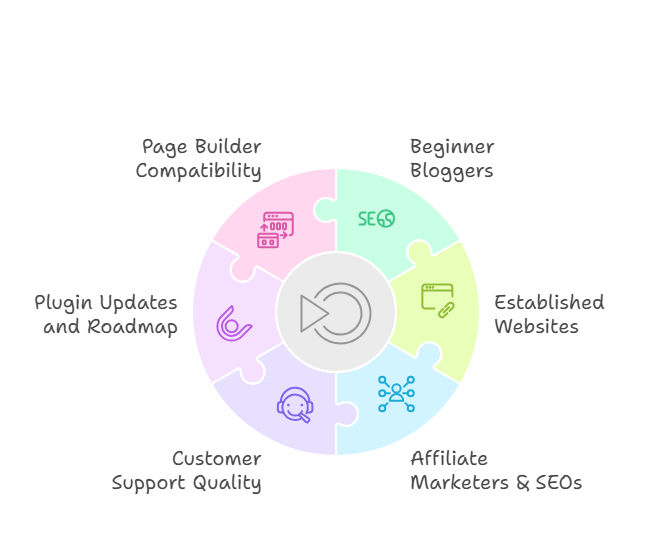
New bloggers benefit from Link Whisper’s educational aspect, learning effective internal linking strategies through observing the plugin’s suggestions over time. The tool helps establish good SEO habits from the beginning of their content journey.
As content libraries grow, Link Whisper ensures no valuable connections get missed due to inexperience or oversight. This systematic approach helps beginners compete more effectively against established sites with superior linking strategies.
For newer bloggers, focusing on manual suggestions rather than automation helps develop understanding of effective linking principles before implementing advanced automated strategies.
For Established Websites
Large content libraries benefit enormously from Link Whisper’s ability to discover hidden linking opportunities. The plugin often identifies valuable connections between older content that manual processes would never uncover.
Established sites frequently contain orphaned content that receives minimal internal linking attention. Link Whisper’s reports quickly identify these optimization opportunities, often resulting in immediate traffic improvements for neglected pages.
The batch processing capabilities prove particularly valuable for large-scale optimization projects, enabling systematic improvements across extensive content libraries without overwhelming time commitments.
For Affiliate Marketers & SEOs
Affiliate marketers can strategically guide visitors toward monetized content through intelligent internal linking pathways. Link Whisper helps create natural progression routes that don’t appear manipulative or overly commercial.
SEO professionals benefit from comprehensive reporting capabilities when presenting client optimization recommendations. The detailed analytics support strategic decisions with concrete data rather than intuition alone.
The automation features particularly benefit affiliate sites with recurring keywords that should consistently link to specific product reviews or comparison pages, ensuring systematic optimization without manual oversight.
Support, Updates & Compatibility
Customer Support Quality
Link Whisper has a help center with documentation covering setup, features and compatibility.
The support documentation includes comprehensive guides and video tutorials covering both basic setup and advanced optimization strategies. The knowledge base addresses common questions with practical examples and step-by-step instructions.
The vendor lists premium support on the 3-site plan and up, so the 1-site plan has more limited support.
Plugin Updates
The vendor says it ships new features roughly every two weeks, according to its pricing page.
WordPress compatibility remains excellent, with Link Whisper typically releasing compatibility updates within days of new WordPress versions to ensure uninterrupted functionality.
Works Well With These Page Builders
Link Whisper works with several WordPress editors and page builders, with support varying by builder:
- Elementor: Full support
- Gutenberg: Full support
- Divi: Supported, with some limitations
- WPBakery: Partial support
- Bricks: Not supported
The integration maintains consistent functionality across different builders, ensuring your optimization workflow remains uninterrupted regardless of design preferences or technical requirements.
Final Verdict: Is Link Whisper Worth It?
Who Should Use It?
Link Whisper delivers excellent value for specific user categories:
- Website owners managing 50+ content pieces requiring systematic optimization
- Time-conscious creators prioritizing efficiency in SEO workflows
- Agencies handling multiple client websites needing scalable solutions
- Content creators focused on organic growth and user engagement
- SEO professionals requiring comprehensive analysis and reporting tools
Who Might Skip It?
Link Whisper may not suit certain situations:
- Small sites with fewer than 30 pages and infrequent publishing schedules
- Extremely budget-conscious users who can dedicate significant time to manual linking
- Users preferring complete manual control over every SEO decision
- Static websites with minimal content updates or expansion plans
- Sites with highly technical content where automated suggestions might lack accuracy
For these scenarios, manual linking approaches might remain more appropriate until content volume or time constraints make automation beneficial.
Our Recommendation
Link Whisper represents one of the most effective WordPress SEO tools available, consistently delivering promised functionality with measurable results. The combination of time savings, improved user experience, and enhanced search performance makes it valuable for most serious website owners.
Begin with the free version to evaluate core functionality, then upgrade to premium once you recognize the optimization potential. Agencies and professional SEOs should prioritize premium features for comprehensive reporting and multi-site management capabilities.
The tool succeeds because it solves a genuine problem that affects most WordPress users: creating and maintaining effective internal linking strategies.
For websites serious about SEO performance and user experience optimization, Link Whisper represents a sound investment that can pay back its cost in time saved.