Internal linking is the practice of linking from one page on your site to another page on the same domain. Done well, it helps Google find and understand your pages, tells readers where to go next, and moves authority from pages that earn backlinks to the pages you want to rank. Done badly, it leaves important pages buried, orphaned or described with vague anchors.
This guide covers what internal links do, the rules that actually matter, how to structure links on a SaaS or B2B site, and a step-by-step audit you can run this week. Where Google has published guidance, I link to it so you can check the source.
What Is Internal Linking in SEO?
An internal link is any hyperlink that points to another URL on the same domain: navigation menus, footer links, breadcrumbs, “related posts” blocks and, most importantly, links placed inside body copy (contextual links).
Internal vs. external links
- Internal links connect pages on your own site. You control where they point and what anchor text they use.
- External links point from your site to another domain (outbound) or from another domain to yours (backlinks). You control outbound links; backlinks have to be earned. See my guide to outbound links for the other half of the picture.
Both matter. Backlinks bring authority into your site; internal links decide where that authority goes once it arrives.
Why Internal Linking Matters for SEO
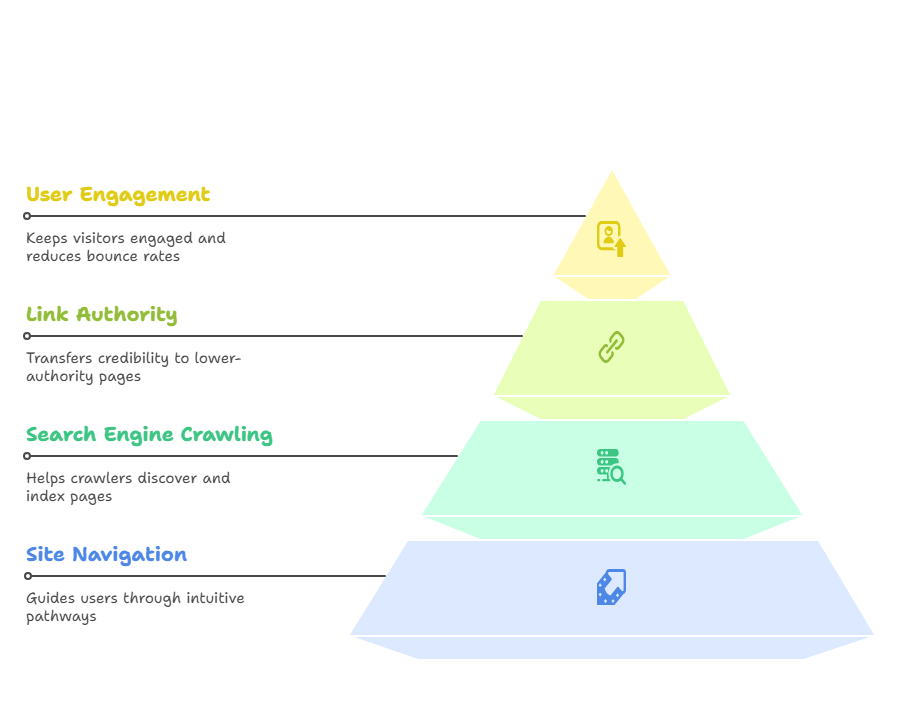
Google discovers pages through links
Google’s own link best practices say every page you care about should have a link from at least one other page on your site. Sitemaps help, but a page that no other page links to (an orphan page) is harder for Google to discover and gets little context about what it covers.
Links spread authority (PageRank)
Google still uses links, internal and external, to understand how important a page is. Pages that earn backlinks, such as your homepage, research posts or free tools, can pass some of that value to the pages that drive revenue: feature pages, integration pages and pricing. My guide to link equity explains how that value flows between pages in more detail.
Anchor text adds context
The clickable words of a link tell both readers and Google what the destination page is about. A link that says “SOC 2 compliance checklist” is far more useful than one that says “click here”.
Readers find the next step
Good internal links answer the reader’s next question: from a “what is” article to a how-to guide, from a use-case page to pricing. That helps people stay on the site and convert. Note that this is a user-experience and conversion benefit. Google has said repeatedly that it does not use Google Analytics metrics such as bounce rate or session duration as ranking factors, so do not build internal links to “game” engagement numbers; build them because they help readers.
Google Updates That Affect Internal Linking
Helpful content is now part of core ranking
Google’s helpful content system was folded into its core ranking systems in March 2024. The practical lesson for internal linking is simple: link to pages because they help the reader, not to push keyword-stuffed anchors at thin pages. Google’s guide to creating helpful content is the best reference here.
Mobile-first indexing
Google now indexes and ranks primarily from the mobile version of your pages. If your mobile layout hides links that appear on desktop (collapsed menus are fine; links that are removed entirely are not), Google may not see them. Check that your mobile templates include the same important internal links as desktop. Google’s mobile-first indexing documentation covers this.
JavaScript links
Google can generally follow links only when they are real <a> elements with an href attribute. Links built with onclick handlers, <span> elements or buttons that change the URL through script may not be crawled. If your app or marketing site uses a JavaScript framework, make sure navigation renders standard anchor tags in the HTML.
AI search
AI Overviews and other AI search features still rely on pages being crawled, indexed and understood. A clear internal link structure makes it easier for any crawler to see which page is your definitive resource on a topic, which is useful whichever search surface a buyer uses.
Internal Linking Best Practices
Use descriptive anchor text that reads naturally
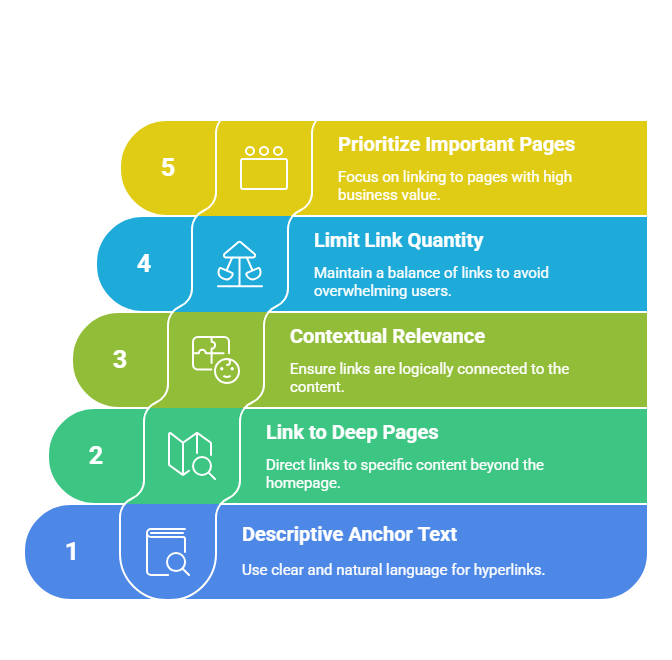
Google’s guidance is to make anchor text specific and concise, and to avoid both vague text (“read more”, “click here”) and keyword stuffing. A quick test: read the anchor on its own. If it tells you what is on the other side, it is good.
- Weak: “To learn more, click here.”
- Better: “Our Salesforce integration guide shows the setup step by step.”
- Over-optimised: “Get the best CRM software for small business CRM today.”
Vary anchors naturally across pages. You do not need to use the exact same phrase every time you link to a page; close variations give Google more context. My anchor text guide covers the different anchor types in depth.
Link to deep pages, not just the homepage
Most sites already link to the homepage from every page through the logo and menu. The pages that need contextual links are the deeper ones: feature pages, use cases, integrations, comparison pages and older blog posts that still have value.
Keep links relevant
Link where the destination genuinely helps the reader at that point in the text. A link from a post about onboarding emails to your onboarding-email template makes sense; a link from the same post to an unrelated pricing calculator usually does not.
How many internal links per page?
Google says there is no ideal number of links per page, though a page with an extreme number of links becomes hard to use. As a house rule of thumb, I aim for roughly 3 to 5 contextual links per 1,000 words of body copy, plus whatever the navigation provides. Treat that as a starting point, not a rule: a short glossary entry might need one link, while a long pillar page might need twenty.
Point authority at the pages that matter
Find the pages on your site that have the most backlinks (Ahrefs, Semrush or Google Search Console’s Links report will show this). Then add contextual links from those pages to the commercial pages you want to rank. This is the cheapest way to make your link building work harder.
Should you nofollow internal links?
No. Adding rel="nofollow" to internal links does not “save” PageRank for other pages; that idea (PageRank sculpting) stopped working in 2009. If you do not want Google to index a page such as a login screen, use a noindex robots meta tag. If you do not want it crawled at all, use robots.txt. Google’s documentation on qualifying links makes the same point. For a full explanation of the attributes, see dofollow vs. nofollow links.
Multiple links to the same page
Linking to the same URL more than once on a page is fine for readers. Some SEO tests suggest Google may give the most weight to the anchor text of the first link it finds on a page, but Google has not confirmed this. The practical takeaway: make sure the first contextual link to an important page uses a descriptive anchor.
Internal Linking for SaaS and B2B Sites
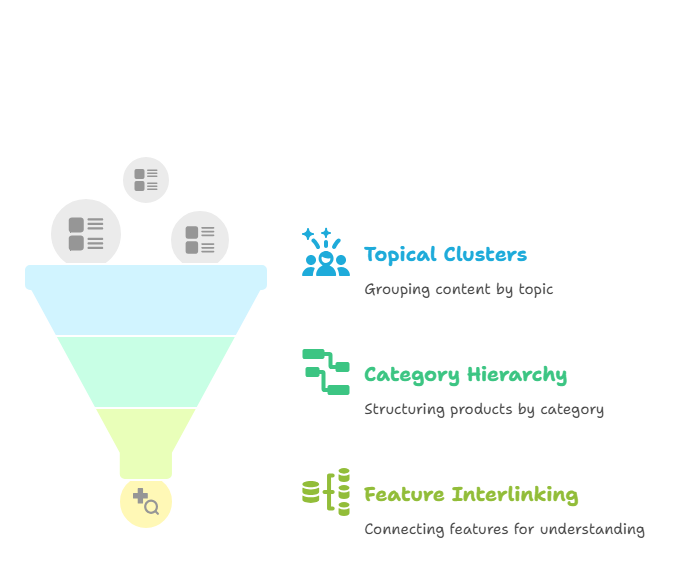
A SaaS site usually has four types of pages that need to work together: product and feature pages, use-case or industry pages, integration pages, and educational content (blog, guides, glossary). The goal is to connect them so a reader, and Google, can move from a problem to your solution in a few clicks.
The hub-and-spoke model
Pick a topic you want to own, such as “employee onboarding”. Create one comprehensive hub page on it, then publish supporting articles on narrower questions (“onboarding checklist for remote teams”, “onboarding email templates”, “how to measure onboarding success”). Link every supporting article to the hub, link the hub to each article, and link related articles to each other where it helps the reader.
A SaaS linking path that works
- Problem article (for example “how to reduce SaaS spend”) links to the related use-case page (“SaaS spend management”).
- The use-case page links to the feature pages that solve it (“license tracking”, “renewal alerts”).
- Feature pages link to relevant integration pages and to pricing.
- Customer stories link back to the features and use cases they mention.
This keeps informational posts informational while still giving readers, and authority, a route to the commercial pages. My SaaS SEO guide covers how to plan those page types in the first place.
Blogs and content hubs
On a blog, use topic clusters as above, add breadcrumbs, and make sure category pages are crawlable and paginated with normal links. Update older posts to link to newer ones; new posts otherwise get links only from the blog index, which pushes them deeper every time you publish.
Ecommerce sites
For stores, the standard path is category to subcategory to product, with “related products” and “frequently bought together” links between products. Keep faceted filter URLs from creating thousands of near-duplicate links.
Advanced Techniques
Fix orphan pages
An orphan page has no internal links pointing to it. It may still be in your XML sitemap, but Google gets no signal from the rest of the site that it matters. To find orphans, compare three lists: the URLs your crawler finds by following links, the URLs in your XML sitemap, and the URLs that get impressions in Google Search Console. Any URL that appears in the sitemap or Search Console but not in the crawl is an orphan. Then decide: link to it from relevant pages, merge it into a stronger page, or remove it.
Keep important pages close to the surface
Crawl depth is the number of clicks a page sits from the homepage. Revenue pages and your best guides should be reachable in about three clicks. Menus, hub pages, breadcrumbs and “related” modules all reduce depth without cluttering the copy.
Use HTML links, not script-only navigation
Use <a href="/pricing/"> rather than buttons or elements that rely on JavaScript to navigate. If you use a JavaScript framework, check the rendered HTML in Search Console’s URL Inspection tool to confirm the links are there.
Clean up redirected and broken internal links
Every time you delete or move a page, internal links to the old URL either break (404) or pass through a redirect. Update them to point straight at the final live URL. Redirect chains waste crawl activity and slow readers down.
How to Audit Your Internal Links
Step-by-step audit checklist
- Crawl the site with Screaming Frog, Sitebulb or a similar crawler.
- Export internal 3xx and 4xx links and fix them at the source so each link points to a 200 URL.
- List orphan pages by comparing the crawl with your sitemap and Search Console data.
- Check crawl depth for your key commercial pages and top guides.
- Review inlinks per page. Your most important pages should be among the most linked-to pages on the site.
- Review anchor text for vague anchors (“here”, “this post”) and for repeated exact-match anchors.
- Map backlinked pages to money pages. Add links from pages with strong backlinks to the pages you want to rank.
- Add links from new content to older relevant posts, and from older posts to new ones.
A real example: auditing this blog
When I audited sheikhshadi.com in October 2026, the problems were the same ones I see on client sites. Several long guides, this one included, had no contextual internal links at all. Other posts linked to articles I had deleted, so the links passed through redirects to unrelated pages. The fix was the checklist above: point every link at a live, relevant URL, and give each post three to five contextual links to related guides and to the service pages they support.
Tools
- Screaming Frog SEO Spider: crawls your site and reports inlinks, anchor text, crawl depth, redirects and broken links. It has a free version with a URL limit.
- Sitebulb: a crawler with visual link-structure reports and prioritised hints.
- Ahrefs Site Audit and Semrush Site Audit: flag orphan pages, broken links and redirect chains, and include internal link opportunity reports.
- Google Search Console: the Links report shows your top internally linked pages; URL Inspection shows whether Google sees a page’s links after rendering.
- WordPress plugins: Yoast SEO Premium, Rank Math and Link Whisper suggest internal links as you write. Treat their suggestions as prompts, not decisions. My Link Whisper review covers where that plugin helps and where it does not.
Use Search Console and GA4 data
- In Search Console, use the Page indexing report to find pages that are “Discovered, currently not indexed” or “Crawled, currently not indexed”. Weak internal linking is a common cause.
- The Performance report shows pages ranking in positions 5 to 20. These are often the fastest wins: add a few relevant internal links from strong pages.
- In GA4, use Explore > Path exploration to see how visitors actually move from blog posts to product and pricing pages.
A simple tracking sheet
You do not need special software to manage internal links. A spreadsheet with these columns is enough:
| Target page | Primary topic | Source page to add link | Suggested anchor | Status |
|---|---|---|---|---|
| /features/renewal-alerts/ | SaaS renewal tracking | /blog/reduce-saas-spend/ | automatic renewal alerts | Added |
| /use-cases/it-teams/ | SaaS management for IT | /blog/shadow-it-guide/ | SaaS management for IT teams | To do |
Sort by target page so you can see at a glance which commercial pages still need more contextual links.
Accessibility and Mobile Usability
Make links easy to tap
WCAG 2.2 success criterion 2.5.8 (Target Size, Minimum, level AA) asks for pointer targets of at least 24 by 24 CSS pixels, with exceptions that include links inside a sentence. Apple’s Human Interface Guidelines recommend a larger 44 by 44 point target for buttons. In practice: give menu items, buttons and stand-alone links enough size and spacing that a thumb does not hit the wrong one.
Make links easy to see and understand
- Contrast: WCAG 2.2 level AA requires a contrast ratio of at least 4.5:1 for normal body text, which includes link text.
- Do not rely on colour alone: underline links in body copy, or make them distinguishable in a way that does not depend on colour.
- Meaningful anchors: screen-reader users often jump from link to link, so “click here” repeated ten times is useless to them. Descriptive anchors help accessibility and SEO at the same time.
In the United States, the ADA does not set its own technical web standard for private businesses, but courts and the Department of Justice commonly point to WCAG as the benchmark. Following WCAG 2.2 AA is the sensible target.
Internal Linking FAQ
How many internal links is too many?
There is no fixed limit. If links stop helping the reader, or a paragraph turns into a list of links, you have too many. My starting point is 3 to 5 contextual links per 1,000 words.
Do internal links pass PageRank?
Yes. Followed internal links pass PageRank between your pages, which is why linking from your most-backlinked pages to your key commercial pages is worth doing.
Can I link to the same page more than once?
Yes, if it helps the reader. Make the first link to an important page descriptive.
Should I nofollow any internal links?
No. Use noindex for pages that should not appear in search and robots.txt for pages that should not be crawled.
Is internal linking different from link equity?
Internal linking is the practice; link equity is the value that links pass. Read my link equity guide for how that value is measured and why some links pass more than others.
Internal Links and Backlinks Work Together
Internal linking is one of the few SEO tasks that is entirely in your control and costs nothing but time. Start with your ten most important pages: make sure each is linked from relevant posts with descriptive anchors, sits within three clicks of the homepage and receives links from your most-backlinked content.
Internal links can only distribute the authority your site already has, though. If competitors have far more referring domains, you also need new editorial backlinks. That is the work my SaaS link building services do: I place links on real sites with real traffic, then use internal linking to route that authority to the pages that drive sign-ups. You can see the results in the Zluri case study, where organic traffic grew from 8,700 to 56,000 in 14 months.
Want to know how many links stand between you and the sites outranking you? Get a free link gap analysis or see pricing.