
If you’re tired of juggling multiple SEO tools just to get basic on-page data, you’re going to love what I’m about to share with you. The Detailed SEO Extension has quietly become one of the most trusted tools in the SEO community, and for good reason.
This isn’t just another Chrome extension cluttering your browser. It’s a carefully crafted tool that does exactly what it promises: gives you instant, actionable SEO insights without the bloat. Whether you’re auditing a client’s website or optimizing your own content, this extension cuts through the noise and delivers the essentials.
What is the Detailed SEO Extension?
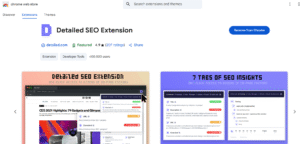
Let me paint you a picture. You’re analyzing a website and need to quickly check the meta description length and spot any missing H1 tags. Instead of viewing source code or switching between multiple tools, you simply click one button and get everything laid out clearly.
Quick Overview
The Detailed SEO Extension is exactly what the SEO world needed: a no-nonsense tool that gets straight to the point. Here’s what makes it stand out:
- A free Chrome Extension designed for on-page SEO analysis
- Created by Glen Allsopp of Detailed.com (ViperChill). Ahrefs acquired Detailed in September 2025, and the extension is still free
- Lightweight, fast, and beginner-friendly
Glen Allsopp isn’t just some random developer who threw together an SEO tool. He’s been in the digital marketing trenches for over a decade, running ViperChill and building Detailed.com. When someone with his track record creates a tool, you know it’s going to solve real problems that actual SEOs face daily.
The extension is under 1 MB (about 323 KB), but don’t let its small size fool you. It packs more practical functionality than tools ten times its size. There’s no learning curve, no complex setup, and no monthly subscription fees eating into your budget.
Why It’s Popular with SEOs
Here’s the thing about SEO tools: most of them are either too basic or overwhelmingly complex. The Detailed SEO Extension hits that sweet spot where it’s powerful enough for professionals but simple enough that anyone can use it effectively.
- Instant access to SEO essentials like meta data, headers, and links
- Streamlines website analysis with no fluff
- Trusted by professionals in Reddit, forums, and SEO Twitter
I’ve seen countless recommendations for this extension across professional communities. It’s not because of flashy marketing or aggressive promotion. It’s because the tool simply works, and it works well.
The extension gives you immediate visibility into the elements that actually matter for on-page SEO. No distractions, no unnecessary features, just the core data points that influence your search rankings. It’s like having a magnifying glass that shows you exactly what search engines see when they crawl your pages.
Key Features of the Detailed SEO Extension
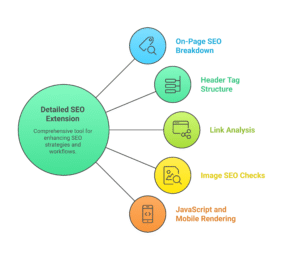
Now let’s dive into the meat and potatoes. What exactly can this extension do for you? I’m going to break down each feature and explain why it matters for your SEO workflow.
On-Page SEO Breakdown
The foundation of any good SEO strategy starts with getting your on-page elements right. The extension excels at giving you a comprehensive overview of these critical components.
- Title and Meta Description: Length check plus optimization tips
- Canonical Tags: Confirm correct indexation
- Meta Robots Tags: Spot noindex/nofollow issues quickly
Let’s talk about title tags first. Google sets no fixed character limit for titles, and 50 to 60 characters is a rule of thumb to avoid truncation. But how many times have you published a page only to discover later that your title was truncated in search results? The extension shows you the exact character count and highlights when you’re pushing the limits.
Meta descriptions get the same treatment. You’ll see the character count. This real-time feedback is invaluable when you’re trying to craft compelling descriptions that drive clicks.
Canonical tags are where things get interesting. Duplicate content issues can tank your rankings, and canonical tags are your first line of defense. The extension immediately shows you if canonical tags are properly implemented and whether they’re pointing to the right URLs.
Meta robots tags are often overlooked until something goes wrong. The extension displays these tags prominently, so you’ll immediately know if a page is set to noindex or if links are marked as nofollow. This has saved me from embarrassing situations where important pages were accidentally blocked from indexing.
Header Tag Structure
Content structure is crucial for both user experience and SEO. Search engines use header tags to understand your content hierarchy, and users rely on them to scan and navigate your content.
- View H1 through H6 hierarchy instantly
- Identify missing or duplicate header tags
The extension presents your entire header structure in a clean, hierarchical view. You can immediately spot issues like missing H1 tags, multiple H1s on the same page, or illogical header sequences (like jumping from H1 to H3 without an H2).
This feature is particularly valuable when you’re working with content management systems that sometimes generate unexpected header structures.
Link Analysis
Internal linking is one of the most underutilized SEO strategies, and external links can significantly impact your page’s authority and user experience. The extension gives you complete visibility into your link profile.
- Internal versus external links
- Anchor text overview
- Nofollow and dofollow status
The link analysis feature breaks down every link on your page, categorizing them as internal or external. This helps you quickly assess whether you’re doing a good job of internal linking or if you’re leaking too much authority to external sites.
Anchor text analysis is particularly useful for internal linking optimization. You can see exactly what anchor text you’re using for internal links and whether it’s helping search engines understand your content relationships.
Image SEO Checks
Images are often an afterthought in SEO, but they represent a significant opportunity for organic traffic and improved accessibility. The extension puts image optimization front and center.
- List of all images with missing alt text
- Broken image detection
Missing alt text is one of the most common SEO oversights, and it’s also an accessibility issue. The extension creates a comprehensive list of all images on your page and immediately flags any that are missing alt text.
Broken images are another common problem that can hurt user experience and potentially impact your rankings. The extension automatically detects images that fail to load, so you can fix them before they become a problem.
JavaScript and Mobile Rendering
Modern websites rely heavily on JavaScript, and mobile-first indexing means mobile optimization is critical. The extension provides basic support for these areas, though with some limitations.
- Basic support but lacks full JS rendered view (limitation)
- No mobile-first audit views (for now)
The extension can analyze JavaScript-rendered content to some degree, but it’s not as comprehensive as specialized tools like Screaming Frog in JavaScript rendering mode. For most basic SEO audits, the level of JavaScript support is sufficient.
Mobile rendering is currently limited, which is one area where the extension could improve. Given that Google uses mobile-first indexing, having mobile-specific audit capabilities would be valuable.
Browser Compatibility
Let’s address the elephant in the room: browser support. The extension is built for Chrome, and there is also an official Firefox add-on.
- Available for Chrome and Chromium browsers, and for Firefox
- Official Firefox add-on available
- Edge and Brave can install it from the Chrome Web Store
Firefox users can install the official add-on from Mozilla Add-ons. Chromium browsers such as Microsoft Edge and Brave can install the extension from the Chrome Web Store.
Performance and Usability
A tool is only as good as its user experience. The Detailed SEO Extension excels in both performance and usability, making it a joy to use rather than a chore.
Speed and Lightweight Design
In a world where browser extensions can slow down your browsing experience, the Detailed SEO Extension stands out for its minimal resource usage.
- Loads instantly on any web page
- No account or login required
The extension activates instantly when you click it, with no loading screens or delays. This might seem like a small detail, but when you’re auditing dozens of pages, those seconds add up. The lightweight design means it won’t slow down your browser or consume significant memory.
The no-login requirement is refreshing in an age where every tool wants you to create an account. You can install the extension and start using it immediately without providing any personal information.
User Interface
The interface design reflects the extension’s overall philosophy: clean, functional, and user-friendly.
- Clean layout with collapsible sections
- Tooltips and hints for beginners
The collapsible sections allow you to focus on the information you need while hiding irrelevant details. This customization makes the extension suitable for both quick checks and detailed audits.
Tooltips and contextual hints make the extension accessible to SEO beginners while providing the depth that professionals need. You’re not overwhelmed with technical jargon, but the information is comprehensive enough for advanced users.
Feature Comparison With Other SEO Extensions
To give you a complete picture, let’s see how the Detailed SEO Extension stacks up against other popular SEO browser extensions.
| Feature | Detailed | MozBar | SEOquake | Ahrefs Toolbar |
|---|---|---|---|---|
| On-Page SEO Audit | Yes | Yes | Yes | Yes |
| Link Metrics | No | Yes (Moz Link Data) | Yes | Yes (Ahrefs Data) |
| Requires Account | No | Free account for DA/PA | No | Free sign-in for DR/UR; paid for more |
| Speed | Fast | Moderate | Moderate | Moderate |
The comparison reveals some interesting insights. While the Detailed SEO Extension doesn’t provide backlink metrics like MozBar or Ahrefs Toolbar, it more than makes up for this with its speed and simplicity.
MozBar and Ahrefs Toolbar need an account for their link metrics, and the deeper data sits behind paid plans. This creates friction in your workflow and adds ongoing costs. The Detailed SEO Extension’s no-account approach means you can start using it immediately.
Integration With Other Tools
No single tool can handle every aspect of SEO, so integration capabilities are important for creating efficient workflows.
- Does not integrate directly with GSC or GA
- Exports page links and image URLs to CSV and copies headings, but has no saved reports
- Use in combo with Screaming Frog or Sitebulb for full audits
The extension doesn’t integrate directly with Google Search Console or Google Analytics, which means you’ll need to manually correlate data between tools. This isn’t necessarily a weakness—it keeps the extension focused and lightweight.
It can export links and image URLs to CSV, but it has no saved reports, which can be frustrating if you need to track changes over time. The extension is designed for real-time analysis rather than historical reporting.
Use Cases and Workflows
Understanding how different professionals use the extension can help you incorporate it into your own workflow more effectively.
For SEOs
SEO professionals need to move quickly while maintaining accuracy. The extension fits perfectly into several common SEO workflows.
- Quick checks while prospecting or doing content audits
- Identify duplicate tags across client pages
During client prospecting, you can quickly assess the SEO health of potential clients’ websites. The extension gives you immediate insights into their current optimization level, helping you identify opportunities and prepare more targeted proposals.
For Content Marketers
Content marketers often focus on creating great content but may not have deep SEO technical knowledge. The extension bridges this gap effectively.
- Make sure blog content is well structured
- Audit image SEO for accessibility
Before publishing new blog posts, content marketers can use the extension to verify that their content follows SEO best practices. The header structure analysis helps ensure content is properly organized.
For Developers
Developers implementing SEO changes need to verify that their code produces the expected results. The extension provides immediate feedback on technical implementations.
- Ensure canonical and meta implementation is accurate
- Test dev versions of pages before pushing live
Canonical tag implementation can be tricky, especially on complex sites with multiple URL parameters or pagination. The extension immediately shows whether canonical tags are working as intended.
Latest Updates and Changelog
Staying current with tool updates is important for maintaining an effective SEO workflow. The Detailed SEO Extension has a track record of consistent improvements.
- Last updated: version 2.2.7, June 2026 (Chrome Web Store)
- Recent features: Dark mode, section toggles, copy-to-clipboard
- Follow updates: Check Chrome Web Store for latest releases
The dark mode addition shows that the developer listens to user feedback and cares about user experience. This might seem like a small feature, but it makes a big difference during long audit sessions.
Section toggles improve the interface’s customizability, allowing users to focus on the information most relevant to their current task.
Security and Privacy
In an era of increasing privacy concerns, the extension’s approach to data handling is refreshingly transparent.
- No tracking or personal data collection
- Does not store or export URLs automatically
- The developer states in its Chrome Web Store privacy disclosure that it does not collect or use your data
The no-tracking policy means you can use the extension without worrying about your browsing data being collected or shared. This is particularly important for SEO professionals who might be auditing sensitive client websites.
The Chrome Web Store privacy disclosure says the developer does not collect or use your data, which matters when you audit client sites.
What Users are Saying
User feedback provides valuable insights into real-world usage and satisfaction levels.
- Rated 4.8/5 from 234 ratings on the Chrome Web Store, with about 600,000 users (November 2026)
- Recommended on professional forums and SEO communities
- Praised for simplicity and reliability
The Chrome Web Store rating reflects consistent user satisfaction across a large user base. Reading through the reviews, common themes include appreciation for the extension’s speed, accuracy, and lack of unnecessary complexity.
Recommendations in professional communities carry significant weight. These are experienced SEO professionals who have tried multiple tools and chosen to recommend this one based on practical experience.
Pros and Cons
Every tool has strengths and weaknesses. Here’s an honest assessment of where the Detailed SEO Extension excels and where it falls short.
Pros
- Fast and clean interface
- No login or monthly fees
- Perfect for quick auditing
The speed advantage cannot be overstated. In a workflow where you’re checking multiple pages, the time savings add up quickly. The clean interface reduces cognitive load, allowing you to focus on the data rather than navigating complex menus.
The free, no-login model removes barriers to adoption and use. You can install it, share it with team members, and start using it immediately without any administrative overhead.
Cons
- No mobile support
- No saved reports or Google Search Console and Analytics integration
- Missing deep JS or Core Web Vitals analysis
Mobile is the main gap. If your workflow requires mobile-specific analysis, you’ll need to supplement with other tools.
The lack of saved reports limits the extension’s usefulness for historical analysis. If you need to track changes over time, you’ll need to manually transfer data.
The Bottom Line
Here’s my honest recommendation: if you want a super-fast way to get critical on-page SEO data without signing in or getting overwhelmed, this tool is a no-brainer. It’s perfect for quick checks, client audits, and daily on-page workflows.
The extension excels at what it’s designed to do: provide instant, accurate on-page SEO analysis. It’s not trying to be everything to everyone, which is actually its strength. In a market full of bloated, over-featured tools, the Detailed SEO Extension’s focused approach is refreshing.
For most SEO professionals, content marketers, and developers, this extension should be a permanent fixture in your Chrome toolbar. Use it as your first line of analysis, then move to more specialized tools when you need deeper insights.
The price point (free) makes it a no-risk addition to your toolkit. Even if you only use it occasionally, having it available for quick checks is worth the minimal browser resources it consumes.