

Most SEO work happens inside a browser. You are reading a competitor’s page, scanning a SERP for link prospects, or reviewing a client’s meta tags — and the useful data you need is either buried in a separate tool tab or not visible at all. SEO Chrome extensions solve that friction by surfacing the data you need in the same window you are already working in, without a login, a tab switch, or a dashboard session.
The market for SEO extensions is wide but uneven. A handful of tools are genuinely indispensable — installed on nearly every professional SEO’s browser because they save real time on real daily tasks. A larger number are superficially capable, slow to load, privacy-intrusive, or built to funnel you into a paid subscription before the free tier provides any actual value. Most SEO practitioners settle on three or four extensions that cover different use cases and ignore the rest.
This guide evaluates the six best SEO Chrome extensions that consistently earn permanent spots in professional SEO workflows — across keyword research, on-page analysis, technical checks, and competitive SERP intelligence. Every recommendation includes the specific use case where that extension delivers the most value and what it cannot do on its own.
Quick Comparison: Top 6 SEO Chrome Extensions for 2026
| # | Extension | Primary Use | Pricing | Free Tier | Best Feature | Our Rating |
|---|---|---|---|---|---|---|
| 1 | Ahrefs SEO Toolbar | Domain/page metrics and on-page audit | Free (limited) / requires Ahrefs plan for full data | Yes | DR, UR, backlinks, and traffic data on any page | 9.4/10 |
| 2 | MozBar | Domain Authority and SERP authority overlay | Free with Moz account | Yes | DA and PA visible directly inside Google SERPs | 9.0/10 |
| 3 | Keywords Everywhere | Keyword volume and CPC data in-browser | Credit-based from $7/mo (100K credits/yr) | No | Search volume and CPC overlaid across 15+ platforms | 9.1/10 |
| 4 | SEOquake | On-page SEO audit and SERP analysis | Free (by Semrush) | Yes | Full on-page audit and SERP metrics without any account | 8.9/10 |
| 5 | Detailed SEO Extension | On-page element inspection | Free | Yes | Fastest one-click on-page element breakdown available | 9.2/10 |
| 6 | Keyword Surfer | Keyword volume and ideas in Google SERPs | Free (by Surfer SEO) | Yes | Instant search volume and content ideas inside Google | 8.8/10 |
How We Evaluated These SEO Chrome Extensions
Every extension in this guide was assessed across five dimensions that reflect how professional SEO practitioners actually use browser tools in their daily workflow — not feature completeness on a spec sheet.
Data accuracy and reliability: An extension that shows inaccurate search volumes, stale domain authority scores, or broken on-page data creates more friction than it saves. We evaluated how closely each extension’s data aligns with the full platforms it draws from and how consistently it performs across varied site types and SERPs.
Speed and browser performance impact: Extensions that slow down page loads or consume significant memory defeat their own purpose. We evaluated how quickly each extension activates, how it affects browsing speed on typical SEO research workflows, and whether it remains reliable during extended use across many tabs.
Free tier practical utility: The majority of professional SEOs use Chrome extensions as a complement to paid platforms, not as a replacement. We evaluated what the free tier of each extension actually delivers — whether it provides genuine daily-use value or effectively requires a paid subscription to be useful.
Use case specificity: The best Chrome extensions do one or two things exceptionally well rather than attempting to replicate a full SEO platform. We evaluated how well each extension’s capabilities match specific, common SEO workflow tasks — and whether those tasks genuinely benefit from in-browser access versus a dedicated tool.
Privacy and permissions model: Chrome extensions require browser permissions that can range from reading page content to monitoring all web activity. We evaluated the permissions each extension requests relative to its stated functionality and whether that permissions profile is reasonable for a professional browser environment.
Why SEO Chrome Extensions Still Matter in 2026
The question of whether browser extensions remain relevant alongside comprehensive SEO platforms like Semrush, Ahrefs, and SE Ranking has a clear answer in 2026: they matter more, not less. The reason is workflow speed, not data depth.
A full platform session — opening a new tab, logging in, navigating to the right tool, entering a URL, waiting for results — takes between 30 and 90 seconds for a simple check. A well-configured Chrome extension delivers the same data in under three seconds, on the page you are already reading, without interrupting the task at hand. Across the dozens of quick domain checks, keyword lookups, and on-page element reviews a professional SEO performs in a typical workday, that time difference compounds into hours per week.
The role of extensions has also sharpened as full platforms have become more expensive and more complex. Agencies and practitioners who use Ahrefs, Semrush, or Moz Pro for deep research sessions use their extensions for the quick, contextual checks that do not justify opening a full platform session — verifying a link prospect’s domain rating while reading their blog, checking keyword volume while drafting a title tag, confirming a competitor’s canonical setup while reviewing their ranking content. Extensions are the frontline layer; platforms are the deep-dive layer.
Detailed Reviews: Best SEO Chrome Extensions for 2026
1. Ahrefs SEO Toolbar — Best All-Round Extension for SEO Data in the Browser
| Key Information | Overview |
|---|---|
| Best For | SEO professionals who want comprehensive page and domain metrics — DR, UR, backlinks, organic traffic, and on-page elements — visible while browsing any site or SERP |
| Pricing | Free for on-page checks and limited metrics. Full data requires an active Ahrefs subscription (Lite $129/mo or above) |
| Free Tier | Yes — on-page SEO report, redirect tracer, broken link detection, and basic SERP data available without an Ahrefs account |
| Key Strengths | Domain Rating (DR) and URL Rating (UR) on every visited page, estimated organic traffic and top keywords, on-page audit covering meta tags, headings, canonical, hreflang and robots directives, SERP overlay with link metrics, broken link detection on any page |
| Key Weaknesses | Full metric access requires an active Ahrefs subscription; data pulls can occasionally slow page rendering on complex sites |
| Best For Users | Active Ahrefs subscribers who want the platform’s data surfaced in-browser; any SEO needing a reliable on-page element checker at no cost |
| Requires Account | No for basic features; Ahrefs subscription for DR/UR/traffic data |
| Best Pairing | Ahrefs full platform for deep research; Keywords Everywhere for keyword data alongside Ahrefs’s link metrics |
The Ahrefs SEO Toolbar earns its position as the most capable all-round SEO Chrome extension by combining two distinct and genuinely useful capabilities in a single install: a comprehensive on-page element inspector that works entirely for free without an account, and a live overlay of Ahrefs’s core link and traffic metrics for users who have an active subscription.
The free on-page audit is the capability that makes this extension worth installing even for practitioners who do not use Ahrefs as their primary platform. Opening the extension on any page surfaces the full technical on-page picture in a structured panel: page title, meta description, canonical URL, robots directives, hreflang tags, Open Graph data, heading hierarchy, and all internal and external links with their follow/nofollow status. Reviewing a competitor’s on-page structure, checking a client’s canonical setup after a site change, or auditing a landing page before launch takes one click rather than a source code inspection or a full Screaming Frog crawl of the page in question.
For Ahrefs subscribers, the extension adds the metric overlay that turns every page visit into a quick competitive check. Any page shows its Domain Rating, URL Rating, estimated organic traffic, number of referring domains, and top-ranking keywords directly in the browser toolbar — eliminating the need to copy a URL, open Ahrefs, and navigate to Site Explorer for what is often a 30-second qualitative assessment. In the SERP view, every organic result displays its DR, UR, backlink count, and traffic estimate inline, making keyword difficulty assessments at a glance consistently more informed than the standard search results page provides.
The SERP toolbar also overlays Ahrefs’s on-page data for every result in a Google search — page word count, number of outbound links, presence of schema markup — turning the standard Google results page into a lightweight competitive analysis tool during daily search sessions.
Where Ahrefs SEO Toolbar Falls Short
The extension’s most valuable features — the domain and traffic metrics — are only available to active Ahrefs subscribers, which starts at $129/mo for the Lite plan. Practitioners without an Ahrefs subscription get a capable on-page checker but miss the data layer that defines the extension’s real competitive advantage. Occasional slowdowns on data-heavy pages are also reported by users running multiple extensions simultaneously.
The Verdict on Ahrefs SEO Toolbar
Ahrefs SEO Toolbar is the right primary SEO extension for any active Ahrefs subscriber — it surfaces the platform’s most-used data points in-browser without requiring a platform session for routine checks. For practitioners without an Ahrefs subscription, the free on-page audit capability alone makes it worth installing alongside a separate metric-focused extension like MozBar.
2. MozBar — Best for Domain Authority and SERP Authority Signals
| Key Information | Overview |
|---|---|
| Best For | SEOs and link builders who need Domain Authority and Page Authority visible directly in Google SERPs and on any page while browsing |
| Pricing | Free with a free Moz account. Full on-page analysis and SERP overlay available on free tier. MozBar Premium with keyword difficulty and page optimization requires Moz Pro ($79/mo and above) |
| Free Tier | Yes — DA, PA, and basic on-page elements available free with account creation |
| Key Strengths | DA and PA displayed directly in Google SERPs without clicking into any result, on-page analysis covering meta tags, headings, link attributes, and schema, page overlay on any visited site, highlight follow/nofollow/external links on any page |
| Key Weaknesses | MozBar Premium features require Moz Pro subscription; DA metric increasingly critiqued as gameable; backlink data less accurate than Ahrefs at page level |
| Best For Users | SEOs using DA as a client metric, link builders assessing prospects, practitioners who want free authority data without a paid subscription |
| Requires Account | Yes — free Moz account required for full free-tier access |
| Best Pairing | Moz Pro full platform for keyword research and deeper link analysis; Detailed SEO Extension for on-page elements alongside MozBar’s authority metrics |
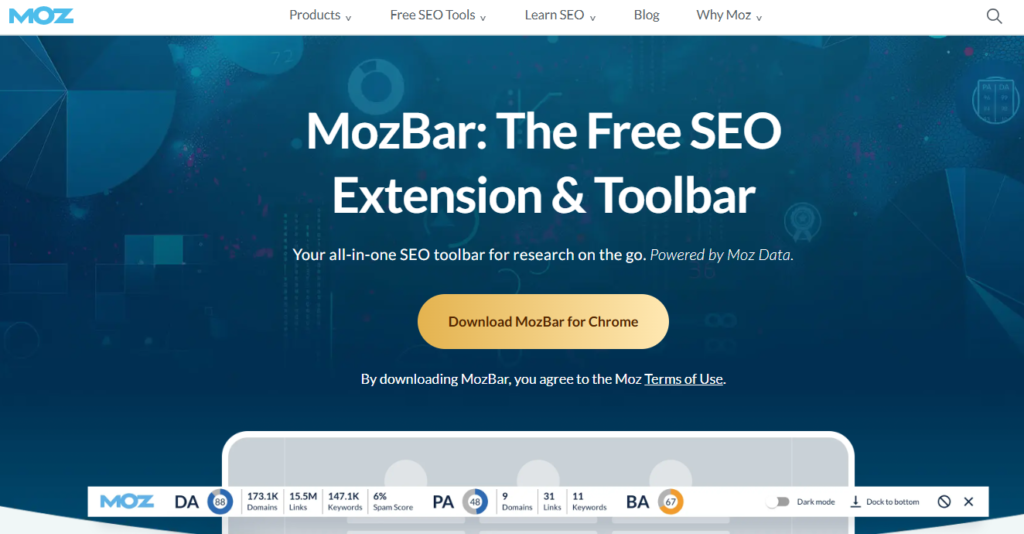
MozBar’s decade-long status as the most installed SEO Chrome extension is not the result of technical superiority — Ahrefs’s toolbar provides more accurate link data and Detailed SEO Extension provides faster on-page checks. MozBar’s staying power is the DA metric itself. Domain Authority is the number that every client, every link prospect, and every marketing stakeholder recognizes as the quick-read measure of a website’s strength — and MozBar is the tool that makes it visible without requiring any subscription.
The free tier delivers genuine, consistent value. Creating a free Moz account and activating MozBar surfaces DA and PA scores in Google SERPs for every organic result, paid result, and featured snippet simultaneously. A quick scan of a keyword’s top 10 results with MozBar active gives an immediate landscape assessment — the distribution of DA scores across ranking sites tells an experienced SEO whether the keyword is approachable for a specific domain without opening a full keyword research tool. For link builders reviewing hundreds of prospects per day, the ability to see DA without clicking into each site individually is a meaningful workflow shortcut.
The on-page analysis panel available in the free tier covers the elements that matter most for quick technical checks: page title, meta description, canonical tag, robots directives, heading structure, and link attribute analysis (follow, nofollow, external, internal) that highlights the link architecture of any page in a single click. The link attribute highlighting — which colors different link types on the page — is particularly useful for link auditing and outreach research, where identifying nofollow links at a glance determines whether a prospect is worth pursuing for link equity.
Where MozBar Falls Short
The keyword difficulty overlay, SERP page analysis metrics, and page optimization suggestions that distinguish the premium experience require a Moz Pro subscription, starting at $79/mo. For practitioners who already pay for Moz Pro, the Premium extension adds meaningful in-browser depth. For those who do not, the free tier’s DA and PA data is the primary use case — and for that specific use case, it remains the strongest free option available.
The Verdict on MozBar
MozBar is the right SEO extension for practitioners who need DA and PA visible in SERPs without a paid subscription, link builders assessing prospects at volume, and anyone whose client communication workflow involves Domain Authority as a benchmark metric. The free tier provides real daily-use value for these scenarios. Install it alongside Detailed SEO Extension for a free two-extension stack that covers on-page checks and authority metrics comprehensively.
3. Keywords Everywhere — Best for Keyword Volume and CPC Data Across Multiple Platforms
| Key Information | Overview |
|---|---|
| Best For | Keyword researchers who want search volume, CPC, and competition data overlaid directly in Google search results and across 15+ other platforms including YouTube, Amazon, and Bing |
| Pricing | Credit-based annual plans: Bronze $1.75/mo (100,000 credits/yr). Silver $5/mo (400,000 credits/yr). Gold $20/mo (2 million credits/yr). Platinum $80/mo (8 million credits/yr). All billed annually. Credits valid for one year from purchase |
| Free Tier | No — credits required for keyword volume data; related keywords widget and PASF suggestions visible without credits |
| Key Strengths | Search volume, CPC, and competition data on Google, YouTube, Amazon, eBay, Etsy, Bing, and 10+ other platforms; related keywords and People Also Search For widgets in SERPs; trend data; Moz DA metrics alongside keyword data; keyword list building inside the browser |
| Key Weaknesses | Credits consumed per keyword shown (not per search) — related widgets generate many credit deductions from a single search; no free tier for volume data; credits expire after one year |
| Best For Users | Content creators, PPC marketers, e-commerce SEOs, and anyone performing keyword research across multiple platforms directly in the browser |
| Requires Account | Yes — API key required; free to register |
| Best Pairing | Ahrefs SEO Toolbar or MozBar for domain metrics alongside Keywords Everywhere’s keyword data; Surfer SEO full platform for content optimization using the keywords found |
Keywords Everywhere solved a specific and common SEO frustration: the need to leave the search results page and open a separate keyword research tool to find out whether the term you just searched has meaningful volume and commercial intent. Before Keywords Everywhere, this context switch happened dozens of times per day for active keyword researchers. After installing it, the data appears inline — volume, CPC, competition score, and trend graph visible directly below the search bar and alongside every keyword in the related, PASF, and long-tail widgets that Google displays.
The credit system is the mechanism that makes Keywords Everywhere economically viable as a browser extension at scale, but it requires understanding before committing. One credit is consumed for each keyword that receives volume data — not for each search. A single Google search that triggers the related keywords widget (8 keywords), the People Also Search For widget (20 keywords), and the long-tail widget (25 keywords) consumes approximately 54 credits for that one search query. Active researchers doing dozens of keyword searches per day can move through credits faster than the credit count implies. The Bronze plan’s 100,000 annual credits — at $1.75/mo — is adequate for moderate, focused keyword research sessions; heavy daily use across many searches points toward the Silver ($5/mo) or Gold ($20/mo) plans.
The multi-platform coverage is where Keywords Everywhere stands apart from free alternatives like Keyword Surfer. While Keyword Surfer shows volume data only in Google SERPs, Keywords Everywhere overlays keyword data on YouTube search results, Amazon product search, Google Search Console queries, eBay, Etsy, and Bing — making it the tool of choice for e-commerce SEOs and content creators who research across multiple discovery platforms. The Moz DA and PA metrics displayed alongside keyword data also eliminate the need for a separate authority extension for practitioners who primarily use Keywords Everywhere’s data layer.
Where Keywords Everywhere Falls Short
The absence of a free tier for volume data is the most significant limitation for cost-sensitive practitioners — the related keyword widget shows keyword suggestions for free, but the volume, CPC, and competition data that make those suggestions actionable requires paid credits. Credit consumption on SERP pages with large related keyword widgets can also be surprisingly fast for new users who have not configured the extension to limit which widgets display volume data.
The Verdict on Keywords Everywhere
Keywords Everywhere is the right in-browser keyword data extension for practitioners who research across multiple platforms and who want the lowest-friction path between a search and a volume figure. The Bronze plan at $1.75/mo (billed annually at $21/yr) is among the lowest-cost paid tools in this entire series of articles. At that price, the break-even on time saved from avoided context switches to keyword tools happens within the first hour of use.
4. SEOquake — Best Free On-Page and SERP Audit Tool
| Key Information | Overview |
|---|---|
| Best For | SEOs who need a comprehensive on-page audit and SERP analysis tool with no account requirements and no paid tier |
| Pricing | Free (developed by Semrush) |
| Free Tier | Yes — fully functional with no account required |
| Key Strengths | SERP overlay with Semrush data (when logged in) including domain score and traffic estimates, on-page SEO audit covering 30+ parameters, keyword density analysis, internal/external link analysis, mobile-friendliness check, page comparison mode, exportable audit reports |
| Key Weaknesses | Full Semrush metric data requires a Semrush account (free or paid); UI is information-dense and can feel overwhelming to new users; does not surface Ahrefs or Moz metrics |
| Best For Users | SEOs who want a complete no-cost on-page audit and basic SERP intelligence tool, practitioners who use Semrush as their primary platform |
| Requires Account | No — full audit features work without login. Semrush account (free or paid) unlocks domain score and traffic data in SERP overlay |
| Best Pairing | Semrush full platform for deep research when SEOquake identifies issues worth investigating; Ahrefs SEO Toolbar for link-focused metrics alongside SEOquake’s audit depth |
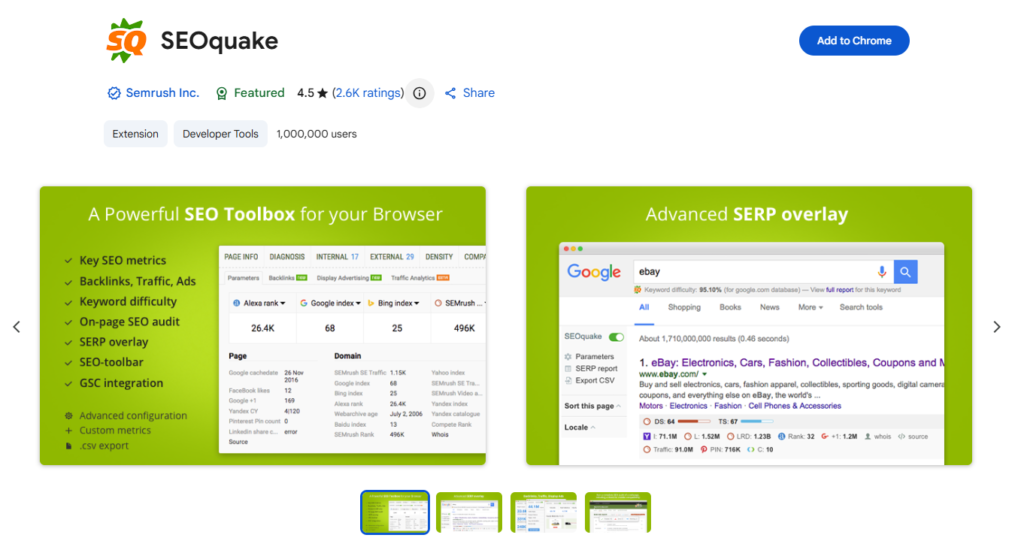
SEOquake is the most feature-complete free SEO Chrome extension available — a claim it earns by providing on-page audit depth, SERP analysis, and keyword density tools that most paid extensions do not match, entirely without requiring a paid subscription or, for core audit features, even an account. For practitioners who are price-sensitive, just starting with SEO, or who want a comprehensive quick-check tool that does not depend on any platform subscription, SEOquake covers more ground than any single alternative.
The on-page audit scans over 30 SEO parameters on any page: title length and pixel width, meta description length, heading hierarchy and keyword coverage, canonical status, Open Graph tags, robots directives, page load time, mobile responsiveness, internal and external link counts, and image alt text coverage. The results are categorized by issue severity, making it practical as a quick pre-audit screen — identifying the most obvious technical issues on a page before committing to a full Screaming Frog crawl or Semrush site audit.
The SERP overlay is where SEOquake’s Semrush integration surfaces. With a Semrush account — even the free tier — every organic result in Google shows the Semrush Domain Score, estimated organic traffic, and number of keywords the domain ranks for. Without a Semrush account, the overlay still displays indexed page counts, Alexa rank, and Bing and Yahoo index data for every result. For competitive SERP assessments where the goal is a quick-read on whether each ranking site is an established authority or a thinner domain, this inline data answers the question in seconds.
The page comparison mode — a less-known but genuinely useful feature — allows side-by-side comparison of SEOquake data for two URLs simultaneously. For agencies performing competitive on-page analysis, this removes the need to open two browser sessions and manually compare element-by-element.
Where SEOquake Falls Short
SEOquake’s interface density can be off-putting on first use — the SERP overlay and audit panel surface a large volume of data simultaneously, and new users can find it difficult to identify which data points are most actionable. The full SERP metric overlay also depends on Semrush data, meaning practitioners who prefer Ahrefs or Moz metrics need a second extension to see those. The keyword density analysis, while comprehensive, reflects an older SEO practice that carries less weight in 2026 than more semantically-sophisticated approaches.
The Verdict on SEOquake
SEOquake is the right choice for any SEO practitioner who wants a complete audit and SERP analysis capability at zero cost. As the only fully-featured free extension on this list that requires no account for its core functionality, it earns a permanent spot in browsers where cost or account dependency is a constraint. Semrush users get additional metric depth from the native integration. Non-Semrush users get a comprehensive auditing tool that compensates for metric overlap with a second authority-focused extension.
5. Detailed SEO Extension — Best for Fast On-Page Element Inspection
| Key Information | Overview |
|---|---|
| Best For | SEOs who need the fastest possible one-click access to every critical on-page element — meta tags, headings, schema, hreflang, canonicals — on any page |
| Pricing | Free |
| Free Tier | Yes — fully functional with no account, no registration, no paid tier |
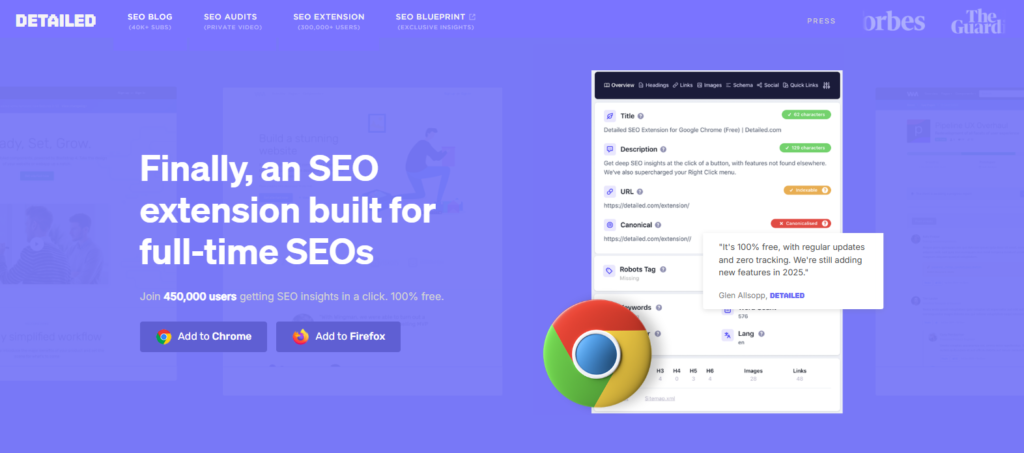
| Key Strengths | Instant structured display of title, meta description, headings H1–H6, canonical, robots, hreflang, Open Graph tags, schema markup types, outbound links, and page word count; entities panel for Google Knowledge Graph alignment; no login required; zero tracking or data collection |
| Key Weaknesses | No domain authority or link metrics; no keyword data; limited to on-page element inspection only |
| Best For Users | Technical SEOs, content SEOs auditing on-page elements quickly, anyone needing fast access to page metadata without opening DevTools |
| Requires Account | No |
| Best Pairing | MozBar or Ahrefs SEO Toolbar for domain authority and link metrics alongside Detailed’s on-page element depth; Keywords Everywhere for keyword data in the same workflow |
Detailed SEO Extension was built by Glen Allsopp, an SEO practitioner, for SEO practitioners — and the practical orientation is evident in every design decision. The extension does not attempt to replicate a platform, surface competitive data, or offer a paid upgrade path. It does one thing with exceptional speed and clarity: when you click the extension icon on any page, you see every relevant on-page SEO element in a clean, structured panel within a second. No account, no loading spinner, no dashboard.
The panel layout reflects how SEOs actually work. Title tag and pixel width are displayed at the top, followed by meta description and character count, then heading hierarchy (all H1 through H6 visible at a glance with their text), then canonical URL, robots directives, hreflang attributes, and schema markup types present on the page. Below that, Open Graph tags for social preview, and the full outbound link list with follow/nofollow status and anchor text. The page word count — useful for content benchmarking against competitors — appears as a summary figure.
The entities panel is a feature that reflects the current direction of Google’s indexing model. It extracts the recognized topical entities from the page’s content — the people, places, organizations, concepts, and events that Google’s Knowledge Graph associates with the page — making it practical to assess whether a page’s content is aligned with the entities that characterize the topic’s top-ranking pages. For content SEOs optimizing for semantic relevance rather than keyword frequency, this entities view provides context that keyword-focused on-page tools do not.
The complete absence of data collection or tracking is explicitly stated in the extension’s Chrome Web Store listing and has been independently verified by the extension’s community of users. For agencies with client confidentiality requirements or practitioners who are cautious about the permissions model of browser extensions, this no-tracking architecture is a meaningful differentiator.
Where Detailed SEO Extension Falls Short
Detailed SEO Extension is precisely scoped to on-page element inspection and nothing else. It provides no domain authority metrics, no backlink data, no keyword volume information, and no competitive domain intelligence. Practitioners who install it expecting a comprehensive SEO extension will find it incomplete — it is designed to be paired with authority and keyword extensions, not to replace them. This is a design choice, not a limitation.
The Verdict on Detailed SEO Extension
Detailed SEO Extension is the right on-page inspection tool for every SEO practitioner, at every level of experience and every budget. It is free, it requires no account, it installs in seconds, and it surfaces on-page data faster and more cleanly than any competing extension. It belongs in every SEO’s browser regardless of what other tools they use — as the on-page layer in a three-extension stack alongside a domain metrics tool (MozBar or Ahrefs SEO Toolbar) and a keyword data tool (Keywords Everywhere or Keyword Surfer).
6. Keyword Surfer — Best Free Keyword Volume Extension Inside Google
| Key Information | Overview |
|---|---|
| Best For | Content creators and SEOs who want instant keyword volume, related keyword ideas, and competitor content data visible directly inside Google search results at zero cost |
| Pricing | Free (developed by Surfer SEO) |
| Free Tier | Yes — fully functional with no credits, no account required |
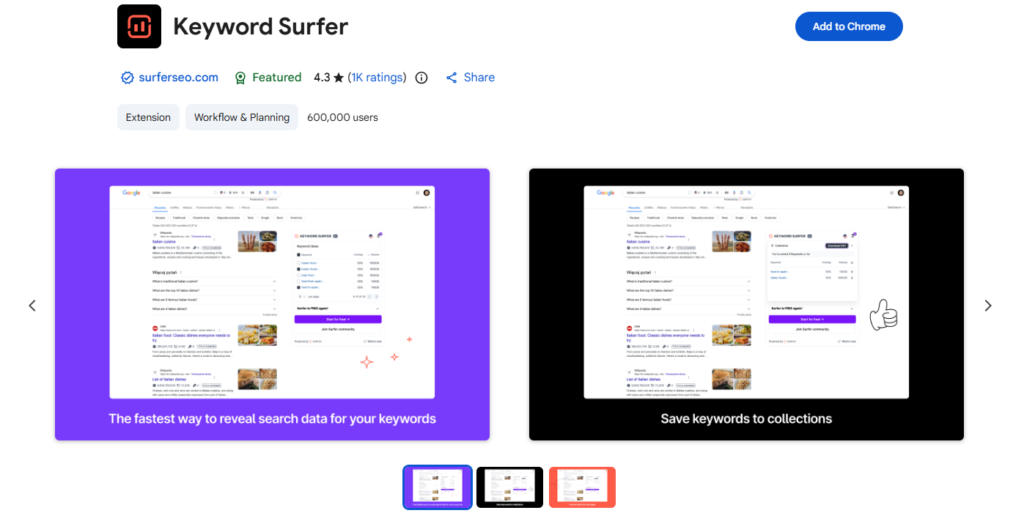
| Key Strengths | Search volume for the searched keyword displayed under the search bar, related keyword suggestions with volume in a side panel, content ideas for the query, competitor page word counts and keyword counts visible in SERPs, no credit system or usage limits |
| Key Weaknesses | Google SERPs only — no multi-platform coverage like Keywords Everywhere; no CPC or competition score; fewer data points than Keywords Everywhere per search |
| Best For Users | Content writers, bloggers, and SEOs who do most of their keyword research in Google and want free, unlimited volume data without any account or credit management |
| Requires Account | No — works without a Surfer SEO account; optional login for Surfer platform integration |
| Best Pairing | Surfer SEO full platform for content optimization using the keywords found; MozBar or Ahrefs SEO Toolbar for domain metrics alongside Keyword Surfer’s volume data |
Keyword Surfer is the most practical completely free keyword volume extension for daily Google search-based research. Where Keywords Everywhere delivers more data points and multi-platform coverage but requires paid credits for volume data, Keyword Surfer provides search volume for any Google query — with no account, no credits, no usage limits — making it the zero-friction choice for content creators and SEOs who predominantly research through Google rather than across multiple platforms.
The search volume display appears directly below the search bar as soon as a search is entered: the queried keyword’s monthly search volume, alongside a column of related keyword suggestions in the right-hand panel of the search results page, each with their own volume figure. The panel also displays content ideas for the query — related topics that performing content on the subject typically addresses — making it practical for content planning directly from the research session without opening a separate content tool.
The competitor content data in SERPs is a feature that distinguishes Keyword Surfer from other free volume extensions. Each organic result in Google shows the estimated organic traffic for that page, the total number of keywords it ranks for, and the word count of the page — all visible inline in the search results. For content gap analysis during keyword research, this data answers the question “what does it take to compete for this keyword?” with enough context to inform a rough content brief before any deeper platform research. A result with 3,400 words, ranking for 87 keywords, and receiving 2,100 estimated monthly visits tells a content strategist what investment level the SERP rewards.
For practitioners who already pay for Surfer SEO’s full platform, the extension bridges the research and optimization workflow: keywords identified in the browser research session can flow directly into Surfer’s Content Editor for brief creation and on-page optimization, maintaining a continuous workflow between discovery and production.
Where Keyword Surfer Falls Short
Keyword Surfer’s scope is deliberately narrow — it shows volume data in Google SERPs and provides content context for ranking pages. It does not show CPC data, competition scores, multi-platform keyword data, trend graphs, or the domain authority metrics that MozBar and the Ahrefs SEO Toolbar provide. Practitioners who need CPC for PPC planning, volume data on Amazon or YouTube, or keyword trend history will find Keyword Surfer insufficient on its own and should evaluate Keywords Everywhere for those use cases. The volume estimates, while useful for relative comparison, are also acknowledged to be less precise than the data from premium platforms.
The Verdict on Keyword Surfer
Keyword Surfer is the right keyword volume extension for content creators, bloggers, and SEOs who want unlimited free keyword data in Google without managing credits or accounts. The zero-cost, zero-friction model is its defining strength. For practitioners who need CPC data, multi-platform coverage, or higher data precision, Keywords Everywhere — at as little as $21/yr — provides a meaningful upgrade without a prohibitive cost. Many practitioners run both: Keyword Surfer for quick volume checks during daily browsing, Keywords Everywhere for research sessions where CPC and platform breadth matter.
Which SEO Chrome Extension Should You Install? A Decision Framework
The right extension combination depends on what data you need most frequently in the browser and whether you have active subscriptions to full SEO platforms.
If you use Ahrefs as your primary SEO platform: Ahrefs SEO Toolbar for DR/UR/traffic data and on-page checks. Add Keywords Everywhere for keyword volume in SERPs.
If you use Semrush as your primary SEO platform: SEOquake for the native Semrush SERP overlay and on-page audit. Add Detailed SEO Extension for faster on-page element inspection alongside it.
If you use Moz Pro or value DA as your primary benchmark metric: MozBar for DA/PA in SERPs. Add Detailed SEO Extension for on-page checks and Keywords Everywhere or Keyword Surfer for volume data.
If you are budget-constrained and want maximum value from free tools: Detailed SEO Extension plus MozBar plus Keyword Surfer — a fully capable three-extension stack at zero cost. Add Keywords Everywhere at $21/yr when CPC data or multi-platform research becomes part of your workflow.
If keyword research across multiple platforms (YouTube, Amazon, eBay) is a core task: Keywords Everywhere is the only extension on this list that covers non-Google platforms. Install it alongside Detailed SEO Extension and MozBar for a complete in-browser toolkit.
If content brief production and optimization is your primary workflow: Keyword Surfer for free volume data in Google plus Surfer SEO’s full platform for content editor optimization. The extension and platform are designed to work together across the discovery-to-production workflow.
Recommended Extension Stacks by Role
| Role | Primary Extension | Supporting Extensions | Total Cost | Coverage |
|---|---|---|---|---|
| Agency SEO (Ahrefs user) | Ahrefs SEO Toolbar | Keywords Everywhere, Detailed SEO | $21/yr | Link metrics + keyword data + on-page audit |
| Agency SEO (Semrush user) | SEOquake | Detailed SEO Extension, Keywords Everywhere | $21/yr | Full audit + SERP overlay + keyword data |
| Link Builder | MozBar | Ahrefs SEO Toolbar, Detailed SEO | Free | Authority metrics + page-level signals |
| Content Creator / Blogger | Keyword Surfer | Detailed SEO Extension, MozBar | Free | Volume data + on-page checks + DA signals |
| Technical SEO | Detailed SEO Extension | Ahrefs SEO Toolbar, SEOquake | Free | Deep on-page inspection + audit depth |
| E-commerce SEO | Keywords Everywhere | MozBar, Detailed SEO | $21/yr | Multi-platform volume + DA + on-page |
| Budget / Beginner | Keyword Surfer + MozBar | Detailed SEO Extension | Free | Core keyword + authority + on-page — zero cost |
Head-to-Head: Which Extension Wins Each Category?
| Category | Winner | Runner-Up | Notes |
|---|---|---|---|
| Domain Authority in SERPs | MozBar | Ahrefs SEO Toolbar | MozBar on DA free tier; Ahrefs on DR accuracy for paying subscribers |
| On-Page Element Inspection | Detailed SEO Extension | SEOquake | Detailed on speed and clarity; SEOquake on breadth of audit parameters |
| Keyword Volume in SERPs | Keywords Everywhere | Keyword Surfer | KE on data depth and CPC; Surfer on zero cost and no usage limits |
| Multi-Platform Keyword Data | Keywords Everywhere | N/A | KE is the only extension covering YouTube, Amazon, eBay and beyond |
| SERP Competitive Overview | Ahrefs SEO Toolbar | SEOquake | Ahrefs on data accuracy; SEOquake on free Semrush integration |
| Zero Cost / No Account | Detailed SEO Extension | Keyword Surfer | Detailed on completeness; Surfer on keyword data at zero cost |
| Best for Semrush Users | SEOquake | N/A | Native Semrush data integration in the SERP overlay |
| Best for Ahrefs Users | Ahrefs SEO Toolbar | N/A | Native Ahrefs data in-browser without platform login |
| Content Workflow Integration | Keyword Surfer | N/A | Designed to feed directly into Surfer SEO content editor |
| Lowest Total Cost | Keyword Surfer / Detailed / MozBar | Keywords Everywhere ($21/yr) | Three free extensions cover most daily use cases |
Expert Insight: Install Three, Use Them Every Day
The most common mistake SEO practitioners make with Chrome extensions is installing too many and using none of them consistently. An extension that is installed but ignored is the browser equivalent of a subscription to a tool you do not open — it provides no value and slightly degrades performance.
The three extensions that deliver the most daily use value for the broadest range of SEO workflows are Detailed SEO Extension (free, instant on-page inspection), MozBar (free, DA in every SERP), and Keywords Everywhere ($21/yr, volume data wherever you research). This three-extension stack costs $21 per year, requires no primary platform subscription, and covers the quick contextual checks that account for the majority of in-browser SEO decisions throughout a working day.
For practitioners with active platform subscriptions, replace or supplement these with the native extension from their primary platform: Ahrefs SEO Toolbar for Ahrefs users, SEOquake for Semrush users. Both extensions surface platform-native data in the browser that no third-party extension can replicate.
Install the extensions that match your actual daily workflow. Keep only those that you actively use. Configure them to activate on demand rather than passively loading on every page. Those three habits are the difference between a browser that works harder than you do and one that quietly slows you down.
Frequently Asked Questions
How many SEO Chrome extensions should I install at once?
Three to five is the practical maximum for most professional SEOs. Beyond that, extensions create browser slowdown, compete for screen space in the SERP overlay, and start duplicating functionality. The most efficient setups cover three distinct functional layers: domain authority and link metrics (MozBar or Ahrefs SEO Toolbar), on-page element inspection (Detailed SEO Extension), and keyword data (Keywords Everywhere or Keyword Surfer). Adding a fourth extension — SEOquake for deeper audit capability or a platform-specific tool — is reasonable. Installing ten extensions creates friction that defeats the purpose of having in-browser tools.
Do SEO Chrome extensions slow down my browser?
Some do, some do not. Extensions that make external API calls on every page load — fetching domain metrics from a remote database for every URL you visit — create more noticeable performance impact than those that only activate on user request. The Ahrefs SEO Toolbar and MozBar, which fetch domain data as you browse, can add a small but perceptible delay to page loading. Detailed SEO Extension and Keyword Surfer, which only activate on explicit click or search, have negligible performance impact. If browser performance is a concern, configure metric-fetching extensions to activate on-demand rather than automatically on every page.
Are SEO Chrome extensions safe to use on client sites?
The permissions question matters. Every Chrome extension requests access to certain browser activities — some only when you click the icon, others on all visited pages. Detailed SEO Extension explicitly states no data collection. SEOquake is developed by Semrush, a major platform with a public privacy policy. Keywords Everywhere uses an API key model where data is processed through their infrastructure. For practitioners working on confidential client projects, reviewing each extension’s Chrome Web Store permissions panel and privacy policy before installation is good professional practice. Extensions from established SEO platform vendors (Ahrefs, Moz, Semrush) carry lower privacy risk than unknown developers.
Can Chrome extensions replace full SEO platforms?
No — and they are not designed to. Chrome extensions provide contextual, in-browser access to the surface-level data that informs quick decisions during daily browsing. Full SEO platforms — Semrush, Ahrefs, SE Ranking — provide deep analysis, historical trend data, project tracking, rank monitoring, backlink prospecting at scale, and the comprehensive audit and reporting infrastructure that professional SEO programs require. The relationship is complementary: extensions for the dozens of quick checks per day, platforms for the analysis sessions that drive strategy and deliverables.


