

YouTube is the second largest search engine in the world — a statement that gets repeated so often it has stopped carrying real weight. What it means in practice is that YouTube has its own ranking algorithm, its own keyword demand signals, its own metadata system, and its own set of optimization levers that are meaningfully different from Google web search. Getting a video to rank for a competitive YouTube query requires understanding those signals specifically, not retrofitting web SEO thinking onto a platform that operates on different principles.
The core ranking signals on YouTube in 2026 are click-through rate, watch time, engagement velocity, and relevance of the video’s metadata to the searcher’s intent. A video with a compelling thumbnail and title gets clicked. A video that holds viewer attention ranks higher than one that loses viewers in the first 30 seconds. A video that generates comments, likes, and shares in its first 24 hours signals to the algorithm that the content deserves broader distribution. YouTube SEO tools help creators and marketers research the keywords driving demand in their niche, optimize the metadata that communicates relevance to YouTube’s search and discovery systems, and track the analytics that reveal what is and is not working across the channel.
The YouTube SEO tool market has matured into two distinct categories. The first is browser extension and platform tools specifically built for YouTube — TubeBuddy, vidIQ, Morningfame, Social Blade — that surface YouTube-native data inside the YouTube interface itself. The second is general SEO platforms like Ahrefs and Semrush that have built YouTube-specific keyword research capabilities on top of their broader data infrastructure. Both categories serve legitimate needs, and most serious YouTube creators and agencies use tools from both.
This guide evaluates 7 YouTube SEO tools across keyword research, video metadata optimization, channel analytics, competitive intelligence, and total cost of ownership for creators at different stages of channel growth.
Quick Comparison: Top 7 SEO Tools for YouTube in 2026
| # | Tool | Primary Use | Starting Price | Free Tier | Best Feature | Our Rating |
|---|---|---|---|---|---|---|
| 1 | TubeBuddy | YouTube channel optimization and bulk management | Free / Pro $3/mo | Yes | A/B testing for titles, thumbnails, and descriptions | 9.3/10 |
| 2 | vidIQ | YouTube analytics, keyword research, and AI content ideas | Free / Boost $19/mo | Yes | Views-per-hour tracking and AI daily video ideas | 9.2/10 |
| 3 | YouTube Studio | Native channel analytics and performance data | Free | Yes (completely) | First-party data no third-party tool can replicate | 9.0/10 |
| 4 | Keywords Everywhere | YouTube keyword volume and CPC data in-browser | From $7/mo (100K credits/yr) | No | Search volume and related keywords inside YouTube SERPs | 8.9/10 |
| 5 | Ahrefs | YouTube keyword research and video rank tracking | From $129/mo (Lite) | No (free Webmaster Tools) | Deepest YouTube keyword database with click-through data | 9.1/10 |
| 6 | Social Blade | Channel growth benchmarking and competitor tracking | Free / Bronze $3.99/mo | Yes | Historical channel analytics for any public YouTube channel | 8.7/10 |
| 7 | Morningfame | Guided YouTube analytics and keyword research for growing channels | Basic $4.90/mo | No (1-month free trial with invite) | Simplified guided analytics with actionable growth recommendations | 8.6/10 |
How We Evaluated These YouTube SEO Tools
Every tool in this guide was assessed across five dimensions that reflect the real workflow of YouTube channel growth — not feature lists or vendor-provided benchmark data.
YouTube keyword research quality: YouTube keyword research is meaningfully different from Google web keyword research. Search volume signals, keyword difficulty, autocomplete-based demand, and competition at the video level require data sourced from YouTube specifically rather than inferred from Google search volume. We evaluated how accurately and comprehensively each tool surfaces the keyword demand signals that determine whether a video has the search audience to justify production.
Video metadata optimization depth: The metadata layer on YouTube — title, description, tags, and thumbnail — is the primary interface between a video’s content and YouTube’s discovery and search algorithms. We evaluated each tool’s ability to guide creators toward metadata that is both keyword-relevant and click-compelling, and the quality of the optimization feedback provided during the pre-upload workflow.
Analytics and performance tracking: YouTube Studio provides first-party analytics, but the interpretation of that data — understanding why a video is or is not performing, identifying the content and metadata patterns that correlate with success across the channel, and benchmarking performance against comparable channels — requires additional tooling. We evaluated the depth and actionability of the analytics each tool provides beyond what YouTube Studio shows natively.
Competitive intelligence and channel research: Understanding what is working for competitor channels, identifying the keywords and content formats that dominate specific niches, and monitoring competitive performance over time are all inputs to YouTube content strategy. We evaluated how well each tool enables this competitive research without requiring creators to reverse-engineer competitor success manually.
Cost-effectiveness at creator scale: YouTube creator tools span an enormous price range — from completely free to hundreds of dollars per month — and the value delivered at each price point varies significantly. We evaluated each tool’s cost relative to the capability delivered, with specific attention to whether the free tier provides genuine utility for early-stage channels and whether the paid tiers justify their cost for creators who are actively monetizing.
Why YouTube SEO Tooling Has Changed in 2026
Three developments have reshaped how creators and marketers approach YouTube SEO in 2026 compared to even two years earlier.
The first is the integration of AI into the content ideation workflow. Both TubeBuddy and vidIQ have invested heavily in AI-powered features that move beyond data display into active strategic guidance — daily video topic recommendations calibrated to channel niche and audience behavior, AI-generated title and description variants scored against keyword and engagement benchmarks, and thumbnail analysis that predicts click-through rate before upload. Creators who are not using these AI-powered pre-production tools are making content decisions based on intuition that their competitors are making based on data.
The second is the growing importance of YouTube Shorts in channel SEO strategy. Shorts have become a significant discovery mechanism for new subscribers — a short-form video that goes semi-viral introduces the creator to an audience that then explores the long-form catalog. The tools that help creators identify which existing long-form content has the strongest clip potential, optimize Shorts metadata for the separate discovery algorithm that governs them, and track the subscriber conversion rate from Shorts viewers to long-form audience have become meaningfully more valuable than they were when Shorts were a secondary format.
The third is the maturation of cross-platform YouTube keyword research. Ahrefs and Semrush have built YouTube-specific keyword databases that enable research into YouTube search demand with the same analytical rigor that web SEO has applied to Google search for years. The intersection of YouTube keyword research with Google web search data — understanding which topics have strong demand on both platforms and can support both a video and a blog post — has become a standard strategic input for content creators who operate across both channels.
Detailed Reviews: Best SEO Tools for YouTube in 2026
1. TubeBuddy — Best All-in-One YouTube Channel Optimization Platform
| Best For | YouTube creators who want the most complete channel optimization toolkit — keyword research, video SEO, A/B testing, thumbnail analysis, and bulk management — in a single browser extension |
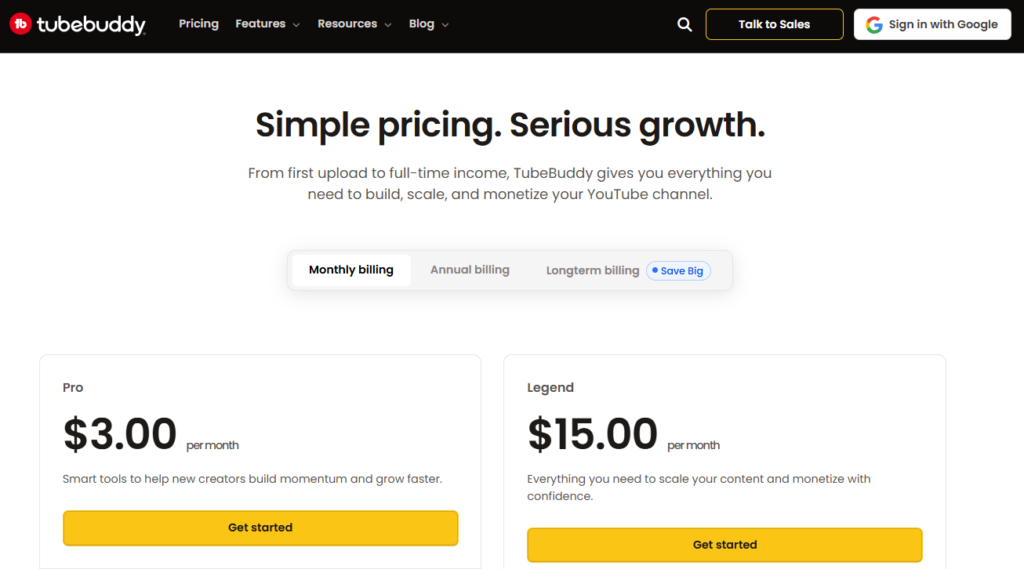
| Pricing | Free (limited features). Pro $3/mo. Legend $15/mo. Enterprise custom. Annual billing saves ~30% |
| Free Tier | Yes — limited keyword explorer, basic tag suggestions, and Best Practice Checks |
| Key Strengths | Industry-leading A/B testing for thumbnails and titles, SEO Studio with keyword-guided metadata optimization, Keyword Explorer, bulk processing for multi-video updates, thumbnail generator, channel health report, suggested Shorts tool, Videolytics overlay on any YouTube video |
| Key Weaknesses | A/B testing and bulk processing require Star or Legend tier; interface can feel feature-dense for new users; competitor analysis less deep than vidIQ |
| Best For Channels | Growing and established channels at any size, creators running content at volume, anyone who needs to retroactively optimize a back catalog |
| Deployment | Browser extension + YouTube Studio integration |
| Best Pairing | vidIQ for competitive analytics alongside TubeBuddy’s optimization; Keywords Everywhere for in-SERP keyword data |
TubeBuddy has held its position as the most widely installed YouTube optimization tool for the better part of a decade, and the reason is not inertia — it is the breadth of genuinely useful functionality packed into a single browser extension. Where competing tools tend to specialize in one or two workflow areas, TubeBuddy covers the complete pre-production, production, and post-publication optimization cycle: keyword research to find a rankable topic, SEO Studio to guide metadata optimization during upload, A/B testing to systematically improve click-through rate after publication, and bulk processing to retroactively optimize the entire channel’s historical content.
The A/B testing capability is TubeBuddy’s most distinctive and valuable differentiator. Available on the Pro plan ($3/mo) and above, it allows creators to test different thumbnails, titles, descriptions, or tags against each other on a live video, rotating variants and measuring actual click-through rate performance to determine which version audiences respond to more strongly. This is not a simulated test — it uses real viewer impressions and real CTR data from the live video. The ability to replace guesswork about what thumbnail or title will perform better with actual viewer behavior data is the kind of optimization lever that separates channels with consistent view growth from those that plateau on initial post-publication performance and never improve.
The SEO Studio workflow walks creators through title, description, and tag optimization using TubeBuddy’s keyword scoring system — weighting keywords by search volume, competition, and the channel’s specific ability to rank given its current size and authority. The guided checklist format makes the optimization workflow repeatable across every video without requiring the creator to hold the full optimization framework in their head, which matters particularly for teams and for creators who publish at high frequency.
The Keyword Explorer draws from YouTube’s autocomplete data to surface the most commonly searched variations of any topic, with scores for each keyword’s volume and competition level. The click-through probability metric — estimating how likely a new video from a channel of a given size is to rank for a specific keyword — is a practical reality check that prevents creators from targeting keywords where the competition is dominated by channels with subscriber counts and channel authority that make ranking genuinely inaccessible.
Where TubeBuddy Falls Short
TubeBuddy’s competitive analytics — tracking competitor channel performance in detail, monitoring competitor upload schedules and engagement velocity, comparing channel growth curves side by side — is less comprehensive than vidIQ’s. Creators whose primary strategic need is deep competitive intelligence should evaluate vidIQ alongside TubeBuddy rather than treating them as direct substitutes. The A/B testing and most bulk processing features also require the Pro plan ($3/mo) or Legend plan ($15/mo), which means the Pro plan ($3/mo), while affordable, leaves out some of TubeBuddy’s most differentiating capabilities.
The Verdict on TubeBuddy
TubeBuddy is the right primary YouTube SEO tool for most creators — the breadth of capability across the full content lifecycle, the A/B testing capability that no other tool in this category matches, and the bulk processing that makes retroactive channel optimization practical at any catalog size make it the default first purchase for creators who are serious about channel growth. Start with the free plan to explore the keyword and SEO tools; upgrade to Star when A/B testing becomes a priority.
2. vidIQ — Best for YouTube Analytics and AI-Powered Content Ideas
| Best For | Creators who want the deepest available YouTube analytics, competitive channel intelligence, and AI-generated video topic recommendations calibrated to their niche |
| Pricing | Free (limited). Boost $19/mo. Max $49/mo. |
| Free Tier | Yes — basic keyword research (5 related keywords per search), views-per-hour data, 3 competitor channels, basic SEO score |
| Key Strengths | Views Per Hour real-time performance tracking, Daily Ideas AI-powered topic recommendations, competitor channel monitoring with upload alerts, detailed keyword inspector with search volume and competition scores, AI thumbnail generator, channel audit tool, trend alerts for niche topics |
| Key Weaknesses | No A/B testing (TubeBuddy leads here); bulk processing tools more limited than TubeBuddy; Boost plan at $19/mo is a significant price jump from the $3 Pro plan |
| Best For Channels | Data-driven creators focused on competitive intelligence and content strategy; channels in competitive niches where trend timing matters |
| Deployment | Browser extension + web dashboard + YouTube Studio integration |
| Best Pairing | TubeBuddy for A/B testing and bulk optimization alongside vidIQ’s analytics depth |
vidIQ positions itself as an analytics-first YouTube growth platform — and the data depth it delivers for competitive channel analysis and performance tracking justifies that positioning. Where TubeBuddy’s design philosophy is optimization and productivity, vidIQ’s is intelligence and insight. The two tools serve sufficiently different primary workflows that many professional creators and YouTube agencies run both simultaneously.
The Views Per Hour metric is vidIQ’s most operationally useful unique feature. VPH measures how quickly any video — on any channel, including competitors’ — is accumulating views relative to the time since publication. This real-time velocity data identifies which videos are getting algorithm distribution, distinguishing between evergreen performers that accumulate views slowly over months and viral performers that spike in the first 48 hours. For creators timing content around trending topics, VPH data on competitor videos in the same niche reveals which topics are getting the distribution boost that indicates algorithm momentum — and which are publishing into silence.
The Daily Ideas feature — vidIQ’s AI-powered content recommendation engine — generates personalized video topic suggestions based on the creator’s channel niche, audience demographics, and current YouTube search trends. Rather than presenting a static list of keyword ideas, it surfaces a daily feed of topics with estimated view potential, supporting rationale, and suggested titles. For creators who struggle with content ideation or who want data validation before committing production time to a topic, this daily feed functions as an always-on content strategist that responds to what is actually trending in their specific niche at the moment.
The competitor tracking system allows creators to add competitor channels and receive alerts when those channels publish new videos, see detailed performance breakdowns of competitor content over time, and compare channel growth curves side by side. The practical output of this monitoring is a continuously updating picture of what is working in the creator’s competitive space — which content formats are getting views, which titles are generating clicks, and which topics are commanding audience attention from the channels they are competing with for the same audience.
Where vidIQ Falls Short
vidIQ has no A/B testing capability for thumbnails or titles — a meaningful gap relative to TubeBuddy for creators who want systematic CTR optimization after upload. The bulk processing tools are also more limited: vidIQ supports bulk copy and editing of cards and end screens, but catalog-wide bulk updates to descriptions, titles, or tags require processing videos individually. The price jump between the Boost plan ($19/mo) and the Max plan ($49/mo) is steep — most of the features that define vidIQ’s competitive value require the Max tier, making the practical minimum investment for meaningful use higher than the entry price suggests.
The Verdict on vidIQ
vidIQ is the right primary YouTube SEO tool for creators and marketers whose primary optimization objective is strategic — understanding the competitive landscape, identifying trending topics before they peak, and calibrating content strategy to what the data says is working. For creators already using TubeBuddy who need deeper competitive analytics and AI content recommendations, vidIQ’s free plan provides meaningful additional capability without requiring a paid subscription.
3. YouTube Studio — The Non-Negotiable Free Analytics Foundation
| Best For | Every creator on YouTube — YouTube Studio is the native analytics platform that provides the first-party performance data that every other tool in this list supplements, interprets, or builds on |
| Pricing | Free — built into every YouTube channel |
| Free Tier | Yes — completely free for all channel owners |
| Key Strengths | First-party Google impression and click data, real audience retention curves showing frame-by-frame viewer drop-off, actual traffic source breakdown (search vs. suggested vs. browse), real demographic data, monetization analytics, comments, community posts, and live stream management |
| Key Weaknesses | No keyword research, no competitive intelligence, no metadata optimization guidance, no historical data beyond 18 months, no comparison to competitor channels |
| Best For Channels | Every YouTube channel without exception — this is not optional |
| Deployment | Web dashboard (studio.youtube.com) + YouTube mobile app |
| Best Pairing | TubeBuddy and vidIQ for optimization and competitive intelligence built on top of Studio’s data; Morningfame for simplified interpretation of Studio’s analytics |
YouTube Studio is not technically an SEO tool — it is the native channel management and analytics platform that YouTube provides to every creator. It belongs in this list not because it competes with TubeBuddy or vidIQ but because no YouTube SEO program is complete without it, and many creators substantially underutilize it while investing in third-party tools that cannot replicate what Studio provides.
The audience retention graph is the most valuable single piece of data available to YouTube creators for improving content quality — and it exists exclusively in YouTube Studio. The retention curve shows exactly what percentage of viewers are still watching at every second of a video, with absolute granularity. A visible drop at 00:47 of a 12-minute video is not an abstraction — it is the precise moment where the content lost the audience, identifiable in the video itself, and directly actionable by editing or restructuring future videos to eliminate the equivalent drop-off point. No third-party tool has access to this data.
The traffic sources report — which breaks down the percentage of views arriving from YouTube Search, Suggested Videos, Browse Features, External Sources, and other channels — tells creators whether their SEO investment is generating search traffic or whether their views are primarily algorithm-driven discovery. A channel that gets 8% of its views from search and 71% from Suggested Videos has a very different strategic profile from one that gets 42% from search, and the optimization priorities differ accordingly. TubeBuddy and vidIQ can improve search discoverability, but only YouTube Studio can tell you whether search discoverability is actually the growth constraint worth addressing.
The Click-through Rate and Average View Duration metrics at the video level are the foundation of YouTube optimization decisions. CTR tells you whether the thumbnail and title are compelling audiences who see the video to click it. AVD tells you whether the content is holding the audience that does click. Poor CTR points to thumbnail or title problems that A/B testing in TubeBuddy can diagnose and solve. Poor AVD points to content quality or structure problems that metadata optimization cannot fix. Studio provides both metrics at the granularity needed to diagnose which type of problem any given video has.
Where YouTube Studio Falls Short
YouTube Studio provides no keyword research, no competitive channel intelligence, no pre-upload metadata optimization guidance, and no benchmarking against comparable channels in the same niche. The data it provides is entirely about the creator’s own channel and videos — it shows what has happened, not why it happened in context, and not what to do differently based on what competitors are doing successfully. The 18-month data retention limit also truncates historical performance analysis for established channels where multi-year trend data would be strategically valuable.
The Verdict on YouTube Studio
YouTube Studio is the mandatory foundation of any YouTube SEO program — it provides data that no other tool can access and that every optimization decision should be grounded in. Establish a weekly review habit with Studio’s analytics: retention curves on recent videos, CTR trends, traffic source distribution, and the audience demographics. The insights from this review define the specific problems that TubeBuddy, vidIQ, and keyword research tools should be deployed to solve.
4. Keywords Everywhere — Best for Keyword Volume Data Inside YouTube Search
| Best For | Creators who want search volume, CPC, and related keyword data overlaid directly inside YouTube’s search results page without switching to an external tool |
| Pricing | Credit-based annual plans: Bronze $7/mo (100K credits/yr). Silver $14/mo (400K credits/yr). Gold $40/mo (2M credits/yr). Platinum $120/mo (8M credits/yr). All billed annually |
| Free Tier | No — credits required for volume data; basic related keywords widget visible without credits |
| Key Strengths | YouTube search volume displayed under the YouTube search bar on any query, related keyword suggestions with volume in the SERP sidebar, trend data, multi-platform coverage (YouTube + Google + Amazon + 12 more), Moz DA metrics for video/channel authority context |
| Key Weaknesses | Credits consumed per keyword shown (related widgets can deplete credits quickly); no free tier for volume data; less YouTube-specific depth than TubeBuddy’s Keyword Explorer |
| Best For Channels | Content creators doing keyword research directly in YouTube; creators who also research Google web keywords for cross-platform content |
| Deployment | Chrome browser extension |
| Best Pairing | TubeBuddy for full YouTube keyword scoring and SEO optimization; Ahrefs for deeper YouTube keyword competitive analysis |
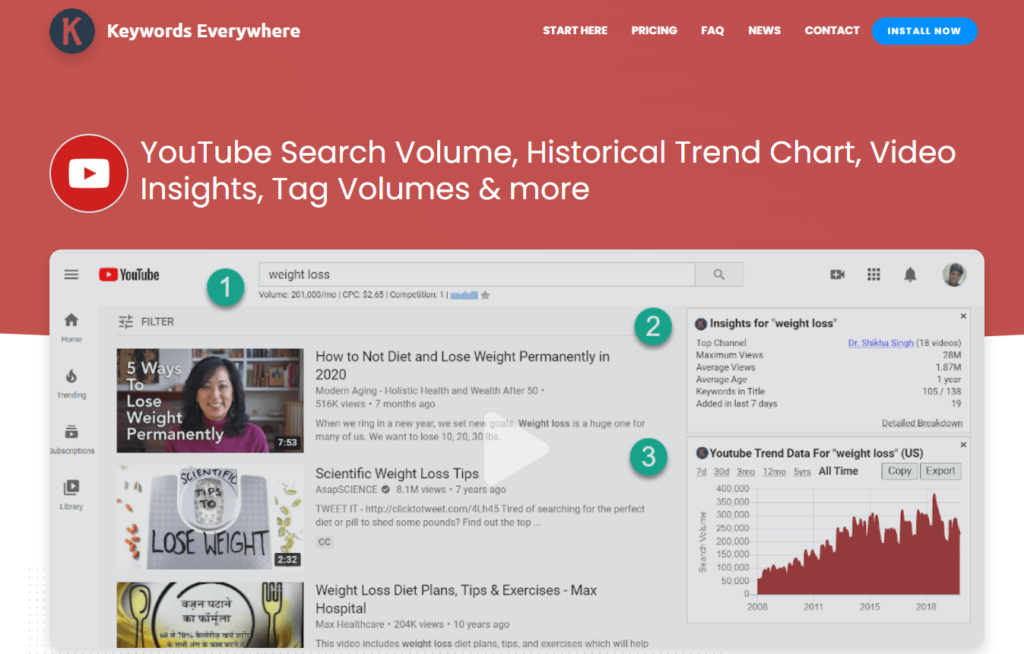
Keywords Everywhere’s inclusion in a YouTube SEO toolkit rests on a straightforward practical advantage: it surfaces YouTube search volume data in the same place you are already doing YouTube keyword research — the YouTube search bar. When a creator types a potential video topic into YouTube to explore what is already ranking and what the autocomplete suggestions reveal about related demand, Keywords Everywhere shows the monthly search volume for the queried term and every autocomplete suggestion without requiring a separate tool session.
The YouTube integration overlays keyword volume data directly under the YouTube search bar — the same mechanism that Google search receives, adapted for YouTube’s API. The related keywords panel on the right side of YouTube search results populates with suggested queries alongside their own volume figures, CPC estimates, and trend data. For a creator in research mode — scanning YouTube for a topic to determine whether there is search audience to justify producing a video — this in-SERP data transforms the qualitative browsing session into a quantitatively informed research process.
The credit consumption model requires attention when using Keywords Everywhere on YouTube. A YouTube search that triggers the related keywords panel with 20 suggestions consumes approximately 21 credits (1 for the main query plus 1 per suggestion shown). Active YouTube keyword research sessions — searching for dozens of topic variants to find the optimal combination of volume and competition — can move through credits quickly at the Bronze tier (100K annual credits at $7/mo). Moderate research volume sits comfortably in the Bronze or Silver tier; heavy daily research across multiple niches may point toward Gold ($40/mo).
The multi-platform dimension is a meaningful differentiator for creators who produce content for both YouTube and Google. A topic that has strong search volume on both platforms is a candidate for a video that earns YouTube discovery alongside a companion blog post or web page that earns Google search traffic — a content format that delivers dual ROI on a single research investment. Keywords Everywhere surfaces this overlap in a single research workflow, making the cross-platform opportunity visible without requiring parallel research sessions in separate tools.
Where Keywords Everywhere Falls Short
Keywords Everywhere’s YouTube keyword data — while accurate for volume context — does not include the YouTube-specific keyword difficulty scoring, channel authority benchmarking, and optimization checklist integration that TubeBuddy’s Keyword Explorer provides. For creators who want to know not just whether a keyword has volume but whether their specific channel has the authority to rank for it, TubeBuddy’s tool provides the channel-specific context that Keywords Everywhere lacks. Keywords Everywhere is the right supplementary research tool for in-SERP discovery; TubeBuddy is the right optimization workflow tool for turning research into ranked videos.
The Verdict on Keywords Everywhere
Keywords Everywhere is the right YouTube keyword research extension for creators who do research directly in the YouTube interface and want volume data without leaving the platform. At $7/mo for the Bronze tier, the cost is negligible relative to even a single video that ranks for a keyword with meaningful search volume. Install it alongside TubeBuddy for a complete YouTube SEO workflow — Keywords Everywhere for in-SERP research, TubeBuddy for optimization and competitive scoring.
5. Ahrefs — Best for Deep YouTube Keyword Research and Competitive Video Analysis
| Best For | Content marketers and agencies who want the deepest available YouTube keyword database, video rank tracking, and integration of YouTube and Google keyword research in a single platform |
| Pricing | Lite $129/mo. Standard $249/mo. Advanced $449/mo. Enterprise $1,499/mo. (Annual: Lite $108/mo, Standard $208/mo, Advanced $374/mo) |
| Free Tier | No — Ahrefs Webmaster Tools (free for verified site owners) does not include YouTube features |
| Key Strengths | YouTube-specific keyword research in Keywords Explorer with volume, difficulty, and traffic potential; competitor video analysis in Site Explorer; video rank tracking; integration of YouTube keyword data with Google web search data for cross-platform content strategy; Content Explorer for topic research |
| Key Weaknesses | Full YouTube keyword features require Lite plan ($129/mo) or above; not a YouTube-native browser extension — primarily a web platform; no metadata optimization workflow or channel management features |
| Best For Channels | Content marketing teams, YouTube agencies, creators who run both a YouTube channel and a website and want integrated keyword research |
| Deployment | Web platform (ahrefs.com) |
| Best Pairing | TubeBuddy or vidIQ for YouTube-native optimization on top of Ahrefs’s keyword research; YouTube Studio for performance analytics |
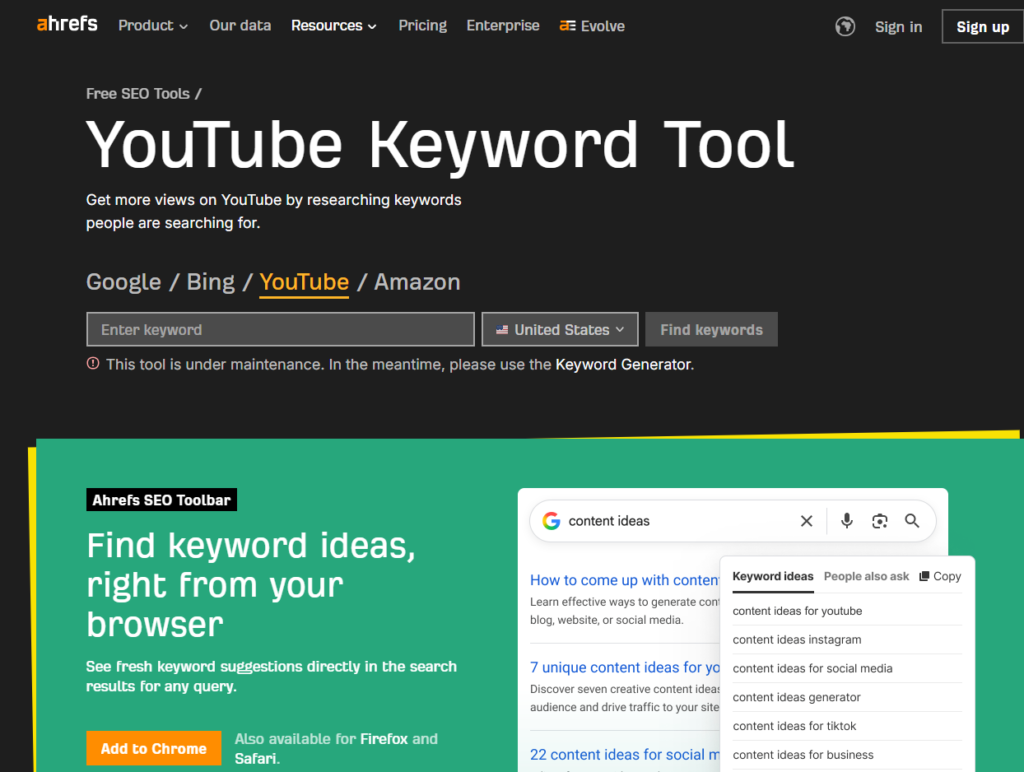
Ahrefs’s inclusion in a YouTube SEO tools list reflects the maturity of its YouTube keyword database rather than any YouTube-specific feature design. The Keywords Explorer in Ahrefs allows users to toggle between search engines — Google, Bing, Amazon, YouTube, and others — and the YouTube database is large and well-maintained enough to support serious YouTube keyword research with the same analytical rigor that Ahrefs applies to web SEO.
The practical advantage of researching YouTube keywords in Ahrefs rather than in TubeBuddy or Keywords Everywhere is the depth of the data available for each keyword and the integration with the broader research workflow. A YouTube keyword analysis in Ahrefs shows monthly search volume, keyword difficulty calibrated to YouTube competition, traffic potential (the estimated traffic a #1 ranked video would receive), and the specific videos currently ranking at the top of YouTube search for that term — complete with their estimated monthly views. This competitive video analysis — seeing exactly which videos are ranking, what their titles are, how many views they get from this keyword, and how long they are — is more comprehensive than any YouTube-native tool provides.
The cross-platform keyword research capability is where Ahrefs delivers unique value for content creators who operate across both YouTube and Google. Researching the same topic across both platforms simultaneously reveals whether the demand pattern is platform-specific or genuinely broad — and whether the topic that ranks on YouTube also supports a web SEO opportunity. The creators and content marketers who have systematically mapped their content calendar to topics with strong demand on both platforms compound the return on every content production investment.
For agencies managing YouTube SEO programs alongside web SEO, the ability to manage both workflows from a single platform — with a single data foundation, a single reporting system, and a single subscription — reduces the tool overhead that accumulates when separate specialist tools are required for each channel.
Where Ahrefs Falls Short
Ahrefs is a web platform, not a YouTube browser extension. It provides no in-YouTube metadata optimization workflow, no real-time SEO scoring during video upload, no A/B testing, no bulk channel management, and no YouTube Studio integration. It is a research platform, not an optimization platform. Creators who want the full YouTube optimization workflow need TubeBuddy or vidIQ alongside Ahrefs — using Ahrefs to find the best keywords, then TubeBuddy’s SEO Studio to optimize the video metadata around those keywords during upload.
The Verdict on Ahrefs
Ahrefs is the right YouTube keyword research tool for content marketing teams, agencies, and creators who are already Ahrefs subscribers for web SEO and who want to extend that research depth to YouTube without adding a separate keyword platform. For YouTube-only creators who do not also run a website requiring web SEO, the $129/mo Lite plan investment may be difficult to justify against TubeBuddy and vidIQ’s more accessible pricing. For cross-platform content teams, it is a natural extension of an existing investment.
6. Social Blade — Best for Competitor Channel Benchmarking and Growth Tracking
| Best For | Creators and marketers who want historical channel analytics and growth benchmarking for any public YouTube channel — their own or competitors’ — without connecting a channel account |
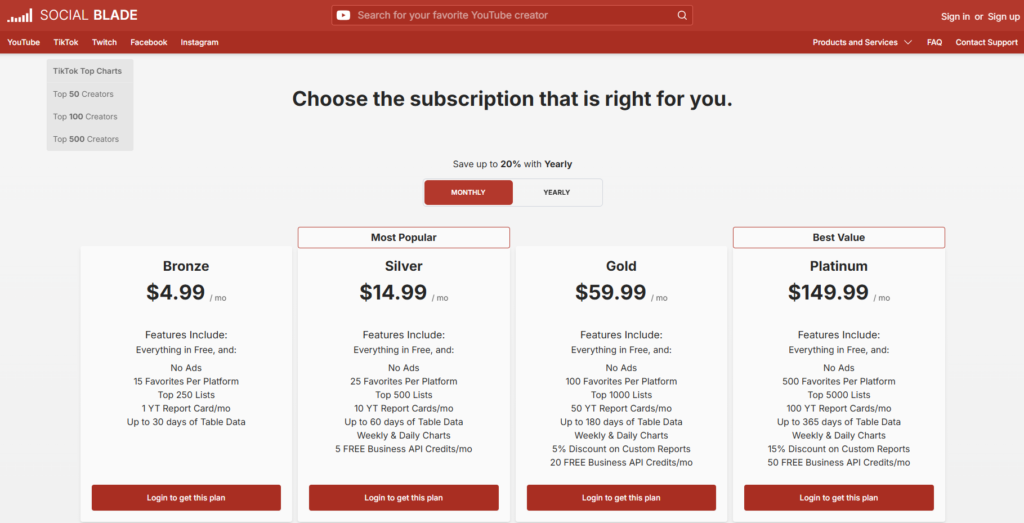
| Pricing | Free (ad-supported, limited data). Bronze $4.99/mo. ($4.50/mo annual). Silver $14.99/mo.($12.50/mo annual) Gold $59.99/mo.($50/mo annual) Platinum $149.99/mo.($120/mo annual) |
| Free Tier | Yes — basic channel statistics, subscriber counts, recent view history, and basic estimated earnings visible without account |
| Key Strengths | Historical subscriber and view growth charts for any public YouTube channel, competitor comparison side by side, channel ranking within YouTube by category and country, growth velocity trends, estimated earnings ranges, no channel connection required for public data |
| Key Weaknesses | All data drawn from YouTube’s public API — no access to private channel analytics; earnings estimates are algorithmic projections with wide ranges, not verified figures; no keyword research or metadata optimization |
| Best For Channels | Creators benchmarking their growth against comparable channels, brands evaluating influencer partnerships, agencies conducting competitive channel research |
| Deployment | Web platform (socialblade.com) |
| Best Pairing | vidIQ for deeper competitive video analytics; TubeBuddy for optimization — Social Blade for macro competitive benchmarking |
Social Blade occupies a specific and useful niche in the YouTube analytics landscape: it tracks historical growth data for any public YouTube channel using YouTube’s public API, without requiring channel ownership or authentication. Any channel — a direct competitor, an influencer being evaluated for partnership, a channel in an adjacent niche being researched for content strategy insights — can have its growth history, subscriber trajectory, view velocity, and estimated earnings reviewed in seconds.
The core value is the historical growth chart. YouTube Studio shows a creator’s own channel history in detail, but provides no way to see a comparable historical view of competitor channels. Social Blade fills this gap — its charts show subscriber and view growth over time, identifying the specific upload dates that drove subscriber spikes (which reveals which video topics triggered algorithm distribution), the periods of plateau or decline that reveal content strategy mistakes, and the overall growth trajectory that contextualizes a channel’s current subscriber count.
For brands and agencies evaluating influencer partnerships, Social Blade provides a fast due diligence layer. Before committing to a sponsored video deal, reviewing the prospective influencer’s growth chart on Social Blade reveals whether their subscriber count was built through genuine audience development or through a sudden spike that may reflect purchased subscribers or a one-off viral anomaly that does not represent their typical performance. The view-to-subscriber ratio — visible from Social Blade’s data — is a practical measure of audience engagement that a subscriber count alone does not capture.
The channel ranking feature — showing where any channel sits in YouTube’s overall ranking by country and category — provides context for channel performance that raw subscriber counts do not. A channel ranked in the top 1% of its category with 80,000 subscribers has more competitive significance than a channel with the same subscriber count ranked at 50% of its category, and Social Blade surfaces this ranking context alongside the raw growth metrics.
Where Social Blade Falls Short
Social Blade is entirely dependent on YouTube’s public API data — it sees exactly what any logged-out user can see about a public channel, aggregated over time into growth charts. It has no access to actual watch time, retention, traffic sources, demographic data, or any of the private analytics that YouTube Studio provides. The earnings estimates it displays are wide-range algorithmic projections based on estimated CPM ranges and public view counts — useful as rough-order-of-magnitude context, but not figures that should inform actual financial decisions. Social Blade provides no keyword research, no metadata optimization, and no content strategy guidance of any kind.
The Verdict on Social Blade
Social Blade is the right tool for competitive channel benchmarking and due diligence on any public YouTube channel. The free tier provides enough data for most casual competitor research, and the Bronze plan ($4.99/mo) provides the ad-free experience and expanded historical data that makes sustained competitive tracking practical. It belongs in the toolkit as the competitive intelligence layer — not as a substitute for the optimization and keyword tools that drive actual channel growth.
7. Morningfame — Best Guided Analytics for Small and Growing Channels
| Best For | Small and growing YouTube creators who want structured, guided analytics with clear actionable recommendations rather than raw data dashboards |
| Pricing | Basic $4.90/mo ($3.90/mo annual). Plus $12.90/mo ($9.90/mo annual). First month free with invitation code |
| Free Tier | No — 1-month free trial with invite code (no credit card required) |
| Key Strengths | Guided analytics workflow with actionable growth recommendations, performance grading system that contextualizes metrics for small channels, keyword research comparing video ranking likelihood to comparable-sized channels, 24-hour post-upload performance email, channel comparison against similarly-sized channels |
| Key Weaknesses | Invite-only access adds friction for new users; no A/B testing, bulk processing, or browser extension; keyword research on Basic plan is time-limited; not designed for large channels or enterprise use |
| Best For Channels | Small channels (under 50K subscribers), creators who find raw analytics dashboards overwhelming, creators building their first channel who want guided strategic direction |
| Deployment | Web platform (invite-only) |
| Best Pairing | TubeBuddy for optimization workflow; YouTube Studio for first-party performance data alongside Morningfame’s guided interpretation |
Morningfame’s distinctive design philosophy is that most analytics tools show creators data without telling them what to do with it — and that the gap between data and action is where small creators lose momentum. Rather than presenting a comprehensive dashboard of metrics to interpret, Morningfame processes a channel’s YouTube Analytics data and surfaces a structured series of workshops: specific, ranked recommendations for what to improve next, with the reasoning explained in plain language rather than raw metric notation.
The performance grading system contextualizes metrics relative to comparable channels — channels at roughly the same subscriber count in similar niches. A video that receives 2,000 views may be exceptional for a channel with 800 subscribers or mediocre for a channel with 50,000 subscribers, and the absolute figure tells a creator nothing without this context. Morningfame benchmarks each video’s performance against the distribution of performance across comparable channels, giving the creator a graded assessment — above average, average, or below average — that is genuinely interpretable rather than an isolated number.
The keyword research tool calibrates ranking likelihood specifically to the channel’s current size. A keyword with high search volume and high competition may be genuinely rankable for a channel with 200,000 subscribers and unachievable for one with 2,000. Morningfame’s keyword scoring incorporates channel-specific ranking probability, pointing creators toward the keywords where their specific channel has the realistic ability to rank on the first page rather than the keywords that simply have the most search volume.
The 24-hour post-upload performance email is a practical feature that requires no active dashboard monitoring. After every video upload, Morningfame sends an email summary of how the video performed in its critical first 24 hours — views, subscriber gains, watch time, and click-through rate compared to the creator’s channel average. The first 24 hours are the window in which YouTube’s algorithm most actively tests and distributes new content, and Morningfame’s automated summary delivers the signal-to-noise interpretation that YouTube Studio’s raw data does not.
Where Morningfame Falls Short
Morningfame’s invite-only access model — while intentional and designed to maintain a specific community character — adds friction that is difficult to justify from a user acquisition perspective in 2026. Invitation codes are freely available from numerous review sites and creator communities, but the additional step is a barrier that comparable tools do not impose. The platform also does not offer a browser extension, A/B testing, bulk management, or the competitive channel intelligence that vidIQ provides. It is designed for a specific use case — guided, structured analytics for small creators — and sits outside that use case, it underdelivers relative to more comprehensive alternatives.
The Verdict on Morningfame
Morningfame is the right YouTube analytics tool for small creators — specifically those who find raw analytics dashboards uninspiring or difficult to translate into action. The structured workshop format and channel comparison benchmarking provide the contextual interpretation that turns analytics from an observation into a to-do list. At $4.90/mo for the Basic plan, the cost is lower than any other paid tool in this list. For creators who have grown beyond 50,000 subscribers and need competitive intelligence, advanced keyword research, or optimization automation, the graduation path leads to vidIQ and TubeBuddy.
Which YouTube SEO Tool Should You Use? A Decision Framework
The right YouTube SEO stack depends primarily on channel size, content volume, and whether the growth constraint is strategic, technical, or both.
If you are building your first channel (under 10K subscribers): YouTube Studio for first-party analytics. TubeBuddy’s free plan for basic keyword research and tag optimization. Morningfame for guided analytics that turns data into action. This combination costs less than $10/mo and covers the primary optimization needs of an early-stage channel.
If you have an established channel focused on SEO-driven growth: TubeBuddy Star ($19/mo) for A/B testing and keyword optimization. vidIQ’s free plan or Boost ($19/mo) for competitive analytics and Daily Ideas. Keywords Everywhere ($7/mo) for in-SERP keyword research. Total stack: under $30/mo for the core tools that drive measurable SEO improvement.
If you manage YouTube as part of a broader content marketing program: Ahrefs Standard ($249/mo) for integrated YouTube and Google keyword research. TubeBuddy for channel optimization. YouTube Studio as the analytics foundation. This stack integrates YouTube and web content research into a single platform.
If you primarily need competitive channel intelligence: vidIQ Max ($49/mo) for competitor channel monitoring and views-per-hour tracking. Social Blade for macro growth benchmarking. YouTube Studio for own-channel analytics.
If you are a creator who wants maximum data at minimum cost: YouTube Studio (free), TubeBuddy free plan, vidIQ free plan, and Morningfame Basic ($4.90/mo). Upgrade to TubeBuddy Star when A/B testing becomes the primary growth lever.
Recommended YouTube SEO Stacks by Channel Type
| Channel Type | Primary Tool | Supporting Tools | Monthly Cost | Coverage |
|---|---|---|---|---|
| New Creator (0–10K subs) | YouTube Studio (free) | TubeBuddy Free, Morningfame Basic | $4.90/mo | Analytics + guided growth + basic SEO |
| Growing Creator (10K–100K) | TubeBuddy Pro ($3/mo) | vidIQ Boost ($19/mo), Keywords Everywhere | $22/mo | Full optimization + analytics + keyword research |
| Established Creator (100K+) | TubeBuddy Legend ($15/mo) | vidIQ Max ($49/mo), Social Blade Bronze | $64/mo | Bulk optimization + deep analytics + competitive tracking |
| Content Marketing Team | Ahrefs Standard ($249/mo) | TubeBuddy Legend, vidIQ Max | $313/mo | Cross-platform keyword research + optimization + analytics |
| YouTube Agency | Ahrefs + TubeBuddy Enterprise | vidIQ, Social Blade Silver | Custom | Full competitive research + managed channel optimization |
| Budget Creator | YouTube Studio (free) | TubeBuddy Free, vidIQ Free | $0/mo | Core analytics + basic optimization at zero cost |
Head-to-Head: Which Tool Wins Each Category?
| Category | Winner | Runner-Up | Notes |
|---|---|---|---|
| Thumbnail and Title A/B Testing | TubeBuddy | N/A | TubeBuddy is the only tool in this list with mature A/B testing |
| YouTube Competitive Analytics | vidIQ | Social Blade | vidIQ on channel-level intelligence; Social Blade on macro growth benchmarking |
| YouTube Keyword Research (Native) | TubeBuddy | vidIQ | TubeBuddy on optimization scoring; vidIQ on AI-powered suggestions |
| YouTube Keyword Research (Database) | Ahrefs | Keywords Everywhere | Ahrefs on depth and cross-platform; KE on in-browser speed |
| Channel Analytics Guidance | Morningfame | vidIQ | Morningfame on structured guidance for small channels; vidIQ on raw data depth |
| Bulk Channel Management | TubeBuddy | N/A | TubeBuddy’s bulk processing has no equivalent in this category |
| AI Content Ideas | vidIQ | TubeBuddy | vidIQ’s Daily Ideas more comprehensive; TubeBuddy growing its AI capability |
| First-Party Analytics | YouTube Studio | N/A | No competitor — Studio is the only source of retention and demographic data |
| Competitor Benchmarking | Social Blade | vidIQ | Social Blade on historical public data; vidIQ on active competitive monitoring |
| Lowest Cost for Real Value | Morningfame Basic ($4.90/mo) | TubeBuddy Free | Morningfame on paid value; TubeBuddy on zero cost |
Frequently Asked Questions
What is the difference between YouTube SEO and Google SEO?
YouTube SEO and Google SEO share foundational principles — keyword relevance, click-through rate, and content quality — but operate on different signals. Google primarily ranks pages based on backlinks, content depth, and on-page signals. YouTube ranks videos based on watch time, audience retention, engagement signals (likes, comments, shares), click-through rate from impressions, and metadata relevance. The algorithms are related — YouTube is owned by Google and YouTube videos rank on Google — but optimizing for YouTube search requires YouTube-specific tools and thinking, not just applying web SEO principles to video metadata.
Do video tags still matter for YouTube SEO in 2026?
Tags have diminished in importance relative to their status in earlier years of the platform. YouTube has stated that titles and descriptions carry more ranking weight than tags, and that tags primarily help YouTube understand video content in edge cases where the title and description are ambiguous. Most experienced YouTube creators treat tags as a lightweight supporting element — adding 5 to 10 relevant keyword tags takes two minutes and provides marginal SEO benefit — rather than a primary optimization focus. The production effort that was previously spent on extensive tag research is more effectively directed toward title optimization and thumbnail quality.
How important is a video’s first 24–48 hours for long-term ranking?
Extremely important. YouTube uses the performance of a video in its first 24 to 48 hours as a primary signal for whether to distribute it more broadly. A video that generates strong click-through rates, high average view duration, and significant engagement in the first hours after upload gets boosted into more subscriber feeds, more Suggested Video slots, and broader search visibility. A video that underperforms in this window tends to remain at low distribution levels regardless of how much later optimization is applied. This first-window performance dynamic is why publishing timing — scheduling uploads when the creator’s existing audience is most likely to be active — matters as a YouTube SEO tactic in ways that have no parallel in web SEO.
Can I use the same keyword research approach for YouTube and Google?
Partially. The same topic may have meaningful search demand on both platforms, and identifying those overlapping opportunities supports efficient content production. However, YouTube-specific keyword research tools account for factors that Google keyword research tools miss: the dominance of video-specific search intent (tutorials, reviews, entertainment), the impact of YouTube autocomplete as a demand signal, and the channel authority factors that determine whether a specific channel can rank for a specific keyword. A keyword that is accessible for a 500-subscriber channel on Google may be dominated by channels with millions of subscribers on YouTube, and vice versa. Always validate YouTube keyword opportunities with YouTube-native tools before producing content around the assumption that Google demand translates directly.
Expert Insight:
Build a Stack, Not a Tool Collection
The most effective YouTube SEO programs in 2026 are built around three or four tools with clearly defined roles — not comprehensive single-platform solutions or sprawling collections of overlapping tools. YouTube Studio provides the first-party analytics foundation. TubeBuddy or vidIQ provides the optimization workflow and competitive intelligence layer. Keyword research is covered by either TubeBuddy’s native Keyword Explorer, Keywords Everywhere for in-SERP speed, or Ahrefs for cross-platform depth. Social Blade handles competitive benchmarking for channels where understanding competitor growth patterns informs content strategy.
The fundamental principle that governs YouTube growth has not changed in 2026 despite the algorithm updates, AI integrations, and new tool capabilities that have accumulated over the past few years: YouTube rewards content that people click, watch, and engage with. Every SEO tool in this list is, at its core, a mechanism for increasing the probability that a video gets clicked (through better titles and thumbnails), watched (through better topic selection and content quality signals), and engaged with (through better audience targeting and distribution timing). The tools do not make great content. They make it more likely that great content reaches the audience it deserves.
The YouTube SEO Stack That Works for Most Creators
For a creator at the 5,000 to 100,000 subscriber range who is actively growing: YouTube Studio as the analytics foundation (free), TubeBuddy Legend ($15/mo) for keyword research, metadata optimization, and A/B testing, and Keywords Everywhere ($7/mo) for in-SERP research. Under $25 per month for a complete YouTube SEO workflow that covers the primary optimization levers that convert publishable content into ranked and discovered content.
For teams managing YouTube as a content marketing channel alongside web properties: add Ahrefs Standard ($249/mo) for the cross-platform keyword research integration that aligns YouTube content with broader organic search strategy. The combined stack covers every significant SEO touchpoint from keyword discovery through video optimization through competitive benchmarking.


