

In 2026, the boundary between “technical” and “non-technical” work has shifted further than most organizations have updated their mental models to reflect. A marketing manager who would have needed a developer to build a campaign landing page in 2018 can now build, publish, and A/B test one on Webflow in an afternoon. An operations analyst who would have waited weeks for engineering prioritization to automate a data pipeline can configure it in Make before their next team standup. A startup founder who would have raised a seed round before building an MVP can now ship a testable web application on Bubble before spending a dollar on development. No-code tools did not eliminate the need for skilled developers — the complexity ceiling for production applications without code is real and consequential — but they moved that ceiling up dramatically, putting a significant and growing class of digital products, workflows, and content within reach of non-engineers who bring domain expertise, business judgment, and speed that developers working at request-queue distance cannot match.
The market has matured past its early hype phase into a stable ecosystem with clear category winners, well-documented capability gaps, and enough real-world production deployments to evaluate tools on outcomes rather than demos. No-code platforms in 2026 divide into distinct functional categories with minimal overlap: website and content builders that produce marketing-optimized web presences with CMS functionality, app builders that support user authentication, relational databases, and complex business logic, automation tools that integrate and route data between existing software systems, database platforms that structure and organize operational data, internal tool builders that enable operations and engineering teams to build dashboards and admin panels rapidly, and visual content creation platforms that handle design and media production without creative software expertise. Understanding which category a tool belongs to prevents the most common no-code mistake — buying the wrong tool for the job because all no-code platforms superficially resemble each other in marketing.
This guide evaluates the best no-code tools across those categories, with verified current pricing and specific guidance on which tool fits which use case, which tool a team is most likely to outgrow, and what the learning curve actually looks like for a non-technical user approaching each platform for the first time.
Quick Comparison: Top 10 No-Code Tools for 2026
| # | Tool | Best For | Starting Price | Free Tier | Learning Curve | Our Rating |
|---|---|---|---|---|---|---|
| 1 | Webflow | Marketing websites, content-driven sites, and design-led web presences | Basic $14/mo (annual) | Yes (subdomain only) | Moderate — visual design logic is intuitive but responsive breakpoints and CMS collections take time | 9.4/10 |
| 2 | Bubble | Complex web app MVPs, SaaS products, and marketplaces requiring real business logic | Starter $29/mo (web, annual) | Yes (no deployment) | Steep — the most powerful no-code web app builder also has the highest learning curve | 9.2/10 |
| 3 | Zapier | Connecting apps and automating workflows across 8,000+ integrations | Professional $19.99/mo (annual) | Yes (100 tasks/mo) | Low — the simplest automation tool to start with; complexity increases at scale | 9.2/10 |
| 4 | Airtable | Collaborative databases, project tracking, CRMs, and operational data management | Team $20/user/mo (annual) | Yes (1K records/base) | Low-Moderate — spreadsheet-like interface is approachable; relational database features require a conceptual shift | 9.1/10 |
| 5 | Make | Complex multi-branch workflow automation with advanced logic at significantly lower cost than Zapier | Core $9/mo (annual) | Yes (1,000 ops/mo) | Moderate-High — visual scenario builder is powerful but requires understanding of operations, routing, and credit consumption | 9.0/10 |
| 6 | Glide | Turning spreadsheets and databases into internal business apps without design or coding skills | Maker $49/mo | Yes (limited) | Low — the fastest path from data to deployed app in the no-code category | 8.9/10 |
| 7 | Notion | All-in-one workspace for docs, wikis, databases, and team knowledge management | Plus $10/user/mo (annual) | Yes (unlimited personal) | Low — the most approachable collaborative workspace tool; depth emerges gradually as you explore databases | 9.1/10 |
| 8 | Retool | Internal tools, admin panels, and dashboards built on live databases and APIs by technical teams | Team $12/user/mo | Yes (5 users) | High — not for non-technical users; designed for developers building internal tools faster, not eliminating development | 8.9/10 |
| 9 | Descript | Audio and video editing, transcription, and content repurposing without traditional editing software | Hobbyist $16/mo (annual) | Yes (1 hr media/mo) | Low — editing by deleting transcript text is the most intuitive video editing paradigm for non-editors | 9.0/10 |
| 10 | Canva | Visual design for marketing assets, social media, presentations, and brand content | Pro $15/mo ($120/yr) | Yes (robust) | Very Low — the most accessible design tool ever built; the question is never “can I figure this out?” | 9.3/10 |
How We Evaluated These No-Code Tools
Every tool was assessed across six dimensions that reflect the real demands of non-technical teams building, automating, and publishing without developer support.
Actual no-code accessibility: The marketing claim that a tool requires “no code” must be tested against the reality of a non-technical user’s first session. Some tools labeled “no-code” require understanding of API webhooks, database schemas, or conditional logic structures that are fundamentally programming concepts without the syntax. We evaluated what percentage of a tool’s practical capability is accessible to a non-developer with zero technical background, and what percentage requires concepts that most non-technical users will need documentation or tutorial support to apply.
Output quality and capability ceiling: No-code tools carry an inherent trade-off — ease of use is purchased by narrowing the space of outputs the tool can produce. The relevant question is whether the capability ceiling is above or below the requirements of the target use case. A website builder that produces polished, responsive, SEO-optimized marketing sites but cannot implement complex custom animations is a high ceiling for marketing teams and a low ceiling for agencies serving premium clients. We evaluated each tool’s output quality within its stated category and the ceiling at which additional complexity requires either a code override or migration to a different tool.
Pricing model honesty: No-code tools are notoriously prone to pricing models whose advertised entry costs misrepresent actual costs at meaningful scale. Zapier’s free tier’s 100-task limit, Make’s credit-consumption model’s interaction with polling-trigger automations, Airtable’s per-editor seat counting for infrequent contributors, Bubble’s Workload Unit usage charges as applications scale, and Glide’s per-user charges above the plan-included limit all represent common scenarios where the pricing model creates unexpected costs. We evaluated pricing transparency and the gap between advertised starting prices and realistic costs for typical production use cases.
Integration ecosystem and data portability: A no-code tool that exists as an isolated island — receiving data from nothing and exporting nothing — has limited utility in real business environments where data flows between multiple systems. We evaluated each tool’s native integration depth, API availability, compatibility with Zapier and Make as connectivity intermediaries, and the ease with which data created in the tool can be exported, backed up, or migrated.
Scalability and production readiness: The journey from “it works in the demo” to “it handles production traffic without degrading” varies enormously across no-code platforms. Some tools are explicitly prototyping environments that expect migration to custom code at scale; others are production-ready for mid-market SaaS applications and operational workflows. We evaluated each tool’s published scalability parameters, real-world performance reports from production deployments, and the specific thresholds at which a switch to a more capable platform typically becomes necessary.
Community, documentation, and support quality: Non-technical builders depend on community resources — tutorials, templates, forums, video walkthroughs — in a way that experienced developers who can read documentation and debug independently do not. We evaluated the quality and depth of each tool’s learning resources, the activity level of its user community, and the responsiveness of its support channels.
Why No-Code Has Meaningfully Changed in 2026
Three shifts define the no-code landscape in 2026 that distinguish it from three years earlier.
The first is the integration of AI generation into the build experience itself. Every major no-code platform in 2026 has added AI-assisted features that materially reduce the time from intention to working output. Webflow’s AI SEO tools generate schema markup automatically. Bubble’s AI assistant scaffolds application logic from natural language descriptions. Airtable’s AI fields categorize and summarize database records. Make’s AI integrations connect to OpenAI, Claude, and other providers directly within workflow scenarios. Notion’s AI assistant drafts, summarizes, and restructures content inline. The AI layer does not replace the judgment required to build useful things, but it has compressed the time between learning a tool and producing professional output — the period that previously filtered out casual and non-technical adopters.
The second is the consolidation of no-code into clearly differentiated categories after years of overlap and platform confusion. The “build anything” positioning that characterized the early no-code market — every platform claiming to serve websites, apps, automations, and databases simultaneously — has given way to honest category specialization. Webflow is the website builder. Bubble is the web app builder. Zapier and Make are the automation tools. Airtable is the operational database. Retool is the internal tools builder. Glide is the spreadsheet-to-app converter. Each platform’s focus has sharpened along with its capability within that category, and the ecosystem integration between them — Airtable as the Glide backend, Zapier connecting Webflow forms to HubSpot, Make routing Bubble API data to Notion — has become a recognized and recommended operating pattern rather than a workaround.
The third is the maturation of pricing models toward usage-based charges that better reflect the cost of running applications at scale — and the accompanying complexity those models introduce. Bubble’s Workload Units, Make’s credits, Glide’s update limits, and Zapier’s task-based pricing all tie actual cost to actual consumption, which is commercially honest but requires planning that flat-rate pricing does not. The teams that use no-code most effectively in 2026 are those that model their expected usage before committing to a platform, rather than discovering cost surprises after building a workflow that consumes resources differently than its description implied.
Detailed Reviews: Best No-Code Tools for 2026
1. Webflow — Best No-Code Website Builder for Design-Led Teams
| Key Information | Overview |
|---|---|
| Best For | Marketing websites, content blogs, landing pages, portfolio sites, and brand-forward web presences where design quality and SEO performance are primary requirements |
| Pricing | Free (Webflow subdomain, limited). Basic $14/mo (annual). CMS $23/mo (annual). Business $39/mo (annual). E-commerce: Standard $29/mo · Plus $74/mo · Advanced $212/mo (all annual). Workspace seat plans: Core $19/mo/seat (annual) for multi-project management |
| Free Tier | Yes — full visual builder access on Webflow subdomain; custom domain requires paid plan |
| Learning Curve | Moderate — the visual editor is intuitive for designers familiar with CSS concepts; CSS grid, responsive breakpoints, and CMS collection architecture require meaningful study before producing professional output |
| Key Strengths | Complete design freedom from the visual editor with no template constraints, built-in CMS for content-driven sites, clean semantic HTML and CSS output, native SEO tooling including schema markup generation, global CDN hosting, automatic SSL, e-commerce with custom checkout design, Webflow Interactions for animation without JavaScript, and the largest no-code website design community |
| Key Weaknesses | Not an app builder — complex user authentication, databases, and business logic require external tools or migration to a code-based platform; pricing splits site hosting and team workspace into two separate plans that often need to be purchased together; legacy Editor seats being removed in 2026 forces existing users to transition to the Workspace model |
| Integration | Native integrations with HubSpot, Mailchimp, Zapier; Webflow CMS API for programmatic content; Logic for native form-triggered automations; connects to Airtable via Zapier/Make for CMS data sourcing |
| Best Pairing | Airtable or Notion as a structured content database feeding Webflow CMS via API; Zapier for routing Webflow form submissions to CRMs and email platforms |
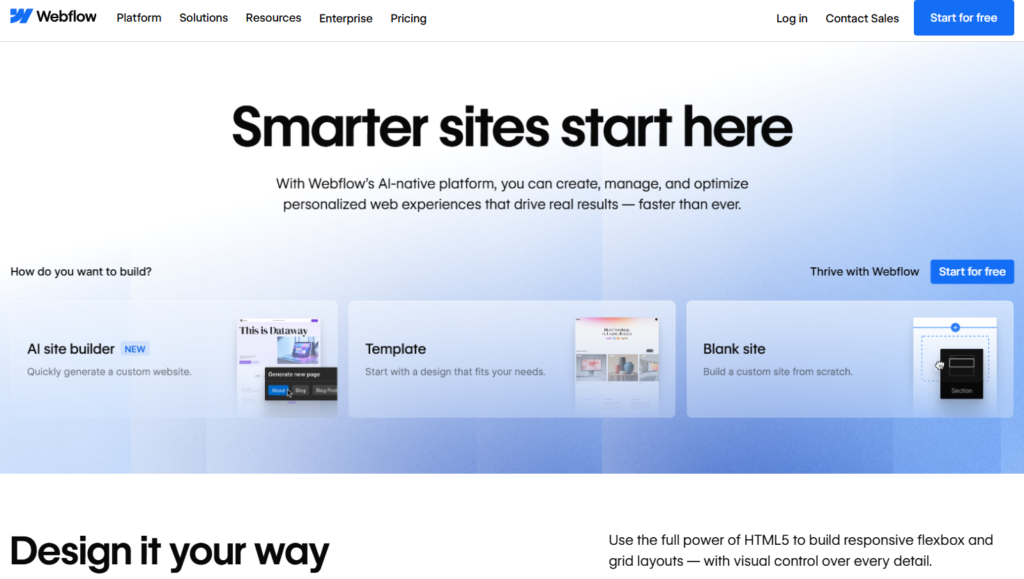
Webflow earns its position as the no-code category standard for marketing websites because it solved a problem that all website builders before it failed to solve adequately: giving non-developers complete design freedom without requiring them to write code. WordPress gives non-developers control over content but constrains design to template capabilities. Squarespace gives non-developers attractive templates but constrains design to the template’s intent. Webflow gives non-developers complete layout, typography, and interaction control by teaching them to think visually about the same CSS properties developers write in stylesheets — but through a visual interface that makes the relationship between design decisions and their underlying properties transparent rather than hidden behind theme settings.
The CMS architecture is the feature that separates Webflow from page builders in its category. A Webflow CMS Collection is a structured database of content items — blog posts, team members, product features, portfolio projects — where each item is built from defined fields (text, rich text, image, link, boolean, reference to another collection) and rendered through a reusable Collection Template page. This architecture means that adding the 50th blog post produces exactly the same layout as the first post, automatically, without any designer intervention. The SEO implications are meaningful: every CMS item page generates from the same template, ensuring consistent heading structure, meta description fields, Open Graph tags, and schema markup without manual configuration per post. For marketing teams publishing at content scale, this automated consistency is the difference between a site that compounds organic traffic and one that accumulates inconsistent pages.
Webflow’s 2026 AI additions specifically target the SEO and accessibility elements that non-technical users most frequently misconfigure or skip. The AI SEO tools generate optimized meta descriptions from page content, suggest schema markup types for different page categories, identify accessibility issues in the visual editor, and produce image alt text suggestions from visual analysis. These AI assistants do not replace SEO strategy, but they substantially reduce the SEO technical debt that non-technical site builders historically accumulated without realizing it.
Where Webflow Falls Short
Webflow is a website builder, not a web application platform. Building anything beyond a marketing site with dynamic content — user accounts, personalized content, payment processing tied to a user database, form logic beyond simple email capture — requires either integrating external services (Memberstack for authentication, Stripe for payments, Zapier for form routing) or migrating the application logic to a code-based framework. The dual pricing structure — a Site plan per published website plus Workspace seats for team members — means that an agency managing 10 client sites with a small team will pay for both the hosting of each site and the team seats needed to manage them, a cost structure that catches users off guard when building out beyond a single site.
The Verdict on Webflow
Webflow is the right no-code tool for any team that needs a professional, design-led web presence and is willing to invest the learning time to understand its layout model. The CMS plan at $23/mo annual is the practical entry point for any content-driven site. E-commerce teams with high transaction volumes should evaluate the Plus plan at $74/mo annual to eliminate the 2% Webflow transaction fee. The free tier is genuinely useful for learning the platform and testing designs before committing.
2. Bubble — Best No-Code Platform for Complex Web Applications
| Key Information | Overview |
|---|---|
| Best For | Web application MVPs, SaaS products, marketplaces, membership platforms, and any project requiring user authentication, relational database management, and complex business logic without custom code |
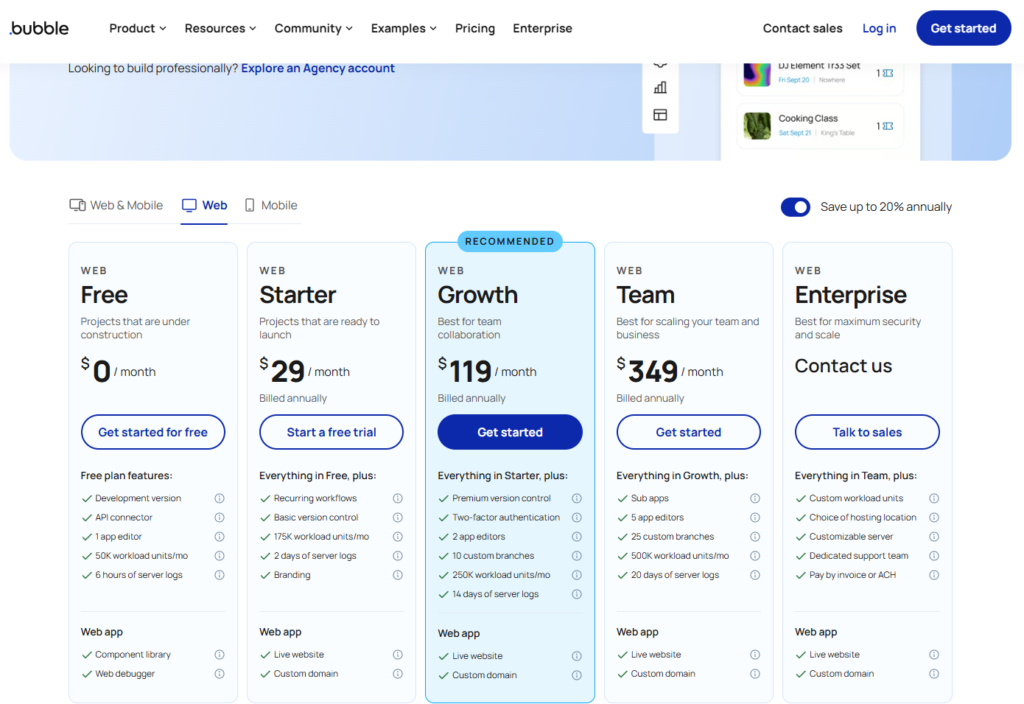
| Pricing | Free (build and prototype, no live deployment). Starter $29/mo (web, annual). Growth $119/mo (web, annual). Team $349/mo (web, annual). Web+Mobile plans cost more. Workload Units (WUs) measure app resource consumption; add-on WUs at $0.30/1,000 beyond plan limits. Enterprise: custom |
| Free Tier | Yes — full builder access; cannot deploy a live application on the free plan |
| Learning Curve | Steep — Bubble’s visual programming paradigm requires learning data types, workflows (conditional logic), states, reusable elements, and privacy rules; most non-technical founders require 20–40 hours of dedicated learning before producing a functional MVP |
| Key Strengths | The no-code platform with the closest functional proximity to custom web development: visual relational database design, conditional workflow logic, user authentication and permissions, responsive UI design, plugin marketplace with 5,000+ extensions, API connections to any external service, version control and branching on Growth+, payment processing via Stripe, and a production-ready hosting infrastructure that has powered funded SaaS applications |
| Key Weaknesses | Learning curve is genuinely steep for non-technical users; apps can develop performance problems at scale if not optimized — a concern that has produced a professional Bubble optimization consultancy ecosystem; Workload Unit overages create unpredictable billing as applications grow; mobile apps are web-wrappers rather than native, creating performance limitations for mobile-first products |
| Integration | Native API connector for any REST API, Zapier and Make integration, Stripe for payments, Airtable and Google Sheets as external data sources |
| Best Pairing | Xano or Supabase as a standalone backend when Bubble’s native database approaches its performance limits; Zapier or Make for external service integrations that don’t require a custom Bubble API workflow |
Bubble is the tool that made “non-technical founders” a viable category for startup building. Before Bubble’s widespread adoption, the path from idea to functional web application for a non-developer was either learning to code (6-12 months minimum), hiring a development agency (tens of thousands of dollars before MVP), or convincing a technical co-founder to join. Bubble created a fourth path: a visual programming environment where the logic required to build a functional SaaS product — user registration and authentication, database tables with relational structure, conditional page routing, API calls to external services, payment processing — is buildable through drag-and-drop interfaces and a workflow editor that describes application behavior in near-natural-language conditional logic.
The Bubble application model is structured around three layers that correspond directly to the three layers of any web application: the interface (what users see and interact with), the database (structured data that the application stores and retrieves), and the workflows (conditional logic that determines what happens when a user takes an action). Building a Bubble application means thinking through all three layers simultaneously, which is why the learning curve is genuinely steep compared to simpler no-code tools. A first-time Bubble builder building a marketplace where users can list items, browse other users’ listings, message sellers, and complete transactions is engaging with authentication logic, database relationships (users, items, messages, transactions), conditional privacy rules (a user can only see their own draft listings), and payment workflows (trigger Stripe on purchase, update item availability in database, send notification to seller) — all of which are genuinely complex problems that Bubble makes possible but does not make trivial.
The Workload Unit system — Bubble’s resource consumption metric that measures the server processing required to run application workflows, database queries, and external API calls — is the most important pricing consideration for production applications. A simple marketing website with a few database tables and minimal automation will consume WUs at rates well within the Starter plan’s limits indefinitely. A SaaS application with dozens of active users running concurrent database queries and complex workflow logic can exhaust a plan’s monthly WU allocation faster than the builder anticipated, triggering overage charges or forcing an upgrade from the $29/mo Starter to the $119/mo Growth plan. Modeling expected WU consumption before building is the professional practice that distinguishes experienced Bubble developers from those who discover cost surprises after launch.
Where Bubble Falls Short
Bubble’s mobile solution — a web wrapper that packages the Bubble web application in a native app shell — is a meaningful limitation for products where native mobile performance is a competitive differentiator. The wrapper approach means Bubble mobile apps run as web browsers disguised as apps, with the performance characteristics of web content rather than native compiled code. For applications where most user interaction happens on desktop browsers with occasional mobile access, this is an acceptable trade-off. For consumer mobile applications where users’ primary interaction is on a phone and performance expectations are set by native apps, Bubble’s web wrapper approach creates user experience limitations that have caused several successful Bubble applications to rebuild in native or Flutter development after achieving product-market fit.
The Verdict on Bubble
Bubble is the right no-code tool for non-technical founders building web application MVPs, early SaaS products, and marketplace platforms where business logic complexity requires more than a template-based site builder. The Starter plan at $29/mo annual is the appropriate entry point for launching a live application. Budget for the Growth plan at $119/mo when the application has real users and requires collaboration, Bubble branding removal, or consistent performance above the Starter WU limits.
3. Zapier — The Easiest No-Code Automation Platform for Small Teams
| Key Information | Overview |
|---|---|
| Best For | Small businesses, freelancers, and marketing teams who need to connect popular apps and automate simple-to-moderate workflows without learning a complex automation platform |
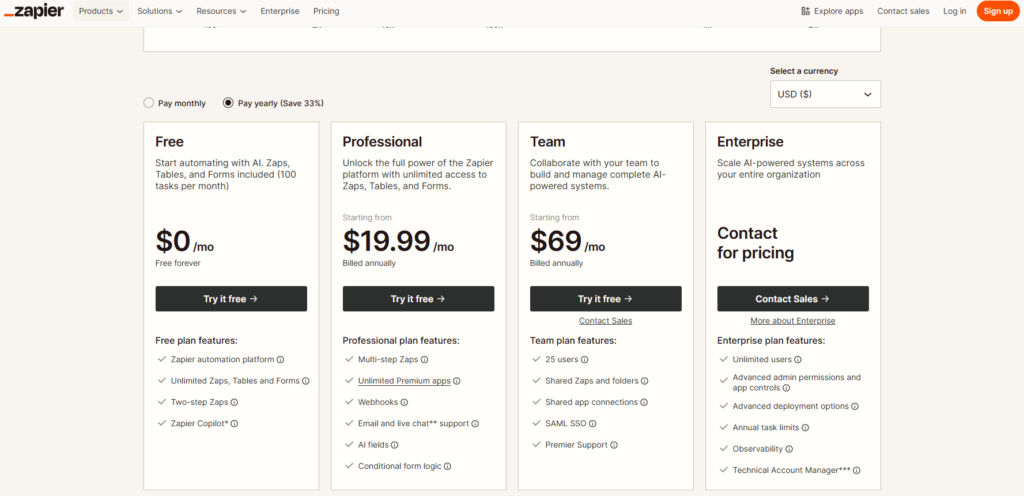
| Pricing | Free (100 tasks/mo, 2-step Zaps, no premium apps). Professional $19.99/mo (annual, 750 tasks, multi-step Zaps, premium apps). Team $69/mo (annual, 2,000 tasks, shared workspace, 25 users). Enterprise: custom |
| Free Tier | Yes — 100 tasks/month with 2-step Zaps; sufficient for testing but not production workflows |
| Learning Curve | Low — the most approachable automation tool available; trigger-action logic is instantly intuitive, and Zapier’s guided setup wizard walks non-technical users through field mapping in plain language |
| Key Strengths | 8,000+ app integrations (the largest ecosystem in the category), AI Copilot for natural language Zap creation, Tables for simple no-code databases within Zapier, Interfaces for building lightweight forms and pages, Zapier Agents for AI-powered workflow orchestration, 14-day free trial of Professional features, and the most comprehensive tutorial library of any automation platform |
| Key Weaknesses | Task-based pricing model where each action in a multi-step Zap consumes one task, making complex multi-step workflows more expensive than they appear; costs escalate significantly with volume (750 tasks at $19.99/mo vs. 2,000 tasks at $69/mo is a 3.5x price increase for 2.7x more capacity); Make offers substantially more operations for less money for power users who can handle a higher learning curve |
| Integration | 8,000+ native apps; Webhooks for custom connections; Tables and Interfaces as native Zapier products; Zapier MCP for AI agent connectivity |
| Best Pairing | Airtable or Notion for the database layer that Zapier routes data into and out of; Webflow for connecting site form submissions to marketing and CRM workflows |
Zapier’s defining advantage is not the power of its automation engine — Make handles more complex conditional logic at lower cost — but its approachability for the 95 percent of potential automation users who have never thought of their repetitive digital tasks as automatable and who need a tool that meets them where they are. The Zap setup experience — choose a trigger app, choose what event triggers the Zap, choose an action app, choose what action to perform, map the fields, test it — is the clearest possible operationalization of the automation concept. A non-technical marketing manager who has never used an automation tool can connect a Google Form to a Slack notification and a Google Sheets row in under ten minutes without reading documentation. This onboarding frictionlessness is the core commercial reason Zapier has become the default automation tool for small and mid-market businesses despite facing cheaper competitors.
The 8,000+ integration library is genuinely meaningful. Make has 3,000+ integrations; Zapier’s library is 2.5x larger and is routinely the differentiating factor when a team needs to connect a niche SaaS tool, industry-specific software, or newer application that has not yet been integrated elsewhere. For the majority of mainstream business software — Google Workspace, Slack, HubSpot, Salesforce, Stripe, Mailchimp, Airtable, Notion — Zapier and Make are functionally equivalent. For the long tail of software that businesses actually use, Zapier’s integration breadth is a meaningful practical advantage.
Zapier’s 2026 additions expand the platform well beyond simple Zap automation. Tables provides a basic no-code database within Zapier, enabling data storage and retrieval without requiring Airtable. Interfaces lets users build simple web pages and forms within Zapier that trigger automation workflows. Zapier Agents creates AI-powered workflow orchestrators that monitor conditions and take actions across connected apps based on natural language instructions. These additions are not category leaders — Airtable is a more capable database than Tables, Webflow is a more capable site builder than Interfaces — but they enable users to build complete lightweight automation-powered applications entirely within the Zapier ecosystem.
Where Zapier Falls Short
Zapier’s task-based pricing becomes the dominant concern at meaningful automation volume. A 5-step Zap that processes 200 triggers per day consumes 5,000 tasks per day — exhausting a Professional plan’s 750-task monthly limit in less than 4 hours. Multi-step, high-frequency automations require rapid tier upgrades that make Zapier’s pricing model significantly more expensive than Make’s operations-based equivalent for power users. The 2-step limit on the free plan is also a practical constraint — almost every real business automation requires at least three steps (trigger, transformation, action).
The Verdict on Zapier
Zapier is the right automation tool for teams new to workflow automation, organizations connecting a diverse set of apps (particularly niche or newer software), and use cases where automation simplicity and setup speed matter more than per-task cost. The Professional plan at $19.99/mo annual is the appropriate entry point for most small businesses. Evaluate Make when multi-step, high-volume automations make Zapier’s task consumption model commercially unsustainable — typically at 2,000+ tasks per month.
4. Airtable — Best No-Code Database for Operations and Collaborative Workflows
| Key Information | Overview |
|---|---|
| Best For | Operations teams, project managers, marketing teams, and small businesses that need a collaborative, structured database with multiple views (grid, Kanban, calendar, Gantt) and built-in automation for tracking projects, inventory, CRMs, and content pipelines |
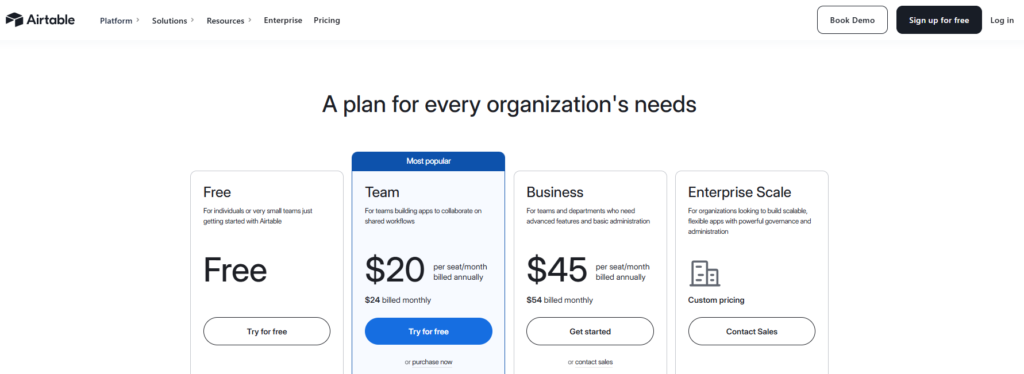
| Pricing | Free (1,000 records/base, 5 editors, 100 automation runs/mo). Team $20/user/mo (annual; 50K records/base, 25K automation runs). Business $45/user/mo (annual; 125K records/base, advanced admin). Enterprise Scale: custom. Monthly billing: $24 (Team), $54 (Business) |
| Free Tier | Yes — 1,000 records per base and 5 editors; sufficient for personal use and small projects |
| Learning Curve | Low-Moderate — the grid view feels immediately familiar to spreadsheet users; relational linking between tables, filtered views, and Interface Designer require a conceptual shift from flat spreadsheets to relational databases |
| Key Strengths | Spreadsheet-like interface reducing adoption friction, multiple structured views of the same data (grid, Kanban, gallery, calendar, Gantt, timeline), Interface Designer for building custom apps on top of the database, native automation with 25K runs/mo on Team, 500+ pre-built templates, real-time collaboration, Airtable AI for field classification and summarization on Business+, strong API for developers building on top of Airtable bases, and the no-code ecosystem’s dominant backend for app builders like Glide and Softr |
| Key Weaknesses | Per-editor pricing model means all collaborators who can edit data count as paid seats — a team of 10 where all members contribute data costs $200/mo on Team; 2025 pricing increase (Team from $12 to $20/user/mo) has driven cost-sensitive teams to evaluate alternatives; not a substitute for a relational database in high-complexity application logic |
| Integration | Native connections to Slack, Jira, GitHub, Google Calendar; Zapier and Make for broader automation; Glide, Softr, Webflow for no-code frontend building on Airtable data; REST API with extensive documentation |
| Best Pairing | Glide or Softr for building mobile or web app frontends on top of Airtable data; Zapier for routing Airtable record changes to other tools; Webflow CMS for publishing Airtable database content to a marketing website |
Airtable’s commercial success rests on one insight executed exceptionally well: most business data that lives in spreadsheets would work better as a relational database, and the reason it ends up in spreadsheets rather than databases is that databases require technical expertise to design and manage. Airtable removes that expertise requirement by providing a database that looks and behaves like a spreadsheet until the user needs relational features — at which point linked fields, filtered views, and roll-up formulas extend the familiar interface into database territory without requiring a schema design conversation or SQL knowledge.
The practical implication is that teams use Airtable for an enormous variety of structured data challenges that would previously have required either a custom database application or an elaborate, brittle spreadsheet. A marketing team’s content calendar — tracking articles from ideation through draft to published, linked to the author, the target keyword, the publication date, and the distribution channels — is the archetypal Airtable use case. The same database that holds the content calendar powers the editor’s Kanban view showing articles by status, the SEO manager’s calendar view showing publication dates, the CMO’s Gantt view showing the editorial pipeline, and the automated Slack notification that fires when an article moves to “published.” One database, four views, one automation, zero spreadsheets.
The Interface Designer — available on all paid plans — takes Airtable beyond its database roots by allowing users to build custom-designed dashboards and data entry forms that show specific team members exactly what they need to see and do. An Interface for a project manager shows the active project Gantt and task completion metrics. An Interface for a contributor shows only their assigned tasks with a simple status-update form. The database underneath is the same; the Interface defines which user sees which slice of it. This access layering, combined with Airtable’s field-level permission system, enables non-technical teams to build what functionally resembles a custom internal application on top of a structured database without any of the development overhead.
Where Airtable Falls Short
Airtable’s 2025 pricing increase — the Team plan rose from $12 to $20/user/month, an increase of 66% — has made it more expensive than several alternatives (Notion, Google Sheets with AppScript, Baserow) for teams with large numbers of editing collaborators. The per-editor billing model, where every team member who can write to a base counts as a paid seat, means that as database adoption spreads across a team, the monthly cost increases proportionally. A 10-person team on the Team plan costs $200/mo; a 20-person team costs $400/mo — before considering that the Business plan at $45/user/mo may be required for the admin features that larger teams need. For cost-conscious teams, Notion’s database capabilities at $8–15/user/mo represent a meaningful price alternative.
The Verdict on Airtable
Airtable is the right no-code database for teams that need structured, collaborative operational data management and can justify the per-seat investment by the productivity improvement of replacing fragmented spreadsheets with a single source of truth. The Team plan at $20/user/mo annual is the appropriate tier for most production use cases. Teams building app frontends on Airtable data should evaluate Glide or Softr to extend their investment.
5. Make — Best No-Code Automation for Complex Workflows at Scale
| Key Information | Overview |
|---|---|
| Best For | Developers, technical operations teams, agencies, and power users who need multi-branch conditional automation, advanced data transformation, and significantly more operations per dollar than Zapier can deliver |
| Pricing | Free (1,000 credits/mo, 2 active scenarios, 15-min intervals). Core $9/mo (annual, 10K credits, unlimited active scenarios, 1-min intervals). Pro $16/mo (annual, 10K credits + priority execution, custom variables). Teams $29/user/mo (annual, 10K credits + collaboration). Enterprise: custom |
| Free Tier | Yes — 1,000 credits/mo with full builder access; sufficient for testing and light personal automations |
| Learning Curve | Moderate-High — the visual scenario canvas is intuitive for mapping data flow, but routers, filters, iterators, aggregators, and understanding how credits are consumed by polling triggers requires hands-on learning that non-technical users find steeper than Zapier |
| Key Strengths | The most powerful visual automation builder in the mid-market: multi-branch routing, conditional filters, data parsing and transformation, iterator and aggregator modules for processing lists, error handling with automatic retry logic, 3,000+ app connections with HTTP module for any REST API, built-in AI integration with Claude and OpenAI, real-time webhook execution (1-min minimum on Core), and 10x more operations per dollar than Zapier on equivalent tasks |
| Key Weaknesses | The credit model’s polling trigger behavior — each scheduled check of an app for new data consumes credits even when nothing new exists — can exhaust monthly limits dramatically faster than users expect; per-user pricing on Teams plan ($29/user/mo) adds up for larger collaboration teams; steeper learning curve makes it inaccessible to many non-technical users who Zapier serves well |
| Integration | 3,000+ native app modules; HTTP and REST/SOAP API modules for unlimited custom connections; built-in AI connections to OpenAI, Claude, Google Gemini; Zapier bridges available for apps Make doesn’t natively support |
| Best Pairing | Airtable or Google Sheets as the database layer for data that Make automation processes; Webflow or Bubble as the application layer that Make connects to external services |
Make (formerly Integromat) occupies a specific and important position in the no-code automation category: it is the tool you graduate to from Zapier when Zapier’s task-based pricing model becomes the constraint on your automation ambitions. The functional capabilities of the two platforms are more similar than their interface differences suggest — both connect apps, route data, and trigger actions based on conditions. The difference is in Make’s handling of complex conditional logic and its economics at scale. Where Zapier charges one task per action step in a linear sequence, Make’s visual canvas supports multi-branch routing where a single trigger can fork into dozens of conditional paths, with each branch applying different logic and connecting to different downstream apps. This branching model more closely mirrors how real business processes actually work, where what happens next genuinely depends on the specifics of what just happened.
The operations economics are Make’s most commercially compelling differentiator. Zapier’s Professional plan at $19.99/mo provides 750 tasks. Make’s Core plan at $9/mo provides 10,000 credits. For non-polling automations (where each automation run corresponds to a real trigger event rather than a scheduled check), this is a 13x operation volume advantage at less than half the price. The caveat — and it is a critical caveat — is that polling triggers (the default mechanism for many app integrations where Make periodically checks an app for new records) consume a credit each time they check, regardless of whether they find anything. A Zap checking for new Gmail emails every minute burns 43,200 credits per month on polling alone, before any actions are performed. Building Make scenarios that use webhook triggers rather than polling triggers wherever possible is the operational practice that makes Make’s economics genuinely favorable; building polling-heavy scenarios can make Make surprisingly expensive at medium volume.
The AI integration capabilities position Make as the automation infrastructure for AI-powered workflows in 2026. Every paid plan provides access to Make AI Toolkit and Make AI Agents, and all paid plans support connecting directly to OpenAI, Claude, and other AI providers using the user’s own API key. A Make scenario that takes a customer support email, runs it through Claude for intent classification and sentiment analysis, routes it to the appropriate response workflow based on that classification, drafts a personalized response, and logs the interaction to Airtable is buildable in Make without code and represents genuinely sophisticated business automation that was not available to non-developers three years ago.
Where Make Falls Short
The polling trigger credit consumption is the scenario where Make’s economics turn against users. An integration between two apps that uses polling (scheduled checks) rather than webhooks (real-time push) can consume thousands of credits per month on trigger checks alone, eating into the plan’s allocation before any actual work is done. Users who build their first Make scenarios with polling triggers and then are surprised by rapid credit exhaustion are experiencing the most common Make failure mode. Understanding when to use webhooks versus polling — a conceptual distinction that requires some technical background to appreciate — is prerequisite knowledge for using Make cost-effectively.
The Verdict on Make
Make is the right automation tool for technically capable users, operations engineers, and agencies who run automations at sufficient volume to make Zapier’s per-task costs prohibitive, and who can invest the learning time required to build efficient non-polling scenarios. The Core plan at $9/mo annual is the entry point for production use. Calculate expected monthly credit consumption against your planned scenarios before committing, and favor webhook-triggered over polling-triggered integrations wherever the connected apps support it.
6. Glide — Best for Turning Spreadsheets into Internal Business Apps

| Key Information | Overview |
|---|---|
| Best For | Operations teams, field service organizations, and small businesses that want to turn existing Google Sheets or Airtable data into a mobile-first internal app without any design or development experience |
| Pricing | Free (limited, personal email users only). Maker $49/mo (unlimited personal users, 500 updates/mo, annual). Business $249/mo (20 included business users, $10/additional user/mo). Enterprise: custom |
| Free Tier | Yes — builds apps from Google Sheets for personal use; not practical for business applications |
| Learning Curve | Low — connecting a Google Sheet and selecting an app template produces a working app in minutes; the “app from spreadsheet” mental model is immediately accessible to any spreadsheet user |
| Key Strengths | The fastest path from structured data to deployed mobile app in the no-code category — connecting a Google Sheets database and selecting components produces a functional app in under 30 minutes; Glide Tables as a native database option; AI-powered automation with Glide Workflows; Airtable, Excel, and SQL data source support on paid plans; automatic mobile-responsive design; user role-based permissions for data access control; 30-day free trial of Business plan |
| Key Weaknesses | Update-based pricing (each data change or external integration call consumes updates) adds hidden cost as app usage grows; per-user charges beyond the 20 included on Team and Business plans add up quickly for larger teams ($5–10/additional user/mo); design flexibility is constrained by pre-built component templates; not suitable for complex app logic requiring the customization depth of Bubble |
| Integration | Google Sheets, Airtable, Excel, and SQL as native data sources; Glide API; Zapier and Make for automation triggers |
| Best Pairing | Google Sheets or Airtable as the data backend that Glide renders as the app frontend; Zapier to automate updates to the underlying data source that Glide displays |
Glide solves the specific problem of organizations that have valuable operational data in spreadsheets but no way to put that data in front of field workers, customers, or operations staff in a usable mobile interface. A facilities management company with a Google Sheet tracking work orders — with columns for location, priority, assigned technician, status, and completion notes — can deploy a Glide app that shows technicians only their assigned work orders, lets them update status and add photos from the field, and gives managers a dashboard view of all open tickets without the technicians ever interacting with the spreadsheet directly. The app is built in under an hour by a non-developer. The data lives in the spreadsheet the team already uses. The operational improvement is immediate and requires no custom development.
This “spreadsheet as database, Glide as interface” architecture is Glide’s canonical use case and the scenario in which its low learning curve provides the highest return. The Glide component library — lists, details pages, forms, calendars, maps, charts — covers the majority of internal tool interface patterns without requiring design decisions. The layout is automatically mobile-optimized. The user authentication is handled natively. The role-based data access (show field workers only their work orders, not other technicians’ assignments) is configured through the Glide visual editor without writing any code.
Glide Workflows — the platform’s native automation feature — adds conditional business logic that can trigger actions based on app interactions: send a notification when a work order is marked complete, update a status field when a form is submitted, or create a new Glide Table row when a user completes an onboarding flow. These automations run on Glide’s infrastructure rather than requiring an external tool like Zapier, and they count toward the plan’s monthly update limit. For apps with predictable, moderate usage, this integrated automation is sufficient. For apps generating high update volumes — many form submissions, frequent API calls, large dataset syncs — the update meter warrants monitoring before a surprise overage appears.
Where Glide Falls Short
Glide’s design flexibility constraint becomes the primary frustration for users with strong aesthetic opinions about their apps. The component templates produce clean, professional interfaces, but the level of customization available is substantially less than Webflow for websites or Bubble for web apps — colors and fonts can be branded, but the structural layout of components is largely fixed. For internal tools where function matters more than custom design, this is an acceptable trade-off. For customer-facing apps where the interface is part of the product experience, the design constraints can limit what Glide can produce.
The Verdict on Glide
Glide is the right no-code tool for any team that has structured data in a spreadsheet or Airtable base and wants to put that data in front of users in a mobile-first interface. The Maker plan at $25/mo is sufficient for internal apps used exclusively by personal email accounts (Gmail, etc.). The Team plan at $99/mo is necessary for business email users and professional deployment. Model your expected user count against the per-user charges beyond the 20 included before committing to a plan tier.
7. Notion — Best All-in-One Workspace for Documents, Wikis, and Team Databases
| Key Information | Overview |
|---|---|
| Best For | Teams replacing a fragmented combination of Google Docs, Confluence, Trello, and spreadsheets with a single collaborative workspace for documentation, project management, and structured knowledge |
| Pricing | Free (unlimited blocks and pages for personal use, limited team collaboration). Plus $12/user/mo (annual; $10/mo monthly, unlimited team members, collaborative workspace). Business $24/user/mo (annual; $20/mo monthly, SAML SSO, advanced analytics, AI included). Enterprise: custom |
| Free Tier | Yes — full personal workspace with unlimited pages; team collaboration and admin features require paid plan |
| Learning Curve | Low — Notion’s block-based editing is immediately accessible to any document or note-taking user; the depth of database views, relations, and formulas emerges through exploration rather than initial instruction |
| Key Strengths | Single platform replacing multiple tools: documents, wikis, project boards, databases, and calendars live in one connected workspace; database-style tables with multiple views (table, board, gallery, timeline, calendar); linked databases enabling the same data viewed differently across pages; AI assistant built into Business plan for drafting, summarizing, and translating content; Notion Calendar integration; extensive template gallery; the most active third-party template and resource community of any productivity tool |
| Key Weaknesses | Not a purpose-built project management tool — advanced Gantt charts, resource allocation, and time tracking require workarounds or integrations; not a data-heavy operational database — record limits and query performance at scale are less than Airtable; AI access bundled into Business tier, requiring a plan upgrade ($15/user/mo) to access features that were previously an $8/user/mo add-on |
| Integration | Native Slack, Google Drive, GitHub, Zapier; Notion API for database read/write; Zapier and Make for automation connecting Notion databases to other tools |
| Best Pairing | Zapier or Make for automating Notion database updates from external triggers; Slack for team notifications from Notion status changes; Linear or Jira for engineering teams that need purpose-built project tracking linked to Notion documentation |
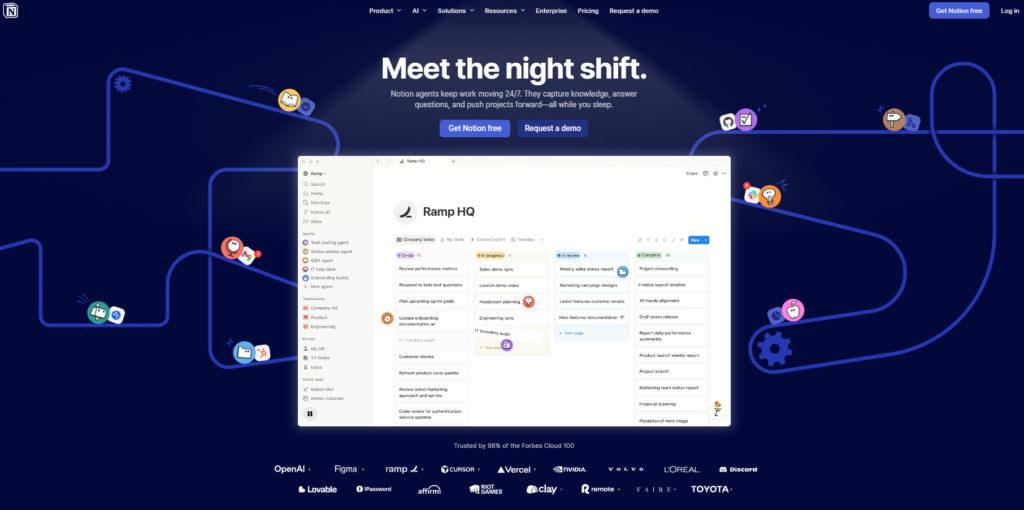
Notion’s fundamental value proposition is the elimination of the tool fragmentation that characterizes most knowledge worker environments: one tool for meeting notes, another for project tracking, a third for internal documentation, a fourth for the company wiki, and a fifth for personal task management. Notion replaces all of them with a single flexible workspace where any page can be a document, a database, a project board, or a wiki — and any database can be viewed as a table, a Kanban board, a calendar, or a gallery depending on which view serves the current purpose. This flexibility, combined with the ability to link databases across pages (show a filtered view of the company project database on each team’s page, updated automatically), is what earns Notion’s position as the default knowledge workspace for startups and growing teams that prioritize flexibility over specialized depth.
The AI integration in the Business plan is genuinely useful for knowledge workers who spend significant time writing and synthesizing information. Notion AI drafts pages from brief prompts, summarizes long documents into key points, translates content across languages, extracts action items from meeting notes, and generates first drafts of documents in Notion’s own style from reference pages. The integration is native — AI assistance appears inline in the document you are writing rather than in a separate tool or tab — and the quality is sufficient for first-draft production of most knowledge work outputs. The decision to include AI in the Business tier at $15/user/mo rather than as a separate add-on simplifies the cost model for teams where AI usage is broad.
Notion’s database layer is the feature that separates it from Google Docs or Confluence as a knowledge management tool. A Notion database that tracks all company projects, with fields for status, owner, deadline, team, and related documentation, can be viewed as a timeline on the company roadmap page, a board by team on each team’s project page, and a table filtered by owner on each individual’s personal dashboard — all from the same underlying data. The ability to surface the same structured information in context-appropriate views, without duplicating data, is the operational workflow improvement that converts Notion skeptics who encounter it in a real production workspace.
Where Notion Falls Short
Notion’s limitations are the mirror of its flexibility. A tool that can be everything is rarely the best at any specific thing. Teams with specialized needs — engineering project management, customer relationship tracking, heavy financial data analysis — will find that purpose-built tools like Linear (engineering), HubSpot (CRM), or Airtable (operational database) serve those specific needs better than Notion’s general-purpose equivalent. Notion’s formula language for database calculations is also less capable than Airtable’s, which limits its utility for teams needing complex derived fields.
The Verdict on Notion
Notion is the right no-code workspace for teams that want to consolidate fragmented knowledge tools into a single collaborative platform and are willing to invest in the setup effort required to build a useful workspace structure. The Plus plan at $8/user/mo annual is the appropriate starting point for team collaboration. Upgrade to Business at $15/user/mo when AI access and SSO become requirements.
8. Retool — Best Internal Tools Builder for Technical Teams
| Key Information | Overview |
|---|---|
| Best For | Engineering teams, data teams, and technical operations professionals who need to build internal dashboards, admin panels, and operational tools on live production databases and APIs faster than building them from scratch |
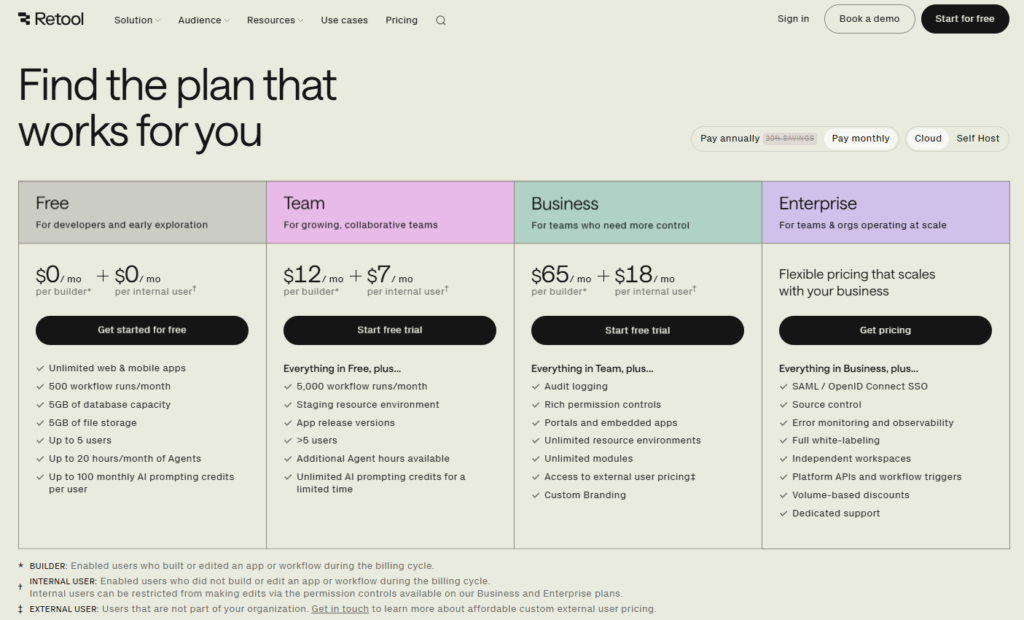
| Pricing | Free (5 users, unlimited apps, 500 workflow runs/mo). Team $12/standard user/mo ($7/end user/mo). Business (audit logs, external app users): contact sales. Enterprise (SSO, SCIM, source control): custom |
| Free Tier | Yes — 5-user limit; suitable for small teams and individual developers evaluating the platform |
| Learning Curve | High — Retool is explicitly designed for developers and assumes familiarity with SQL, REST API concepts, and JavaScript for custom logic; non-technical users will find it inaccessible |
| Key Strengths | Drag-and-drop UI component library (tables, forms, charts, maps) connected directly to live databases and APIs; SQL and JavaScript support for custom queries and transformations; version control, staging environments, and release management on paid plans; Retool Workflows for backend automation; Retool Mobile for native mobile internal tools; the trusted internal tool for Amazon, DoorDash, Brex, and thousands of engineering teams; SOC 2 Type II and HIPAA compliance on Business+ |
| Key Weaknesses | Not accessible to non-technical users — meaningful customization requires SQL and JavaScript; SSO is locked behind Enterprise, forcing medium-sized teams to pay Enterprise pricing for what many consider a basic security feature; dual billing for standard users (builders) and end users (consumers) creates cost planning complexity for tools with large internal audiences |
| Integration | Native connectors for PostgreSQL, MySQL, MongoDB, Firebase, Redis, Salesforce, Stripe, and 100+ databases and APIs; custom REST/GraphQL API connections; Retool Workflows for backend automation; available self-hosted for organizations with data residency requirements |
| Best Pairing | PostgreSQL, Supabase, or Airtable as the database layer that Retool queries and displays; Zapier or Make for automation pipelines that feed data into or out of Retool-connected databases |
Retool occupies an interesting position in the no-code category because it is not, by the most rigorous definition, a no-code tool. It is a low-code tool that assumes developers are its users — the components that make Retool powerful, such as SQL queries, JavaScript transformations, and API configuration, are developer concepts that have been integrated into a drag-and-drop UI builder. The reason Retool belongs in a no-code guide is that it dramatically reduces the time required for developers to build internal tools — tasks that previously required full-stack development for each new internal dashboard or admin panel can be completed by one developer in hours rather than weeks. The “no code” in Retool’s context is the code that developers do not have to write: the HTML, CSS, and frontend JavaScript that custom internal tools require. The backend query logic and data transformation still involve code.
The commercial case for Retool is the opportunity cost of internal tool development. Engineering teams at high-growth companies regularly receive requests for internal tools from operations, customer success, finance, and sales teams — tools to view and edit customer records, approve pending transactions, monitor operational metrics, run manual data corrections, and export configured reports. In traditional development, each of these requests joins a prioritization queue, competes with product features for engineer time, and ships weeks or months after the request. In Retool, an engineer builds most of these tools in hours using pre-built component templates connected to existing databases and APIs. The company avoids the developer time investment while still getting a polished, functional internal tool.
The component library is Retool’s primary value delivery mechanism: pre-built tables that can sort, filter, and edit database rows in place; forms that write directly to connected databases with validation; charts that query and visualize data with configurable aggregations; maps that plot location data with configurable layers; text fields, dropdowns, and buttons that trigger API calls or JavaScript functions. Building an internal customer support tool that shows a customer’s account details, transaction history, support ticket queue, and one-click action buttons for common resolutions (issue refund, apply credit, escalate ticket) is a few hours of configuration rather than a development sprint.
Where Retool Falls Short
The SSO limitation — requiring Enterprise pricing to enable single sign-on, a security feature that most organizations with 50+ employees consider table stakes — is Retool’s most commonly cited frustration in user reviews. Teams that need SAML SSO but do not need the full Enterprise feature set face a difficult choice: build manual user management processes to avoid Enterprise costs, or pay for Enterprise capabilities they mostly do not need. For internal tools handling sensitive data where SSO is a security requirement rather than a preference, this gate forces premature enterprise contract commitments.
The Verdict on Retool
Retool is the right tool for engineering teams that regularly receive internal tool requests and want to reduce the development overhead of answering those requests without sacrificing the capability depth that custom code provides. The Team plan at $12/standard user/mo covers most small to medium engineering team use cases. Evaluate whether SSO is an immediate requirement before committing to Team; the jump to Enterprise pricing for SSO alone is substantial.
9. Descript — Best No-Code Tool for Audio and Video Editing
| Key Information | Overview |
|---|---|
| Best For | Podcasters, content marketers, educators, and business teams who need to edit, transcribe, and repurpose audio and video content without traditional editing software expertise |
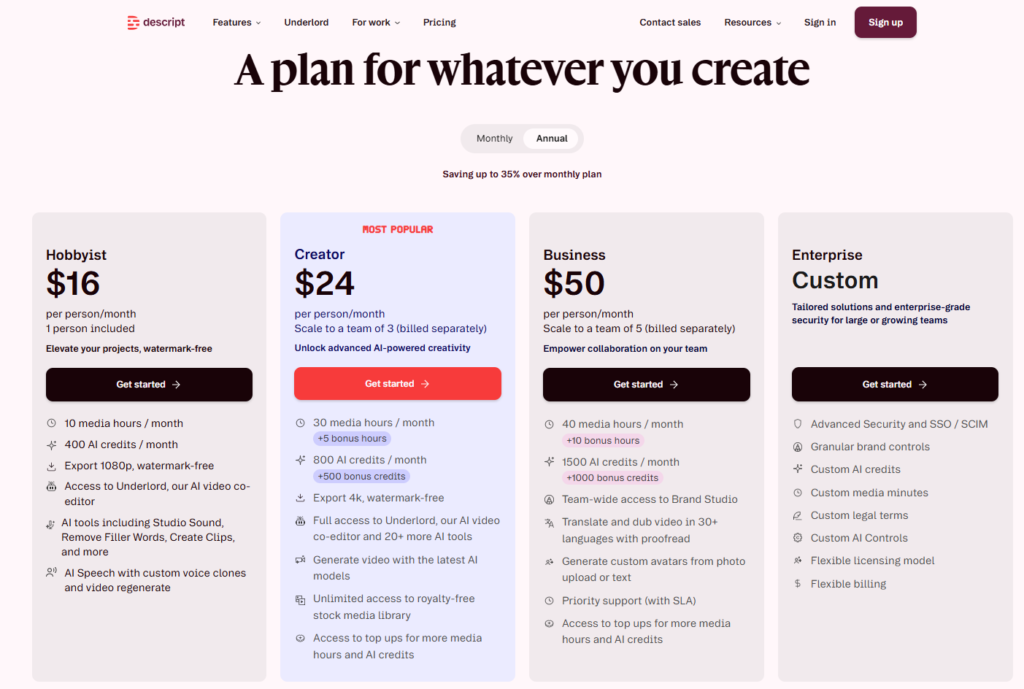
| Pricing | Free (1 hr media/mo, watermarked exports). Hobbyist $16/mo (annual; $24/mo monthly, 10 hrs/mo media). Creator $24/mo (annual; $35/mo monthly, 30 hrs/mo media, 4K export, full AI suite). Business $50/mo (annual; $65/mo monthly, team features). Enterprise: custom |
| Free Tier | Yes — 1 hour of media per month with watermarked exports; practical for evaluation but not regular publishing |
| Learning Curve | Low — the paradigm of editing audio and video by editing the transcript text is immediately intuitive for anyone who can edit a Word document; the learning curve comes from understanding which AI features to apply in which editing scenarios |
| Key Strengths | Text-based editing (delete words from the transcript to delete them from the audio/video), AI transcription at 95%+ accuracy on clear audio, Studio Sound for AI noise reduction and audio quality enhancement, Underlord AI suite for filler word removal, chapter generation, clip identification, and show notes drafting, eye contact correction for video, remote recording with separate audio tracks per speaker, automatic chapter markers for YouTube, and the most integrated editing-to-content-creation workflow in the category |
| Key Weaknesses | September 2025 restructuring from transcription-hours to media-hours model adds complexity for multi-camera setups that consume hours faster; free plan’s 1-hour monthly limit is insufficient for regular content production; not a replacement for professional video editing software (Final Cut Pro, Premiere) for productions requiring complex visual effects, color grading, or multi-camera live switching |
| Integration | Export to MP4, MP3, WAV; automatic YouTube chapter upload; Descript-generated transcripts and show notes exportable to all publishing platforms; Google Drive and Dropbox for project storage |
| Best Pairing | Riverside or Squadcast for high-quality remote recording before importing audio to Descript for editing; Capsho or Notion for publishing Descript-generated show notes and transcripts |
Descript earns its place in a no-code tools guide by solving the same problem for audio and video content that no-code app builders solve for software: removing the specialized expertise barrier between intention and output. Traditional video editing software requires learning a timeline-based interface where footage is arranged on tracks, transitions are applied between clips, and audio levels are adjusted by manipulating waveforms — a paradigm that has an inherent learning curve even for experienced media professionals. Descript replaces this paradigm entirely: record or upload audio and video, read the automatically generated transcript, and delete the parts you do not want. The audio and video are edited automatically based on transcript changes. A non-editor can produce a clean, publishable podcast episode or video by doing nothing more than reading a document and deleting filler words, off-topic digressions, and recording mistakes.
The AI feature suite, branded collectively as Underlord, extends well beyond transcript-based editing into content production workflows. Filler word removal automatically identifies and offers to delete “um,” “uh,” “like,” and other verbal fillers with a single click after reviewing flagged instances. Studio Sound applies AI audio enhancement that reduces background noise, balances levels, and compensates for low-quality microphones — a processing pass that would require manual equalization, compression, and noise reduction in traditional audio software. Eye contact correction uses AI to adjust video recordings so the speaker appears to be looking directly at the camera even when reading notes off-screen. Chapter generation analyzes the transcript and proposes chapter titles and timestamps that can be published directly to YouTube or used as show notes structure. Each of these features individually represents significant production time savings for content creators; combined in a single workflow, they convert a raw recording into distribution-ready content with minutes of human effort.
Where Descript Falls Short
Descript is not the right tool for content requiring complex visual editing — color grading, motion graphics, custom transitions, multi-camera live switching, or visual effects. It is a text-based editor that treats video as a container for spoken content; the visual production value of the output is constrained by the source recording quality and the automatic AI enhancements. Professional video productions for brand videos, commercials, or cinematic content require tools with the visual manipulation capabilities that Descript’s simplicity deliberately excludes.
The Verdict on Descript
Descript is the right no-code tool for any team that regularly produces podcast or video content and currently spends significant time in traditional editing software — or avoids editing entirely because the learning curve is too high. The Creator plan at $24/mo annual is the appropriate tier for weekly content producers, providing 30 media hours per month and the full AI suite. The free plan provides enough capacity to complete a full evaluation workflow before committing.
10. Canva — The Universal No-Code Design Platform
| Key Information | Overview |
|---|---|
| Best For | Marketing teams, small businesses, educators, content creators, and anyone who needs to produce professional-quality visual content — social media graphics, presentations, documents, videos, and brand assets — without graphic design expertise |
| Pricing | Free (250K+ templates, 5GB storage, basic features). Pro $15/mo ($120/yr; 100GB storage, 100M+ assets, background remover, Brand Kit, resizing, scheduling). Teams $10/user/mo (annual, minimum 2 users; shared Brand Kits, team features, 1TB storage). Enterprise: custom |
| Free Tier | Yes — the most functional free tier of any tool on this list; genuinely capable of producing professional designs without ever upgrading |
| Learning Curve | Very Low — the most accessible design tool ever built; drag-and-drop templates produce professional-looking output immediately; the question for new users is never “how do I use this?” but “which template fits my needs?” |
| Key Strengths | 250,000+ design templates for every conceivable format, Magic Studio AI suite (Magic Write for copy, Magic Resize for adapting designs to different platforms, Magic Eraser for removing image elements, Magic Expand for background extension, AI image generation, Dream Lab for advanced image creation), video editing for social content, presentations with speaker notes and live animation, Brand Kit for maintaining consistent visual identity, direct scheduling to social media platforms, Canva Docs for collaborative documents with embedded designs, and the largest user community of any creative tool |
| Key Weaknesses | Not a replacement for professional design software (Figma, Illustrator, Photoshop) for brand identity creation, complex illustration, or technical graphic design; design output can appear template-similar when many organizations use the same popular templates; limited custom animation and interaction capabilities compared to dedicated motion design tools |
| Integration | Direct publish to Instagram, Facebook, LinkedIn, Twitter, Pinterest; Google Drive, Dropbox; Canva Embed for publishing designs to websites; API for custom integrations; HubSpot and Mailchimp for email design |
| Best Pairing | Notion for embedding Canva designs in documentation and wikis; Zapier for automating design distribution workflows; any social media scheduling tool for bulk content publishing |
Canva has achieved something genuinely rare in software: it became the default tool for a broad human activity — visual communication — by making the quality of output accessible to people who could not previously produce it. Before Canva, professional-quality marketing graphics, presentation decks, and social media visuals required either graphic design expertise, expensive design software, or a budget for professional designers. Canva’s template-first approach — thousands of professionally designed templates for every business format, combined with a drag-and-drop editor that makes customization straightforward — put design-quality output within reach of anyone who could type text and drag an element across a canvas.
The Magic Studio AI additions have extended this accessibility into previously skill-dependent operations. Magic Eraser removes unwanted elements from photos (a person in the background, an object on a table) without Photoshop. Magic Resize takes a finished design and adapts it to every required social media format and dimension — Instagram square, Twitter header, LinkedIn cover, Facebook story — without manual reformatting. Magic Write generates marketing copy, captions, and CTAs from prompts within Canva designs. AI image generation and Dream Lab create original images from text descriptions. For marketing teams that need to produce high volumes of on-brand content across multiple platforms, these AI automations represent the difference between a tool and a design production system.
The Brand Kit feature — available on Pro and Teams plans — deserves specific attention for organizations deploying Canva at scale. Brand Kit stores the organization’s logo variations, color palette, fonts, and brand photography in a shared repository that every Canva user in the workspace can access with one click. A social media coordinator building an event promotion post starts from a company-branded template, applies the exact brand colors and fonts from the shared Kit, and publishes content that is visually consistent with every other piece of content the organization has produced. The design consistency that previously required a brand standards document, a design review process, and a creative director’s approval is maintained automatically through the template and Brand Kit system.
Where Canva Falls Short
Canva’s template-based design approach has a visible ceiling for organizations that need to establish genuinely distinctive visual identities. The most popular Canva templates are recognizable precisely because they are popular — a sophisticated design buyer can often identify Canva-produced content by its characteristic template aesthetics. Competitive differentiation through visual identity requires either advanced customization of Canva templates beyond what most users do, or purpose-built brand identity work in professional design tools like Figma or Illustrator that Canva is not designed to replace.
The Verdict on Canva
Canva is the right no-code design tool for virtually any team that produces visual content and does not have dedicated graphic designers. The free tier is genuinely capable of producing professional output for most use cases. The Pro plan at $15/mo or $120/yr provides the Brand Kit, Magic Studio AI suite, and expanded asset library that make Canva a design production system rather than a one-off design tool.
Which No-Code Tool Should You Choose? A Decision Framework
The right no-code tool depends entirely on what you are trying to build or produce.
If you need a marketing website: Webflow CMS at $23/mo annual. The design freedom and SEO infrastructure justify the learning investment over simpler alternatives. If you need e-commerce, evaluate Webflow Standard ($29/mo) against Shopify depending on whether design control or e-commerce feature depth is the priority.
If you are building a web application MVP: Bubble Starter at $29/mo web annual. Accept the learning curve investment. Budget for Growth ($119/mo) when real users arrive and performance optimization becomes necessary.
If you need to connect apps and automate workflows: Zapier Professional ($19.99/mo) for simplicity and broad app coverage. Upgrade to Make Core ($9/mo) when monthly task volume makes Zapier’s pricing model unsustainable — typically above 2,000 tasks/mo.
If you need a collaborative operational database: Airtable Team ($20/user/mo). Evaluate Notion as a lower-cost alternative if you also need documentation and the database requirements are moderate.
If you want to turn a spreadsheet into an app: Glide Maker ($25/mo) for personal-email users or Team ($99/mo) for business deployments.
If you need team documentation, wikis, and lightweight databases: Notion Plus ($8/user/mo annual). Upgrade to Business ($15/user/mo) when AI access and SSO are required.
If you are building internal tools and have developer resources: Retool Free for up to 5 users, Team ($12/user/mo) for production use.
If you need to edit and publish audio or video content: Descript Creator ($24/mo annual) for weekly content production.
If you need to produce visual marketing content: Canva Free for most use cases; Pro ($15/mo) for Brand Kit, AI suite, and premium assets.
Recommended No-Code Stacks by Team Type
| Team Type | Primary Tool | Supporting Tools | Monthly Cost | Coverage |
|---|---|---|---|---|
| Solo Creator / Freelancer | Canva Free + Notion Free + Zapier Professional ($19.99) | Descript Creator ($24) for content | ~$44/mo | Design + knowledge management + automation + content editing |
| Marketing Team | Webflow CMS ($23) + Airtable Team ($20/user) + Canva Pro ($15) | Zapier Professional ($19.99) | ~$78–$150/mo depending on team size | Website + database + design + automation |
| Operations Team | Airtable Team ($20/user) + Make Core ($9) + Notion Plus ($8/user) | Glide Team ($99) for mobile tools | ~$37–$200/mo depending on team size | Database + automation + documentation + mobile |
| Technical Startup | Bubble Growth ($119) + Airtable Team ($20/user) + Zapier Professional ($19.99) | Make Core ($9) for complex automation | ~$170/mo | Web app + database + integrations |
| Content Team / Agency | Descript Creator ($24) + Canva Pro ($15) + Notion Business ($15/user) | Zapier for distribution automation | ~$54–$100/mo depending on team size | Editing + design + knowledge + automation |
| Engineering Team | Retool Team ($12/user) + Airtable Team ($20/user) + Make Pro ($16) | Zapier for external integrations | ~$48–$200/mo depending on team size | Internal tools + database + automation |
Head-to-Head: Which Tool Wins Each Category?
| Category | Winner | Runner-Up | Notes |
|---|---|---|---|
| No-Code Website Building | Webflow | Squarespace | Webflow on design freedom and SEO; Squarespace on simplicity |
| No-Code App Building | Bubble | Glide | Bubble on complexity ceiling; Glide on speed from data to deployed app |
| Workflow Automation (Ease) | Zapier | Make | Zapier on onboarding and app breadth; Make on complexity at lower cost |
| Workflow Automation (Power) | Make | Zapier | Make on multi-branch logic and operations per dollar |
| Collaborative Database | Airtable | Notion | Airtable on relational depth and app ecosystem; Notion on workspace breadth and lower cost |
| Internal Tools | Retool | Airtable Interfaces | Retool on developer power; Airtable Interfaces on non-technical accessibility |
| Spreadsheet-to-App | Glide | Airtable Interfaces | Glide on speed; Airtable Interfaces on native database integration |
| Team Knowledge Management | Notion | Confluence | Notion on flexibility and cost; Confluence on enterprise integrations |
| Audio/Video Editing (No-Code) | Descript | N/A | No comparable competitor for transcript-based media editing |
| Visual Design | Canva | Adobe Express | Canva on template breadth and AI suite; Adobe Express on Creative Cloud integration |
| Best Free Tier | Canva (design) / Notion (workspace) / Zapier (automation) | — | Each wins in its category |
Frequently Asked Questions
What is the difference between no-code and low-code?
No-code platforms are designed for users with zero programming background — every action is performed through visual interfaces, drag-and-drop editors, and configuration forms without writing any code. Low-code platforms are designed for users with some development experience, offering visual tools for the majority of build actions but expecting developers to write code for customization, complex logic, and integrations beyond what the visual interface supports. Retool is technically a low-code platform by this definition — it expects users to write SQL queries and JavaScript. Most other tools in this guide are genuinely no-code. The distinction matters practically: a marketing manager with no technical background can use Webflow, Airtable, Zapier, and Canva independently; they will struggle with Retool without developer support.
Can no-code tools handle real production applications at scale?
Yes, with clear caveats about what “at scale” means for each tool category. Webflow hosts marketing sites with millions of monthly visitors reliably. Airtable supports enterprise organizations with hundreds of users and hundreds of thousands of records. Bubble has powered funded SaaS applications with thousands of active users — though this typically requires optimization expertise that goes beyond casual building. Zapier and Make handle hundreds of thousands of automation runs per month for mid-market businesses. The typical failure mode is not that no-code tools break under production load, but that teams hit the capability ceiling — complex business logic that the visual interface cannot express, or performance requirements that the hosted infrastructure cannot satisfy — and need to rebuild in custom code. The practical question is not “can this handle production?” but “how far into our growth does this take us before we need to migrate?”
Which no-code tool has the best free tier?
For different categories: Canva’s free tier provides access to 250,000+ templates and the core design suite — genuinely capable for most use cases. Notion’s free tier provides unlimited personal pages, making it the best free knowledge workspace. Zapier’s free tier provides 100 tasks/month — useful for testing but insufficient for production. Make’s free tier provides 1,000 operations/month — more generous than Zapier’s for testing. Airtable’s free tier allows 1,000 records per base, which supports moderate personal use. Webflow’s free tier allows building on a Webflow subdomain without a custom domain — appropriate for learning. Bubble’s free tier allows full platform exploration but does not permit deploying a live application. Retool’s free tier supports 5 users with unlimited apps — the most functional developer free tier.
Is it worth learning multiple no-code tools or mastering one?
Most effective no-code practitioners use a stack of 3–5 complementary tools that each handle their category well — a website builder, a database, an automation tool, and a design tool — rather than attempting to make one platform handle all needs. The tools are designed to integrate: Airtable is the database that Glide and Zapier read from; Webflow is the website that Zapier connects to HubSpot; Make is the automation layer that connects Bubble’s API to Notion and Airtable. The stack approach produces better outcomes than any single platform that claims to do everything. The learning investment per tool decreases over time as no-code interface patterns become familiar — a user who has learned Webflow’s CMS architecture will find Airtable’s database model more accessible because the relational structure concepts transfer.
Final Takeways: The No-Code Stack That Covers Most Business Needs
The no-code toolkit for most growing businesses can be summarized cleanly: Webflow for the website, Airtable for operational databases, Zapier or Make for automation, Notion for team knowledge, Canva for design, and Glide or Bubble depending on whether you need a simple internal app or a fully custom web application. This combination covers the majority of digital building needs for teams without dedicated technical staff, at a combined monthly investment of $50–$200 depending on team size — a fraction of the cost of custom development and a fraction of the time to deliver working outputs.
Two principles govern practical no-code tool selection. First, match the tool to the category. The most common no-code mistake is using the wrong tool for the job because the category lines are blurry in marketing — trying to use Webflow as an app builder, Notion as a heavy-duty database, or Zapier for automations whose volume makes it commercially unsustainable. Each tool in this guide is excellent within its category and limited outside of it. Understanding the category you need to address before evaluating tools produces better decisions than evaluating all platforms against all requirements simultaneously.
Second, start with the free tier and upgrade when a specific ceiling becomes the limiting constraint. Almost every tool on this list provides a functional free tier that supports meaningful exploration before any money is spent. A team evaluating Airtable for an operational database can build the initial database structure, test the views, and assess the interface on the free plan before committing to $20/user/mo. A founder evaluating Bubble for an application MVP can build and test the complete application logic before paying for the Starter plan to deploy it live. The free tiers are designed to remove purchase friction, but they also serve as the most honest product evaluation available.
The No-Code Stack That Works for Most Growing Teams
For a growing marketing and operations team of 5–10 people: Webflow CMS ($23/mo) for the website, Airtable Team ($20/user/mo) for operational databases and CRMs, Zapier Professional ($19.99/mo) for connecting the stack, Canva Pro ($15/mo) for design production, and Notion Plus ($8/user/mo) for team documentation. Monthly investment at five users: approximately $200–$250. Coverage: professional website, structured operational data, connected automation, consistent design production, and centralized team knowledge — the complete digital operations infrastructure for a team without a single developer.


